

What Offision emails when someone books
One booking sends two different messages to two different sets of people, and the calendar invitation that rides with them is usually not a file you can click — which is why it gets reported missing when it is not.
One booking sends two different messages. The person who booked gets a confirmation; everybody they invited gets an invitation. They are not the same mail, they do not say the same thing, and only one of them is addressed to somebody who already knows about the meeting.
| Goes to | Sent when | |
|---|---|---|
| Booking created | the organiser | they book |
| Booking confirmed | the organiser | they book, where the resource needs approving — this one instead of Booking created |
| Meeting invitation | each attendee | they are invited |
| Booking edited | the organiser | anything about the booking changes |
| Meeting updated | each attendee | the booking changes under them |
| Booking deleted | the organiser | the booking is cancelled |
| Meeting cancelled | each attendee | the booking is cancelled, or they are dropped from it |
Editing sorts the attendees rather than mailing them all the same thing: somebody added to an existing booking gets Meeting invitation, not Meeting updated, and somebody removed gets Meeting cancelled.
The invitation is usually not a file
This is the part that generates reports, so it is worth being exact about. The calendar invitation always travels with these messages. Whether it arrives as something you can see depends on how your Offision sends mail, which is set on Email settings:
- Sending through your own SMTP server, the invitation is built into the message itself. Outlook and most mail apps read it and show the meeting with Accept and Decline — there is no attachment row, and nothing to click.
- Sending through the Offision address, or through a Microsoft 365 or Exchange
connection, it arrives as a file named
offision.icsalongside the message.
Both deliver the same meeting. A booking mail with no attachment on it is almost never a mail with no invitation in it — it is the first case, working normally.
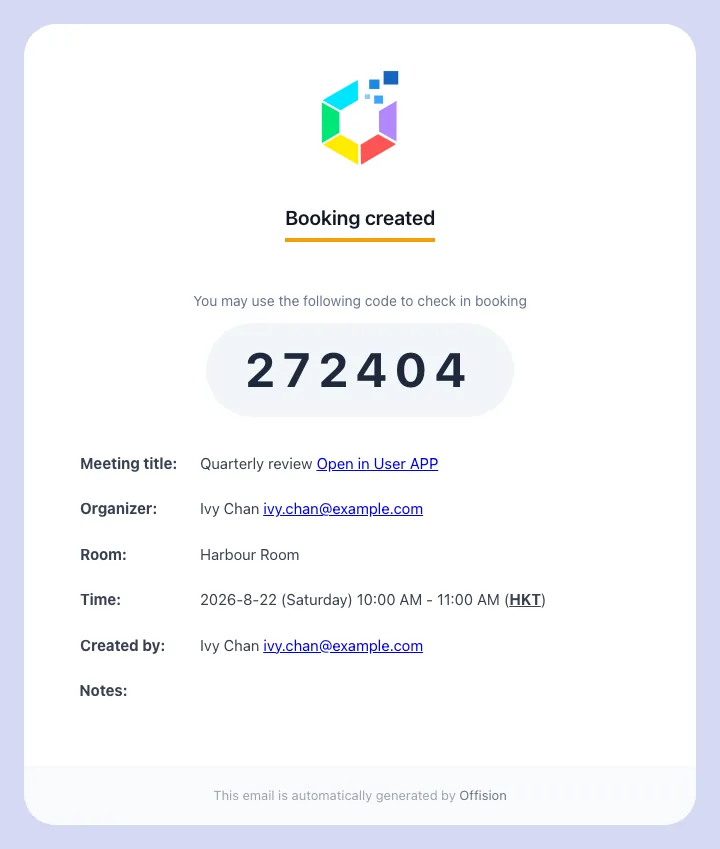
The organiser's confirmation. The invitation travels with it, visible as a file or not depending on the sender.
Rooms always carry it. Desks and equipment are asked
A room booking always carries the invitation. A desk, a piece of equipment or a parking space carries it only where its booking policy says so — the switch is Attach .ics data in email when booking Desk or Equipment, and it is on unless somebody turned it off. A resource with no policy attached at all behaves as though it were on.
It exists because a month of desk bookings arriving as calendar entries buries everything else in somebody’s week, and because a desk has no attendees to inform.
One resource can silence the whole booking
Disable booking email notifications is read across every resource in the booking, not just the one you were thinking of. Book a room and a projector together, and if the projector’s policy has this on, the organiser and every attendee get nothing at all — no confirmation, no invitation, no cancellation. The room’s own policy does not overrule it.
That is the first thing to check when mail stops for some bookings and not others. Choose which booking emails go out is where the switch lives.
Getting the invitation again
Nobody has to keep the mail. Open the booking in the app, choose the ⋯ menu on it and pick Download ICS: the invitation comes down as a file to open into whichever calendar you use. Booking managers have the same item on the management calendar.
What this does not control
- The wording. Subjects and body text are set once for the whole site — see Change the wording of an Offision email.
- Who it comes from. The sender address, and therefore the attachment behaviour above, is Send email from your own address.
- Reminders. The mail that arrives before a booking starts, or when it is about to be released, is a separate set of switches on the booking settings page, not on any policy — Reminders.
- The forecast digest. A scheduled summary for managers is its own subscription — see Email your managers a forecast of upcoming bookings.
- An integrated room’s own invitation. Where a booking is made through Microsoft 365 or Google, that calendar sends its own invitation on its own terms; the mail above is in addition to it, not instead of it.