

Quota settings reference
Set up a booking quota, tab by tab — what a booking costs, what a person is given, what a group shares, and the unit all three count in.
Quota settings is four tabs, and they are meant to be filled in from right to left: the unit first, then what resources cost, then what people are given.
Open Quota settingsResource Quota Policy
What booking a resource costs. One policy can serve many resources; a resource carries at most one.
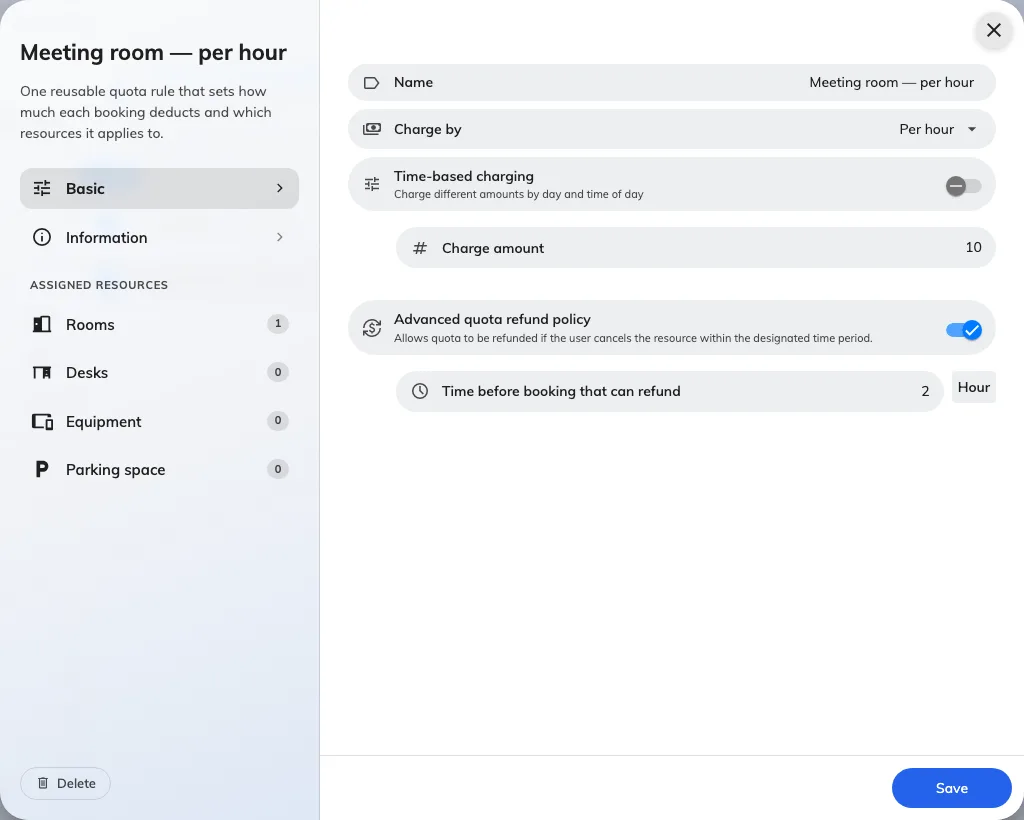
A resource quota policy: the unit, the rate, and the refund window.
| Setting | What it does | When to change it |
|---|---|---|
| Name | What the policy is called in lists and in Quota usage history | Name it for the rate, not the room — one policy usually covers many resources |
| Quota unit | The unit this policy charges in. Offered only while the policy is being created, and fixed afterwards | Cannot be changed. Moving a policy to another unit means deleting it and creating it again |
| Charge by | The rate: Per booking, Per minute(s), Per 15 minutes, Per 30 minutes or Per hour | Per booking makes long meetings free, so use it where the thing being rationed is the occasion — a desk for a day. A metered rate makes duration what people economise on |
| Time-based charging | Replaces the single amount with a weekly timetable, so the same room can cost more at some hours than others | Use it to push demand off the popular hours instead of rationing the room outright |
| Charge amount | What one unit of the rate costs. Whole numbers only | Scale it so you can be more precise later — 10 an hour leaves room that 1 an hour does not |
| Advanced quota refund policy | Allows refunds at all. Off, a cancelled booking returns nothing | Turn it on wherever you want cancelling to be worth doing; leave it off where a booking is a commitment |
| Time before booking that can refund | The deadline, counted back from the booking’s start. Cancel inside it and nothing comes back | Set it to the point where the room could still realistically be re-let |
| Organization unit | Which part of the organisation owns the policy. Only where organization units are enabled | — |
A metered rate rounds the booking up to a whole billing unit: on Per hour, a 70-minute booking is charged as two hours.
The weekly timetable
Switching Time-based charging on replaces Charge amount with a week grid. Drag on a day to create a range, then set its amount; a Holiday column covers the holidays defined by the resource’s own business hours.
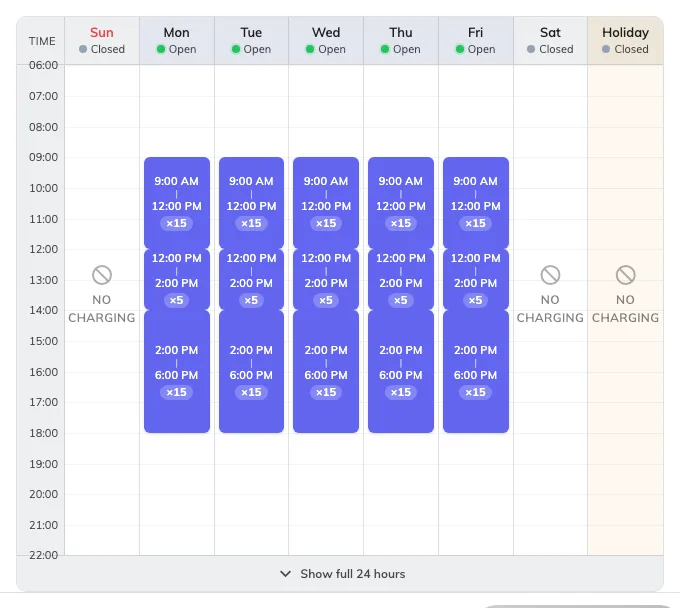
Each range carries its own amount. Time not covered by any range shows No charging.
Time no range covers is free, and the day says No charging to make that obvious rather than looking unfinished. The footer switches the grid between the full 24 hours and business hours only.
Assigned resources
The left rail carries an Assigned resources section below the settings, with one page per resource type — Rooms, Desks, Equipment, Parking space, Other resources — each showing how many are attached. Resources can equally be pointed at a policy from the resource’s own settings.
User Quota Policy
What one person has to spend. A group named here still gives every member their own balance.
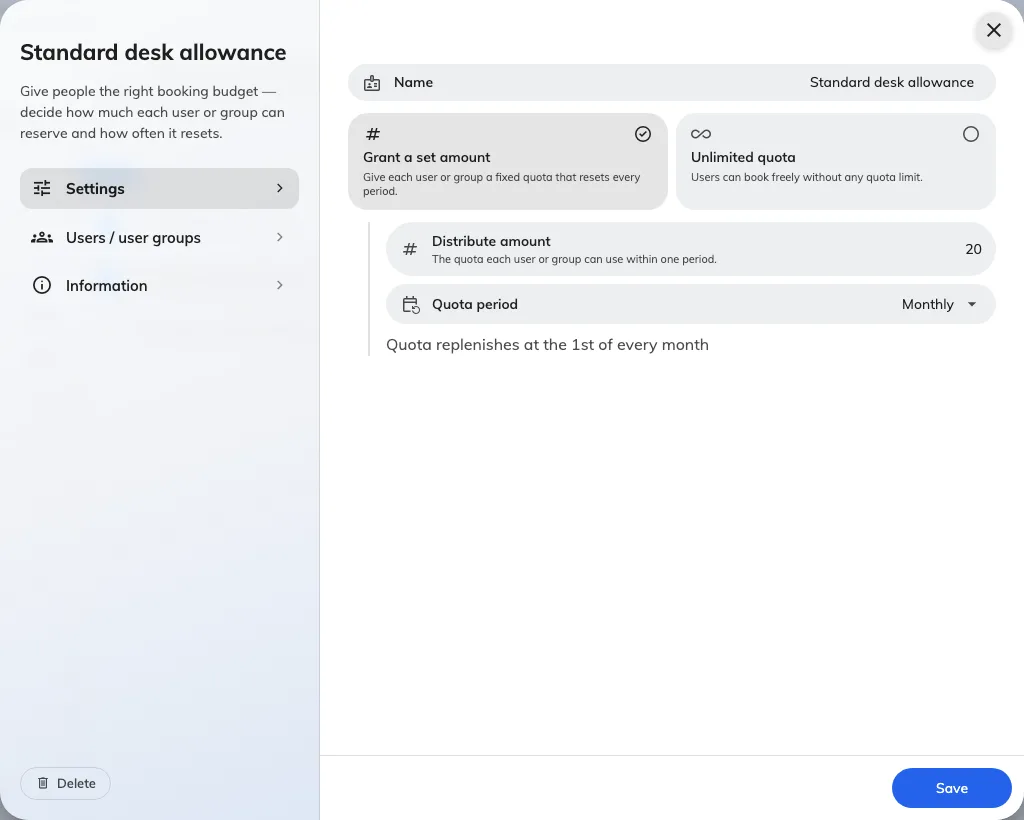
What a person is granted, and the rhythm it resets on.
| Setting | What it does | When to change it |
|---|---|---|
| Name | What the policy is called in lists | — |
| Quota unit | The unit this policy grants. Offered only while the policy is being created | Somebody who books resources charged in two units needs two policies |
| Grant a set amount / Unlimited quota | Whether these people have a budget at all | Unlimited is the only exemption quota has — use it for the people who must never be blocked, rather than trying to exempt them elsewhere |
| Distribute amount | What each person gets for one period | — |
| Quota period | How often it resets: No period limit, Daily, Weekly, Biweekly, Monthly, Quarterly, Yearly | A short period spreads demand out; a long one lets somebody save up for the week they need |
| Start counting date | The date the first period begins, and what every later period is counted from. Offered for Weekly, Biweekly, Quarterly and Yearly only: Daily anchors to the calendar day and No period limit never resets. Monthly does not offer it either — see the note below. The form previews the periods it produces | Align it to your term or financial year — a weekly policy anchored to a Thursday resets on Thursdays, not on Mondays |
| Users / user groups | Who is granted this. Listing a group grants each member separately | Use a group so people joining the team inherit the budget instead of being added by hand |
| Organization unit | Which part of the organisation owns the policy | — |
Nothing carries over: an unspent period is gone when the next one starts. Where somebody holds more than one policy in the same unit, the amounts add up, and one Unlimited policy makes that whole unit unlimited for them.
User Group Quota Policy
The same screen with one difference that changes everything: a group here shares one balance between everybody rather than each member holding their own.
| Setting | What it does | When to change it |
|---|---|---|
| Distribute amount | What the whole group gets for one period — not what each member gets | — |
| Limit per member | Caps how much of the shared pool any one member may take in a period | Turn it on as soon as a pool has more than a handful of people in it. It works on an Unlimited pool too, which is how you get no total ceiling but a firm per-person one |
| Maximum per member | That cap | Set it above a fair share, so it catches hoarding rather than ordinary use |
| User groups | The groups sharing the pool. More than one group here share a single balance between all of them | — |
Every other field behaves as it does on a user quota policy. A member who reaches their own cap is simply short of quota; nobody else’s access to the pool changes.
A person’s own balance is always spent first — the pool is only drawn on once their personal balance is empty.
Quota unit
A name, and nothing else. It is what cost and balance are both counted in, and two policies only ever meet through it.
A unit cannot be deleted while any policy still uses it.
What this does not control
- Who may book a resource. That is the team space, on the resource. Quota never overrides it, and a full balance does not open a room somebody has no access to.
- Which resources a policy applies to. Set on the policy’s own Assigned resources pages or on the resource itself — not from the tabs above.
- Whether a booking needs approval. Separate setting, and quota is charged on save whatever the answer.
- Booking purpose overrides. A booking purpose can replace the resource’s quota policy from the booking form settings, and an override left empty means no quota rather than the resource’s own.