

Stop one person keeping the same resource
A desk, a meeting room, a parking bay — one person books it and nobody else gets near it. One booking rule caps how much of a single resource a person may take, a second stops the standing weekly claim, and two more are there when those are not enough, plus the one thing Offision cannot do.
One person is at the same desk every morning. Or holds the project room all week, or the good parking bay, or the camera kit nobody else can get near. Nothing is broken: a shared resource is bookable by anyone, so whoever books first and books often keeps it. Two rules on the booking policy change that, and both live on the policy the resources point at rather than on a person or a resource — which is why the same pair works for desks, rooms, equipment and parking alike.
1. Cap how much of one resource a person may take
Open Booking policySelect the policy those resources use, choose Edit, and open Booking time/date limit — the third page in the editor. Turn on Limit each person’s time on one resource, then set the period below it.
This is the rule people look for and rarely find, because of what it counts. It counts per person, per resource, per period: within each period, one person may hold at most eight hours on any single resource. Set the period to one week and the same person gets one working day a week on desk 14, and one on the project room — and still has the rest of the week free on everything else.
Two things to know before you save. The eight hours is not editable — you choose the period, not the allowance. And on any period longer than a day you also set a Reference date, which is the date the first period counts from; the limit resets when the next one begins.
2. Stop the standing weekly claim
A cap on hours does nothing about a repeating series, which claims its slot once and holds it indefinitely — the standing Tuesday meeting that owns the boardroom, or the desk booked every weekday until further notice.
On Booking policy, the second page, turn off Allow users to create recurrence booking.
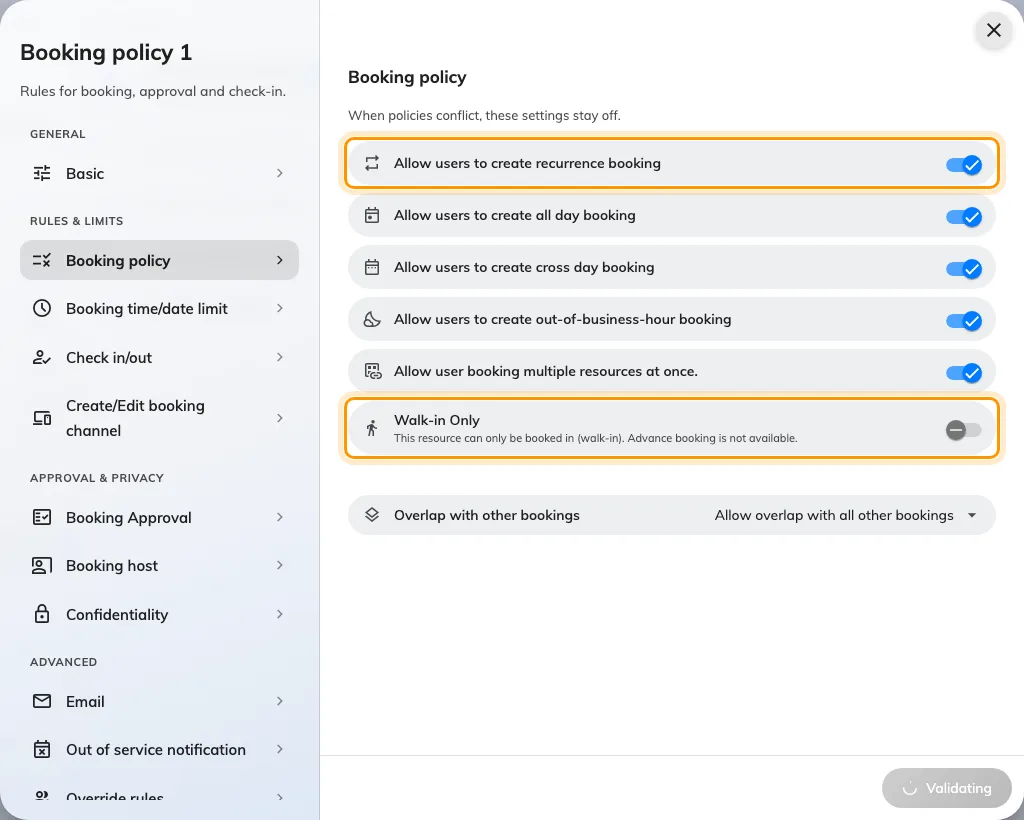
Allow users to create recurrence booking, and below it Walk-in Only — the two switches on this page that decide whether a resource can be claimed in advance at all.
People who had a series keep it; the switch only stops new ones. Turning it off costs least on desks and equipment, where a booking is a day rather than a standing commitment; on meeting rooms it is a real trade, so weigh it against the no-show rule that cancels an abandoned series. Allow or block all-day, recurring and cross-day bookings covers what else that switch changes.
3. When those two are not enough
- Shorten the booking window. On Booking time/date limit, turn on Limit the booking date range and set To to two or three days. Nobody can lock in next month, and Release time decides the hour each new day opens — move it off midnight so the whole floor competes at the same moment. See Limit how far ahead people can book.
- Walk-in Only. On Booking policy. The resource disappears from the booking form entirely and can only be claimed on the spot, which ends advance booking and therefore camping. It is the right answer for touchdown desks and phone booths, and too blunt for anything people plan their week around.
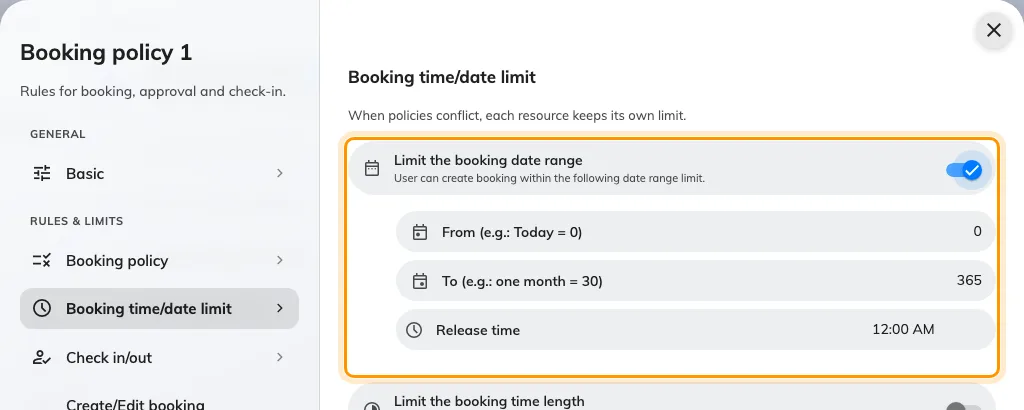
Limit the booking date range, with From, To and Release time. A short window turns a contested resource into a daily scramble rather than a standing claim.
4. Reclaim what is held but never used
Some of what looks like camping is a booking made out of habit and never used. Turn on Require check-in on the Basic page and give it an All-day booking check-in time, and a resource nobody claims by that hour goes back in the pool as a no-show. Set the rules a hot-desk floor needs walks that pair.
One trap if you run occupancy sensors: Ignore occupancy sensor auto check-out for all-day bookings. is on by default, and an all-day booking is exactly what a camper makes. Sensor-driven release will not touch those until you turn it off.
What this cannot do
There is no setting that caps consecutive days. Nothing in Offision says “not this one again tomorrow”, and nothing names a person and a resource together. The rule in step 1 is the closest thing, and it works in hours per period rather than in days in a row.
Quota is volume, not identity. A budget caps how much somebody books across all the resources sharing it, not how often they return to one — useful alongside these rules, not instead of them. See How booking quota works.
If they genuinely need it, give it to them. A Fixed Desk or Fixed Room is assigned to one person permanently, which takes it out of the shared pool honestly instead of leaving everyone else to discover it is taken every morning. See Add a desk.
Check it worked
Sign in as an ordinary user and book the same resource twice inside one period. The second booking should be refused by name, and the first should still be there. If both save, the resource is on a different policy than the one you edited — check which policy it carries.