

Change the order rooms appear in
Rooms are never dragged into place — the list is sorted. One setting picks the default order everyone starts from, Suggestion priority pushes individual rooms up, and each person can re-sort for themselves.
Rooms are never dragged into a custom order. The room list is sorted, and three things decide what that sort produces: the default order you set for the whole workspace, a per-room Suggestion Priority that pushes favourites of yours up whenever suggestions are in play, and — last and strongest — the order each person picks for themselves in the app.
1. Set the default order
Order by, on the Others page of UI customization, decides how the room list and the booking calendar are sorted before anyone touches a filter: Suggestion priority, Favourite, Last booking time, Location, Name, Capacity or Availability. Out of the box it is Suggestion priority.
Open UI customization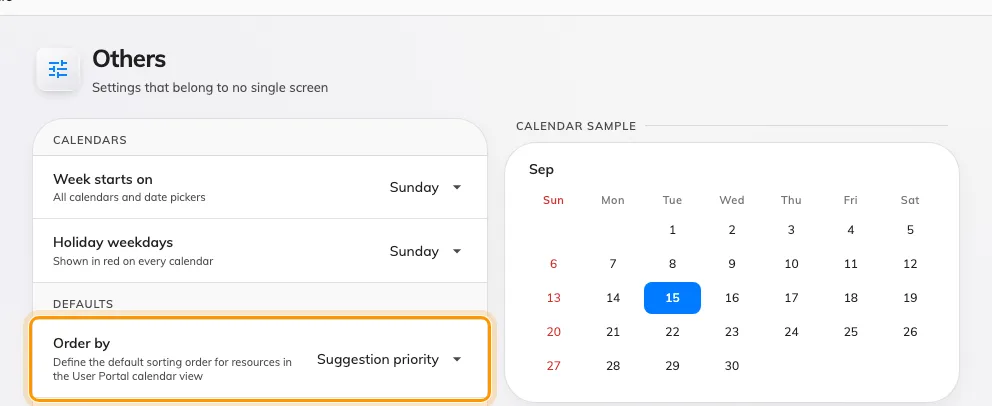
Order by — the order rooms appear in before anybody sorts them.
On an estate spread over several buildings, Location usually stops people scrolling past another site’s rooms. On a single floor, Capacity puts the rooms that fit the meeting first, smallest first. Favourite raises each person’s own starred rooms, so the same default gives everyone a different front page.
2. Push individual rooms up
Suggestion Priority is the closest thing to a hand-placed order: a number from 0 (Lowest) to 5 (Highest) on each room, sorted highest first. It is set on the room itself — see Add a room — and it also decides which rooms Offision suggests first when someone books.
With the default order left on Suggestion priority, raising one room’s number moves it up the list for everybody. Rooms sharing a number keep their usual order among themselves.
3. Know what Location sorts by
Location is not alphabetical by room. It groups by building (by name), then by each floor’s order — the number you give floors when you arrange them on the building — then by room name. If a floor shows up in the wrong place under Location, the fix is the floor’s order on the building, not anything on the rooms.
4. Remember: people can re-sort
The default is only where everyone starts. Each person has an Order control in the app’s filter, and once they pick one, their browser keeps it — their choice wins over your default from then on. Your default is still honoured as the first option offered to them. See Sort the room list for what that looks like from their side.
So if one person reports rooms “in the wrong order” while everyone else sees them fine, they have almost certainly picked a sort of their own — have them change Order back rather than looking for a broken setting.
What this does not control
- The admin console’s own lists. The resource list in the console sorts by its column headers, per signed-in admin.
- Which rooms appear at all. A room someone cannot see is a team-space or filter question — see Give a department its own rooms.
- The calendar’s density. How many rooms fit on screen is column width and row height, not order.