

Tapping a staff card does nothing at the panel
The panel does not react at all to a card. Five causes, all of which look identical from the corridor because the panel stays exactly as it was.
A tap that produces nothing is deliberate rather than broken. The panel drops a card it cannot act on silently, because a room panel in a corridor that complained about every card carried past it would be unusable.
That silence is the difficulty here: five quite different causes all look identical from where the person is standing. Work down the list.
Staff Card is off in both places
Most commonTwo switches govern this and a tap needs only one of them, so both have to be off for nothing to happen — which is exactly what a panel set up before cards were introduced looks like.
Check Staff Card on User identify settings first, since that one covers the whole organisation.
Open Check-in methodThen open the panel’s configuration and its Check-in method page. If Override the system user identification settings is on there, this panel is ignoring the organisation’s list entirely and needs its own Staff Card turned on.
Open Panel configurationsA configuration is shared, so one panel behaving differently from its neighbours usually means it is on a different configuration rather than a different setting.
The number on the card is not stored against anybody
Most commonThe panel reads the card, finds nobody holding that number, and stops. Nothing is shown, because from the panel’s point of view somebody walked past with a card from another building.
Search the number under Access cards. If it is not there, the card was never enrolled; if it is there against the wrong person, the slots were filled from a list that had drifted. Either way the fix is on that page — see Issue an access card to someone.
Open Access cardsThe common version of this is not a missing card but the wrong number: an ordinary MIFARE or DESFire card is enrolled by its chip UID, which is not the number printed on the card. Tap one card at a panel that works, see what it accepted, and check the imported list against that. Upper and lower case do not matter, so case is never the problem.
Something is already open on the panel
CommonA tap is only acted on when the panel is showing its ordinary screen. With a dialog open — a walk-in form somebody abandoned, a confirmation nobody answered, a language picker — the card is ignored until the dialog goes away.
This is the one that reproduces on demand: press a button on the panel, leave the dialog open, and tap. Nothing. Dismiss it and the same card works.
If a panel goes deaf in the middle of a busy morning and comes back on its own, this is almost always the reason. Panels left showing an abandoned form are worth a look during setup: shortening the confirmation timeouts, or turning off the confirmation taps the panel does not need, keeps the ordinary screen in front.
One tap gives a success and an error together
CommonNot silence, but the same root: some readers register one physical card under two different identifiers and send both. The panel treats them as two taps, resolves one and fails the other, and shows both results.
Handle duplicate card readers fixes it — the panel waits briefly, collects everything one tap produced, and resolves the whole lot together so only one result is shown. It is on the panel configuration’s Check-in method page, with Wait time (ms) underneath it.
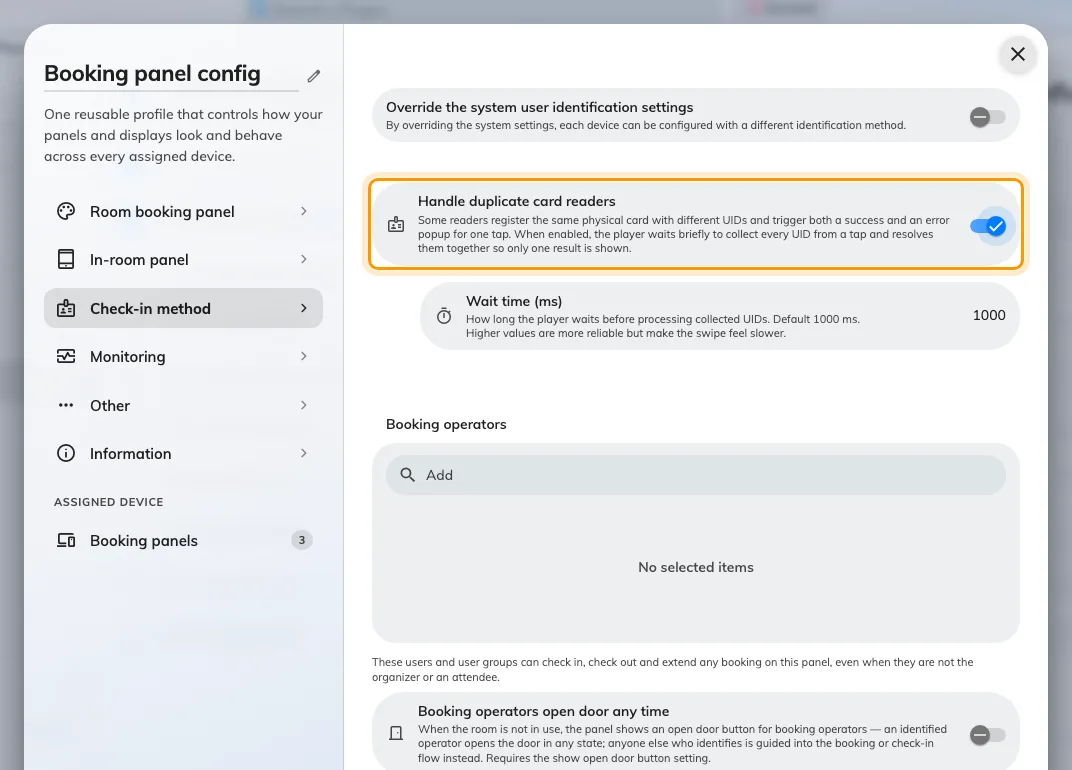
The wait that turns one reader's two identifiers back into one tap.
Leave the wait at 1000 ms unless taps still double up. Raising it is more reliable and makes every tap feel slower, so raise it in small steps.
The panel has to be restarted afterwards. The setting is read once when the panel starts, so a panel that has not been reloaded will behave exactly as it did before you changed it — which reads as the setting not working.
The room only takes bookings made at the panel
RareA resource set to be booked only from its own panel refuses card taps outright, including on a booking that already exists.
It is rare because few estates use it, and it is worth knowing about because nothing on the panel hints at it — the room looks like any other. Check the resource under Booking › Rooms if the first four solutions came to nothing and the same card works on the panel next door.
Open Standard Rooms