

Booking data set reference
Create a data set, the reusable list of options that Autocomplete fields read from — a key, a display text, and an import. Every setting on the screen, and when to use one instead of a Select field.
A data set is a reusable list of options that Autocomplete fields read from. Define it once and every booking form can point at it — which is what separates it from a Select field, whose options live on the one field that declares them.
Open Data setBooking and Visiting keep separate data sets. A set built here is offered to booking form fields only; the visiting form has a screen of its own.
The data set itself
The editor opens on Settings, and the entries live on the second page of its rail.
| Setting | What it does | When to change it |
|---|---|---|
| Name | Names the data set in the picker on a field | Name it after what it holds — this is all somebody configuring a field sees |
| Branch management | Limits the data set to one branch of the organisation | Only on a multi-branch site where each branch keeps its own lists |
| Entries | The rows themselves, on the second page of the rail |
An entry is a pair
| Setting | What it does | When to change it |
|---|---|---|
| Key | The code stored alongside the answer | Set it to whatever your other system reconciles on. Renaming the display text later then leaves past bookings intact |
| Display text | What the person booking reads |
Both matter, and for different reasons. The key is what gets written next to the booking, so it is the half your finance or facilities system will match on; the display text is the half a person recognises. Give the display text in every language your site uses — one given only in English renders in English on a Japanese screen.
Import, export and clearing
The entries page carries Import and Export buttons, and an empty data set offers Import from Excel directly.
| Setting | What it does | When to change it |
|---|---|---|
| Import | Loads the rows from a spreadsheet | For any real list — a chart of accounts is not worth typing |
| Export | Writes the rows back out | Take one before a bulk change, so a bad import can be undone |
| Add row | Adds one entry by hand | For a correction, not for the initial load |
| Select | A tick on each row — Shift-click ticks a range, the box at the top ticks every row the search shows. Delete removes the ticked rows | For clearing out a handful of stale codes |
| Delete all | Empties the list, after asking | Before re-importing a list from scratch |
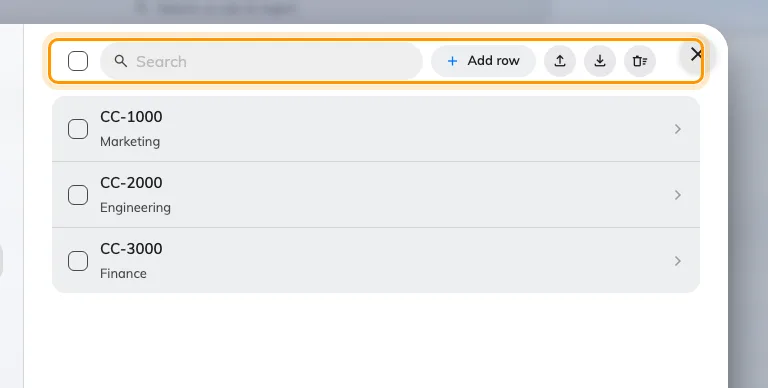
The entries, with Select all, Add row, Import, Export and Delete all above them.
Nothing is removed until the data set is saved, so a delete made by mistake is undone by closing without saving.
What people see
A field of type Autocomplete names one data set, and the person booking searches it as they type rather than scrolling a list. That is the whole reason to prefer a data set over a Select field once the list is long, shared between forms, or maintained by somebody other than you.
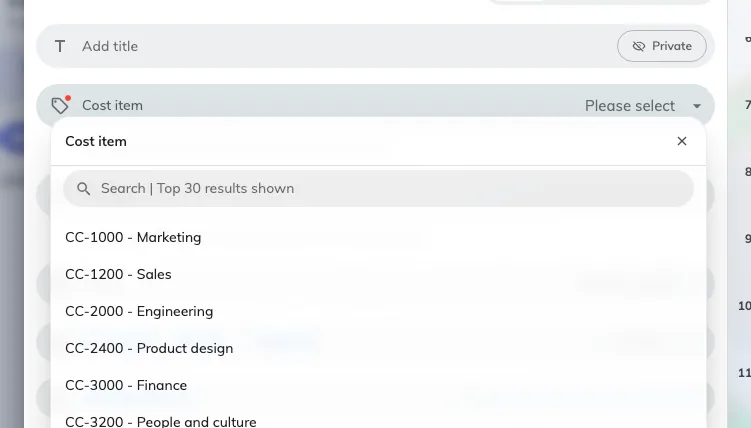
The same set on the booking form, searched as the person types.
Pointing a field at a data set is done on the field, not here — see Fields you add yourself, and Ask for a cost item and project ID on every booking for the whole job end to end.
What this does not control
- Which fields use it. A data set is offered to every booking form; the fields that read it are the ones you point at it.
- Whether the answer is required. That is Required, on the field.
- Who can read the answer. The field’s own Show switches decide that.
- Visiting’s data sets. A separate screen, and the two never share entries.