

Two bookings overlap on the same room
The management calendar shows two blocks on one room at the same time, or somebody says their room was taken. Offision refuses a real overlap at every door, so this is one of six things that look like one — a pending request that never held the slot, a combined-room mirror block, a warning-only closure, a no-show that freed the room, or preparation time.
Every way a booking is made — the app, a panel, the management calendar, a spreadsheet, a calendar invitation — runs the same check, and a booking that overlaps a standing one is refused with This time slot conflicts with another booking. So two blocks on one room are never two confirmed bookings fighting for it. They are one of the six things below, in the order they come up.
Open Management calendarBoth bookings are waiting for approval, and the policy does not hold the slot
Most commonA booking policy offers two approval settings that read almost the same. Require booking approval puts a request in the queue and leaves the slot open — any number of people can ask for the same hour, and the calendar draws every request. Require booking approval (Time slot will be hold before approve) holds the slot from the first request; its status shows as Waiting review (Reserved) and a second request is refused.
Under the first setting, two pending requests on one slot are working as designed. The approver sees it: the approval dialog has a Conflict bookings section — Select which bookings to reject or keep as pending — listing the other requests for the same time. Approve one, and the others must be rejected; approving a second one fails with This time slot conflicts with another booking.
If the queue is confusing people, switch the policy to the holding variant, and the second requester is told at once instead of days later. See Require approval before a room is booked.
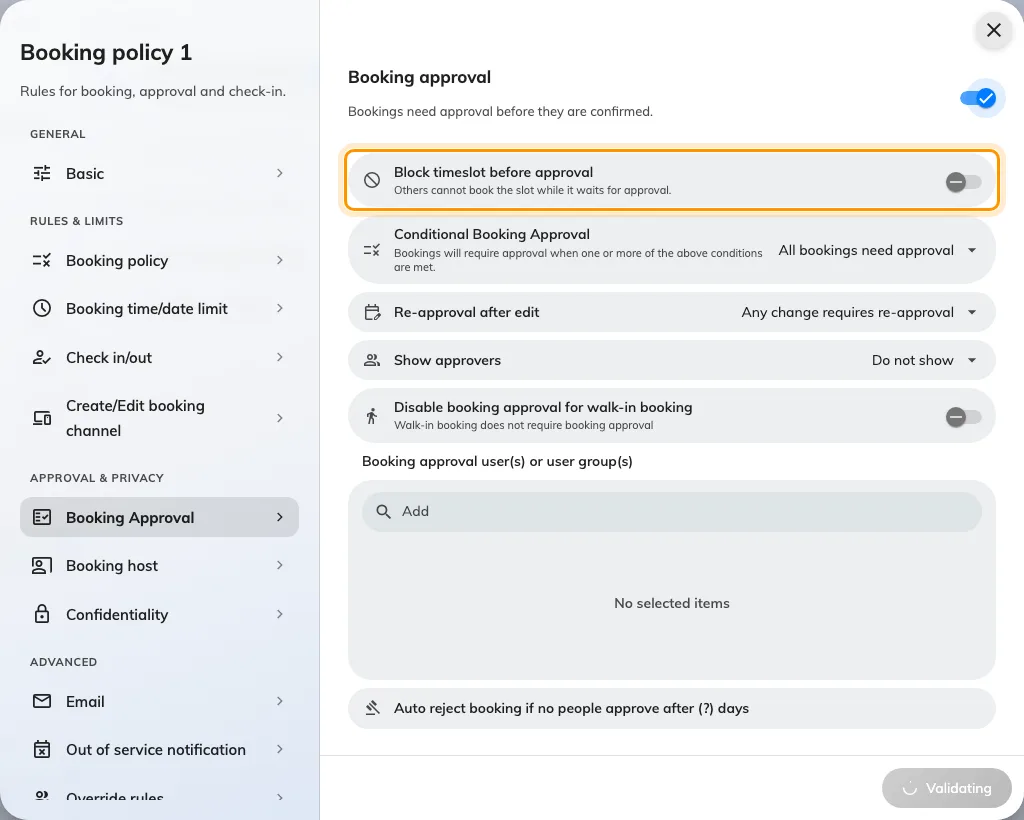
The policy's Approval page: the holding variant is the switch under Require booking approval.
The calendar draws more than the booking check counts
CommonThe management calendar shows every booking that is still alive, including requests waiting for approval and meetings already over. The overlap check only counts bookings that hold the room — confirmed, in use, waiting for check-in, or waiting for approval under the holding policy. A pending request under the plain approval policy is drawn but does not block, so it can sit on top of a confirmed booking without either being wrong.
Read the status of each block before treating the pair as a fault. One of them pending means solution 1; the resolution is the same.
One of them is a combined room's mirror block
CommonBooking a combine room takes each of its parts, and booking a part takes the combine room. The calendar shows the other side as a grey, diagonally hatched block: Combined on a part’s column when the whole room is booked, Split on the combine room’s column when a part is. Those are the same booking seen from the other column, not a second one.
A real overlap between a part and the whole is refused like any other. See Combine two rooms into one bookable room.
An out of service period is overlapping bookings
CommonA closure is not a booking and never cancels one. Two versions of this:
- Block booking during this period was left off — a warning-only period. The booking form warns and lets the booking through, so the calendar shows a faint band with bookings on top of it. That is what the switch means.
- The period was added after the bookings existed. Adding a closure emails the organizers, where the policy says so, and does nothing else — the bookings stay until somebody moves or cancels them.
Either way, nothing is double-booked; the room is closed and somebody has a booking inside the closure. Take a room out of service covers both switches.
A no-show or an early check-out freed the room, and a screen has not caught up
Less commonWhen a booking is released for no-show, or the organizer checks out early, its end is cut to that moment and the rest of the slot becomes bookable at once. Somebody books it, and the room now genuinely has two bookings back to back — the truncated one and the new one.
A panel, an Outlook calendar or a browser tab that has not refreshed still shows the original block at full length, and that is the classic “someone took my room while I was in it” report. Open the first booking: its end time is the release moment, not the time it was booked for. See How check-in and no-show work.
The second block is service preparation time
RareA service item with a preparation time — catering laid out before the meeting, a room reset after it — is drawn on the calendar as its own block beside the meeting it belongs to. It is checked separately, and a booking that runs into it is refused with Preparation time conflict with other booking rather than the message above. Different words, different cause: adjust the preparation time on the service item, or move the meeting.
What never causes it
- A spreadsheet import never books over an existing booking. Rows that conflict are left behind by Skip conflicts & book and handed back in a failed-rows sheet with the reason — the import did not “make a mess”, it skipped.
- The Microsoft 365 or Google sync matches an invitation to the booking it already made and updates it; it does not create a twin. An invitation that conflicts is declined by the room mailbox, with the conflicts listed in the reply.
- Dragging a booking on the management calendar has no override — it runs the same check, and refuses.