

What counts as a no-show
Only bookings that reached their check-in deadline unattended are counted — cancelling is not a no-show. One setting can make the whole number untrue.
A no-show is a booking that reached its check-in deadline with nobody having checked in, and was released. That is the whole definition, and keeping it narrow is what makes the rate comparable between rooms and between months.
Cancelling is not a no-show
This is the question people ask first, and the answer is the one that makes the number fair. A cancelled booking is not counted as a no-show — and it does not count in the total either, so cancelling does not quietly improve anyone’s rate by padding the denominator.
What is counted is bookings that were used, are in use, or were released unattended. Someone who cancels at nine in the morning has given the room back; the figures treat that as the good outcome it is.
That is also the reason a room may be set to stop accepting cancellations once its check-in window has opened: from that point the booking is committed, and one nobody turns up for is recorded as the no-show it was rather than disappearing from both sides of the sum. See the resource policy reference.
A sensor check-in counts as attendance. Where a room checks itself in because somebody is sitting in it, that is a real check-in and never a no-show — so switching sensors on genuinely lowers the rate rather than hiding anything.
One setting can make the whole number untrue
Show check-in button in User Portal lets people check in from the app, wherever they are. It is a convenience, and the product warns about it on the settings page itself, because a room can then be claimed from home by somebody who never arrives.
Anyone reading a no-show rate should know whether that is on. If it is, two settings put the honesty back without removing the convenience:
- GPS check-in, which requires the phone to be near the building.
- User Portal check-in IP restriction, which requires it to be on your network.
Both are covered in Checking in by QR code, and proving you are there.
Where the numbers are
Open No show analytics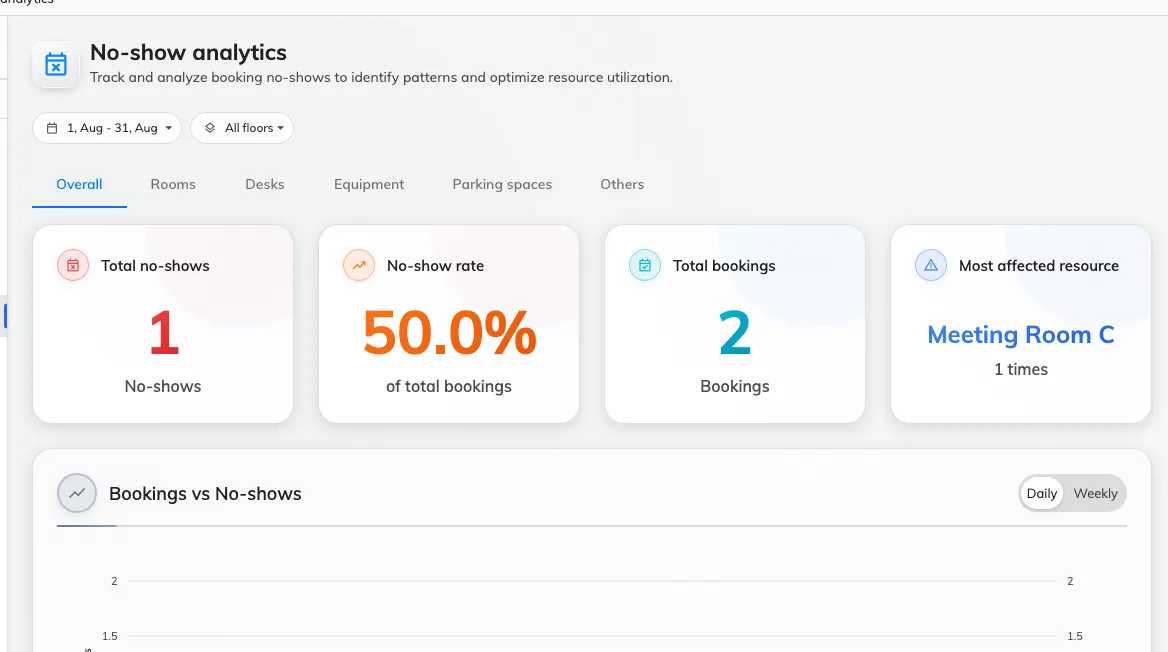
Total no-shows, the rate, the total booked against it, and the worst-affected resource.
The page is filtered by period and by floor, and split by resource type, so meeting rooms and desks can be judged separately — which matters, because they fail differently.
Two other places show the same story more briefly: a card on the booking overview, and a No-show rate trend chart among the booking reports.
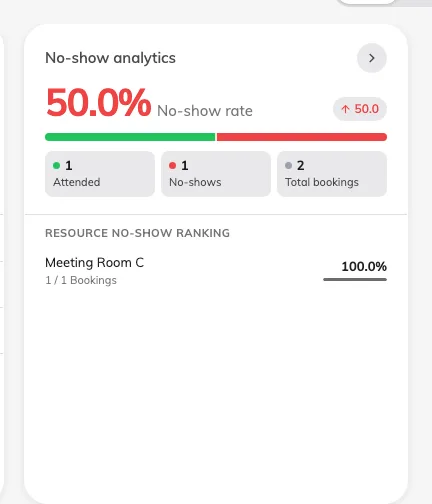
The overview card: the rate, which way it is moving, and attended against no-shows.
Seeing it by department
The user ranking opens with rank, user, count and rate — a list of people, which is rarely the question worth asking. Department is one of the optional columns behind the ranking’s column selector, along with staff ID, email, phone number and each user group category.
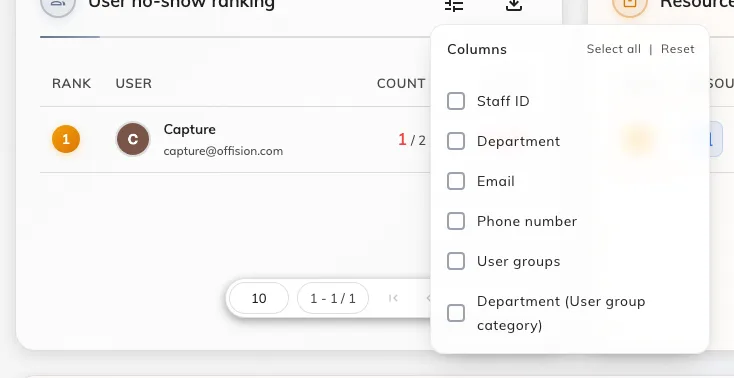
The ranking's column selector, where Department lives.
Switch it on and the same table answers which teams are abandoning rooms rather than which individuals — usually the more actionable version, and a much easier conversation to have. The choice is remembered for you, and it is carried into the Excel export, so a departmental report is a toggle rather than a spreadsheet job.
The figures are also scoped to the part of the organisation you administer, so two admins can read the same page and correctly see different numbers.
The log records the release, not the booking
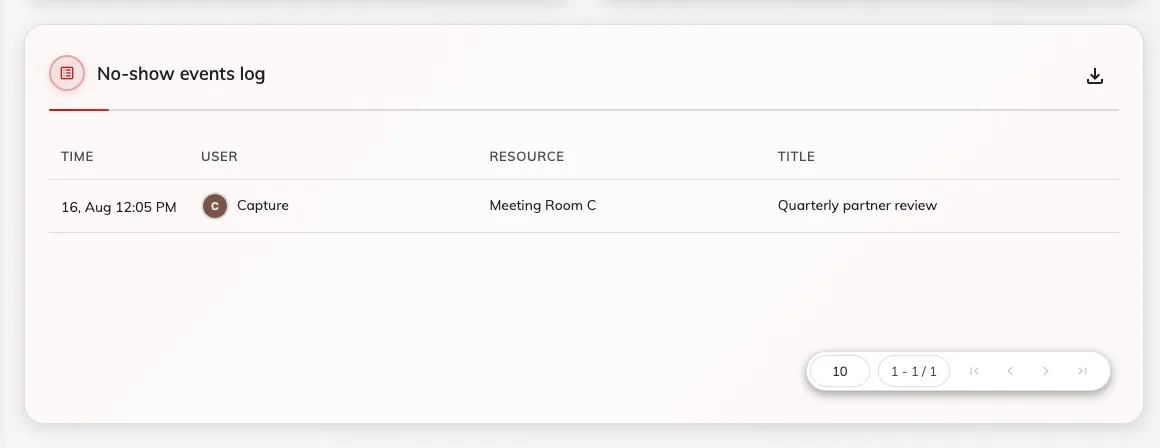
Every release, with the time it happened.
The Time column is the moment the booking was released, not the moment it was due to start. They differ by exactly the check-in grace period, which is worth remembering before reconciling the log against a calendar.
Nobody finds out only from a report
The organiser is told twice, in the app and by email — once when the resource becomes ready to check into, and again when it has been released.
So a name on the ranking is somebody who has already been told, twice, every time. That is worth knowing before using the list as evidence — and worth checking, since both emails can be switched off for the whole organisation. The notifications in the app cannot, so somebody was told even where the mail was off — Reminders.
Open Email reminder settings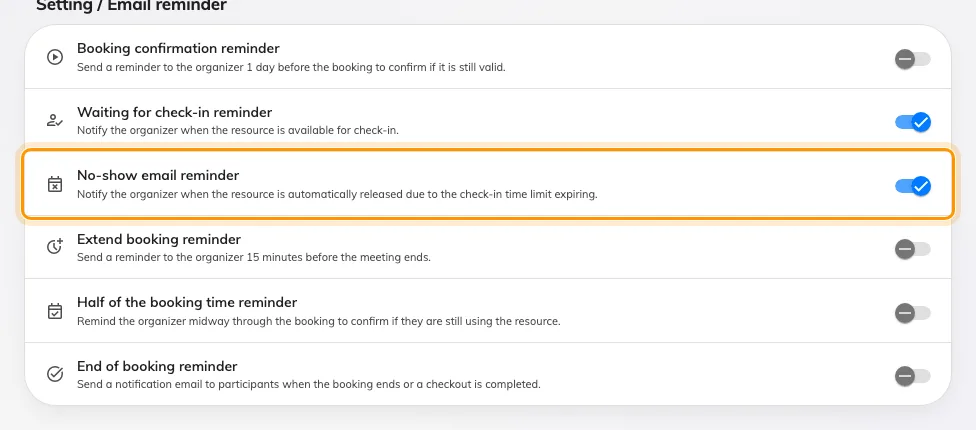
Both ends of the window have a reminder, and both can be turned off.
What it does not control
- It does not cause anything. Analytics only reports. Turning the page off, or never opening it, does not stop a single room being released.
- It does not include bookings that were never released. A room held for its full duration by somebody who did not turn up is not a no-show — it is a booking on a policy that does not require check-in, and it is invisible here.
- Quota is not part of this. A no-show forfeits its quota, and that is recorded in the quota usage history rather than in these figures.
- It does not tell you why. A high rate on one room is a question — about its policy, its window, or the way people book it — not an answer.