

Both maps
Add equipment, parking spaces and other resources
Make a projector, a loan laptop, a car park bay or an iPad bookable. Each has its own list but the same editor as a room; this page is the handful of fields that differ, where each type can and cannot go — floor plans, panels, stickers, import — and how people actually book them in the app.
Rooms and desks are where most tenants stop, but anything that one person at a time should hold can be a resource: the portable projector, the two loan laptops, the visitor bays by the door, the iPad the sales team share. Offision files them under three lists, and every one of them is made on the same editor as a room — so this page is written as the differences from Add a room, not a second copy of it.
For map placement, Classic uses an area or coordinate; Map 2.0 uses a compatible object linked to that resource. A floor alone does not supply that link. Use Map 2.0 Assign for the scene the account displays, or Classic Assign for an existing Classic drawing.
1. Pick the list
Three lists sit beside Rooms and Hot desks in the booking menu. Which one you use decides which fields the editor shows and which app filter the thing appears under, so pick by what it is rather than what is convenient.
Open Equipment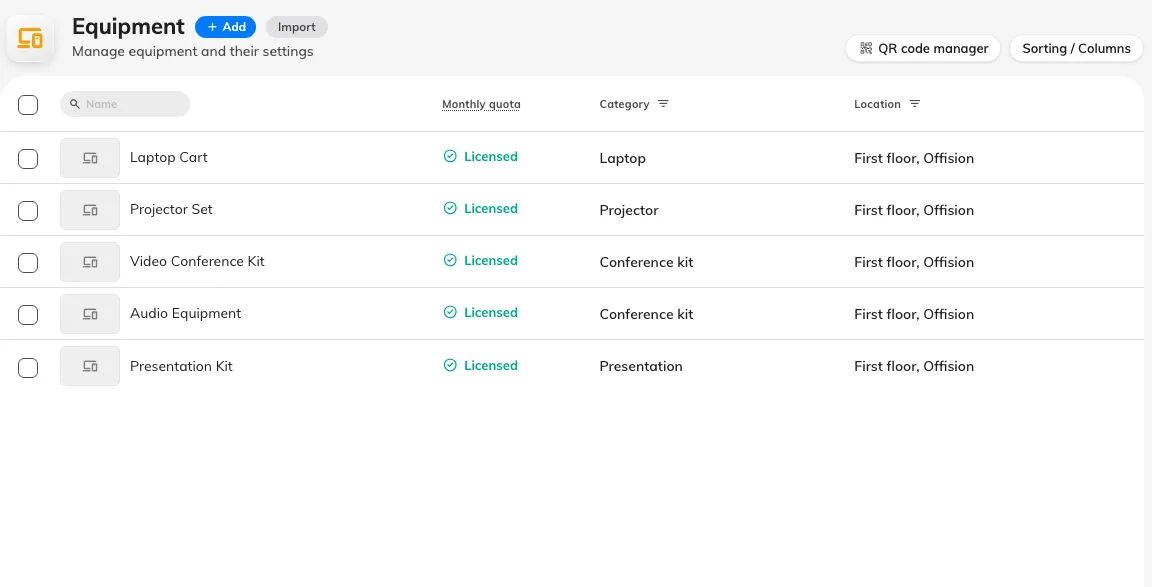
The Equipment list — the same shell as Rooms.
| List | The product’s own description | Use it for |
|---|---|---|
| Equipment | Items that can be used in an office. | Things that go with a meeting or a person — projectors, whiteboards, laptops, tablets, phones, a pool car, a locker |
| Parking spaces | List of spaces for car parking. | Bays. One bay, one resource, sized for a vehicle |
| Other resources | Miscellaneous office items for reservation, such as iPad, computer, and parking lot. | Anything that fits neither — a whole car park booked as one unit, a studio, a piece of lab kit |
Add on each list opens the same one-field panel as a room’s — Add equipment, Add parking space or Add resource — with the next number filled in. Save, then click the row and Edit.
2. Fill in what differs from a room
The editor’s pages — Basic, Policy, Service, Advanced, Out of service period, Information — are identical to a room’s, as are Location, Description, Amenity, Business hour, Access ID and the photo. The differences fit in one table:
| Field | Room | Equipment | Parking space | Other resource |
|---|---|---|---|---|
| Capacity | Required | Not shown | Not shown | Not shown as a saved value |
| Parking space size | — | — | Required. Motorcycle, Car, Medium vehicle or Large vehicle; Car is preselected | — |
| EV charger | — | — | A checkbox. Tick it on bays with a charger, so a booker filtering for one finds it | — |
| Category | Room categories | Equipment categories | Parking categories | Other categories |
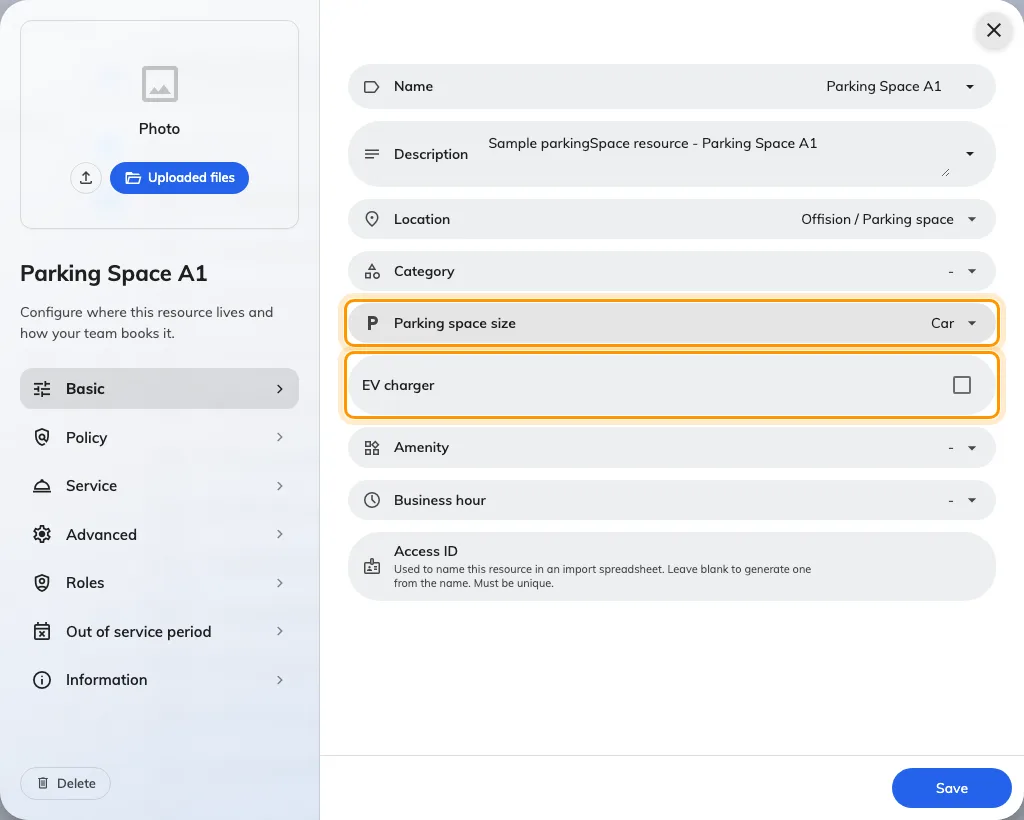
A parking space on Basic: Parking space size and EV charger are the fields a room does not have.
Category is worth a moment. Categories belong to a type, so the picker only offers the ones made for that list, and each category carries a Type for analysis that the usage reports group on. The analysis types available to each list are the product’s own idea of what belongs there:
- Equipment — TV, Projector, Whiteboard, Digital whiteboards, Laptop, Computer, Tablet, Mobile phone, Car, Locker, Other equipment type.
- Parking spaces — Bike space, Ordinary space, Truck space, EV charging space, Bicycle space, Disable parking space.
- Other resources — Others, and nothing else.
Make the categories first, under Categories, and they are ready in the picker — see Set up categories and amenities.
Then Policy, exactly as for a room: Booking settings on, and a booking policy if the default is not right — a loan laptop that must be checked in, a parking bay that can be booked a month ahead. Save.
3. Place it, badge it, put a panel on it
All three types can be placed on a floor plan through Location, and all three get QR code manager in the list header and QR Code sticker in the detail panel — see Put up resource stickers. A sticker on a locker door or a projector case is usually how people book these at all.
A booking panel can be bound to a room, a desk, equipment or an other resource. It cannot be bound to a parking space.
Import works on every list with the same sheet — ID, Name and one column per extra language — plus Has EV Charger for parking spaces. There is no capacity or size column for these types; set those on the resource afterwards.
4. Know how people will book them
This is where equipment and parking differ most from rooms, and it is worth explaining to the people who will use them.
Every type has its own row in the app’s Booking menu, so a projector can be booked on its own like anything else. The menu hides itself when only one type exists.
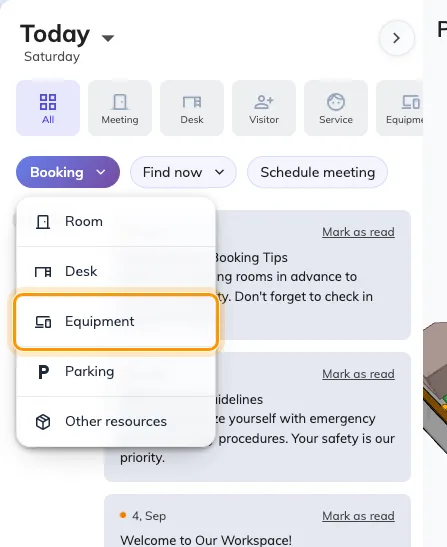
The Booking menu on the app home, with Equipment among the types.
- Equipment is usually booked alongside a room. Choose the room first, then use the toggle beside the search box to flip the list to Equipment. What you pick joins the room on the same booking as a second, green chip — the projector goes with the meeting rather than being a booking of its own.
- A desk is offered parking instead, on a tenant with bookable bays; where there are none, a desk is offered equipment. A room is always offered equipment, never parking.
- Other resources have a row like every other type. What throws people is the search box, which reads Find resources rather than naming the type.
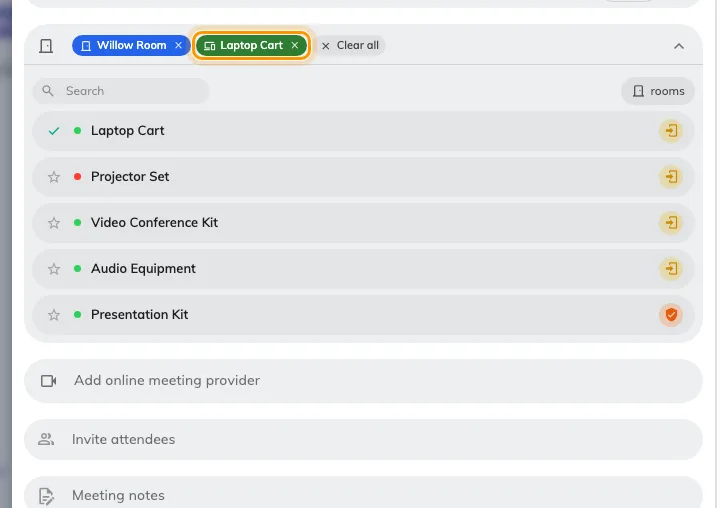
A room and a laptop cart on one booking. The green chip is the equipment.
Whichever way it is attached, an attached item is checked for conflicts and closures like the room it goes with: a projector already promised to another class refuses, and a bay under an out of service period warns or blocks.
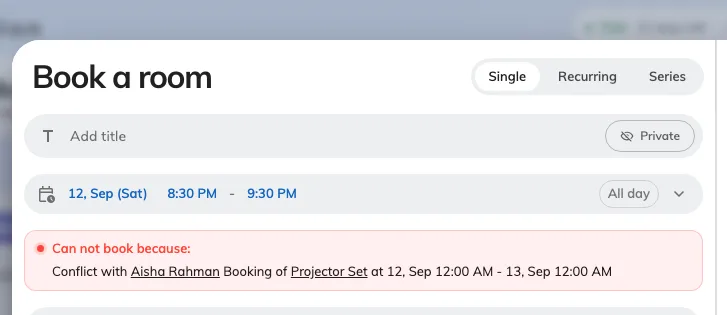
The projector is already taken, so the form refuses before Book is reachable.
5. Check it worked
Open the user app and book one of each type the way a colleague would: a room with a piece of equipment attached, a desk with a parking space on it, and an other resource from the home screen. Then book the same equipment from a second account over the same hour — it should be refused. If a type is missing from the menu, either nothing of that type is bookable yet — Booking settings is the switch — or it is the only type there is, and the menu hides itself.
What does not exist
- A quantity on equipment. Three identical trolleys are three resources. Name them Trolley 1, 2 and 3 and give them the same category.
- A number plate on a parking booking. A plate is only asked for on a visitor’s vehicle, in the visitor section of a booking form; an employee booking a bay is not asked.
- A locker module inside Booking. Lockers with electronic doors are a separate part of Offision. Locker as an equipment category is how you model an ordinary lockable cupboard that people reserve.
- A bike module. Bike and bicycle spaces are parking-space categories.