

How a panel gets its settings
A panel holds almost nothing of its own. Its buttons, its identification and its look come from a named configuration that other panels share — which is why changing one panel can change twenty.
Nothing you change about a panel is stored on the panel. Its buttons, the credentials it asks for, its skin and its screen saver all come from a panel configuration — a named set of settings that any number of panels point at.
That is the one thing to understand before anything else in this section, because it is what makes “I changed one panel and it changed the whole floor” an accurate description of what happened rather than a bug.
Open Panel configurations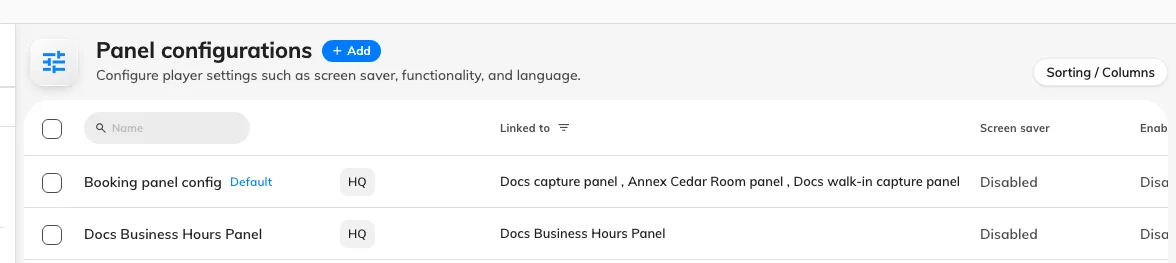
One configuration, with Linked to naming every panel that follows it.
Every setting sits on one of its pages
Opening a configuration opens a rail of pages. The configuration’s name is the rail’s title and is edited in place — there is no Basic page.
- Room booking panel — the panel’s design and everything it draws or offers, over a live preview of the panel itself.
- In-room panel — the Meeting assistant screen inside the room. A different panel with its own settings, which is why it has its own page — see The meeting assistant panel.
- Check-in method — what the panel accepts as proof of who somebody is, and whether it may accept nothing at all.
- Monitoring — the remote-control countdown, and whether anyone is emailed when a panel goes offline.
- Other, then Information on an existing configuration.
- Booking panels, under the rail’s one section title — the devices this configuration drives.
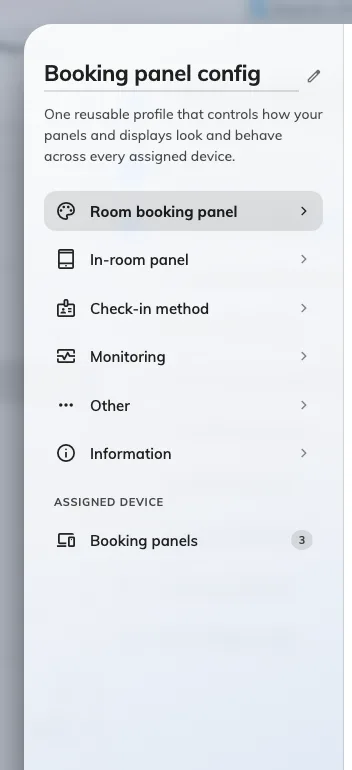
The rail. Room booking panel holds most of what the rest of this section sends you to.
Room booking panel is a preview over eleven groups
Room booking panel is not a page of switches. It is a live preview of the panel with a menu of groups beneath it, each opening as a subpage — so the panel stays on screen while any group is edited.
Under the preview is a row of chips naming the room states, and clicking one shows the panel in that state without changing anything. Inside an open group, a round chevron above the list is the way back to the menu; it stays put however far down the group you scroll. The screen saver is the one thing the chips do not cover: it previews itself while its own group is open, and only when it is switched on.
The first cell of that menu is Touch screen mode, and it governs three of the groups: with it off the panel is a display-only screen and Use a booking, Book from the panel and Door & extras have nothing to offer — see Run a panel as a display-only screen.
| Group | Holds |
|---|---|
| Background & logo | Background image mode and file, the company logo and the ground it sits on, the font |
| Status colours | The colour of each room state |
| Display languages | Which languages the panel offers |
| Room details | Room name text size (Text size), amenities, the room note |
| Booking details | Title, organizer, attendees, thumbnails, online-meeting logo |
| Timeline & clock | Announcements, 24-hour clock, timeline text size, the two timeline options |
| Use a booking | QR code, walk in, check in, check out, extend |
| Book from the panel | Advance booking, booking details, cancel, other rooms |
| Door & extras | Open door, report issue — and, on the In-room panel page, the end-of-meeting announcements |
| Screen saver & energy | The idle playlist and save-energy mode |
| Design by purpose | A design override for individual booking purposes |
The three action groups are the old Function page, and every switch in them is still listed in Function settings. Colour control and Screen saver were pages of their own too; they are Status colours and Screen saver & energy here.
A note under the room name
Room note, in Room details, puts one short card on the panel under the room’s name — the thing everybody should know before they walk in. Its level is the badge on the card: Info, Reminder or Warning. Off, the default, shows nothing.
Content decides the words. Room description shows the room’s own description, so every panel on the configuration shows its own room’s line; Custom text is written here, once per language, and every panel shows the same one.
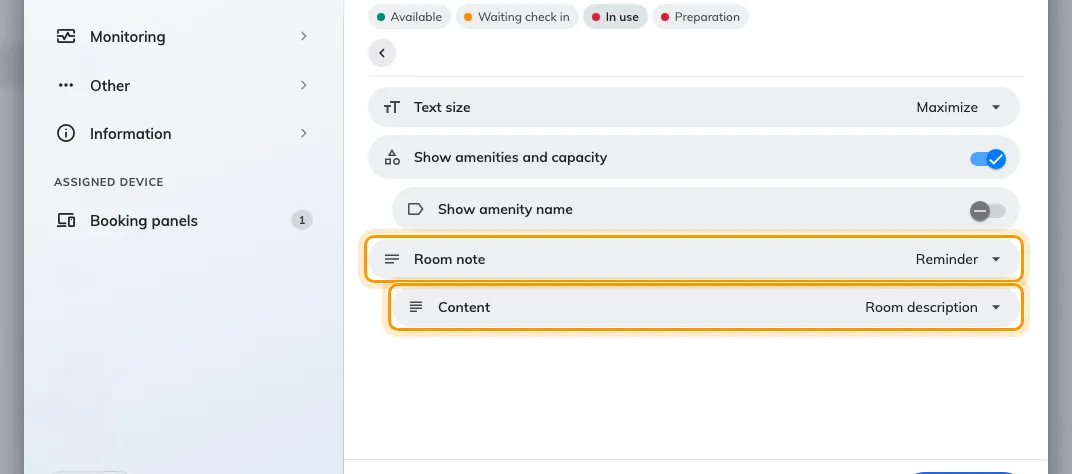
Room note set to Reminder, reading the room's description.

Info — what the room has.

Reminder — what to do before you leave.

Warning — what is out of order.
Both designs draw it, and so does a 480-wide panel.

The same reminder on the Center design.

And on a 480 × 320 panel.
A note with nothing in it shows nothing — a room with no description, or an empty editor. The card also stays off the out-of-service, outside-business-hours and licence screens, which carry their own message.
Making one panel behave differently
There is no per-panel override. A panel that has to behave differently needs a second configuration, and then to be moved onto it.
Both halves are done from the same dialog: build the configuration, then open Booking panels, under Assigned device at the foot of the rail, and tick the panels it applies to. The same move can be made from the other direction, on the panel list, by setting a panel’s configuration there.
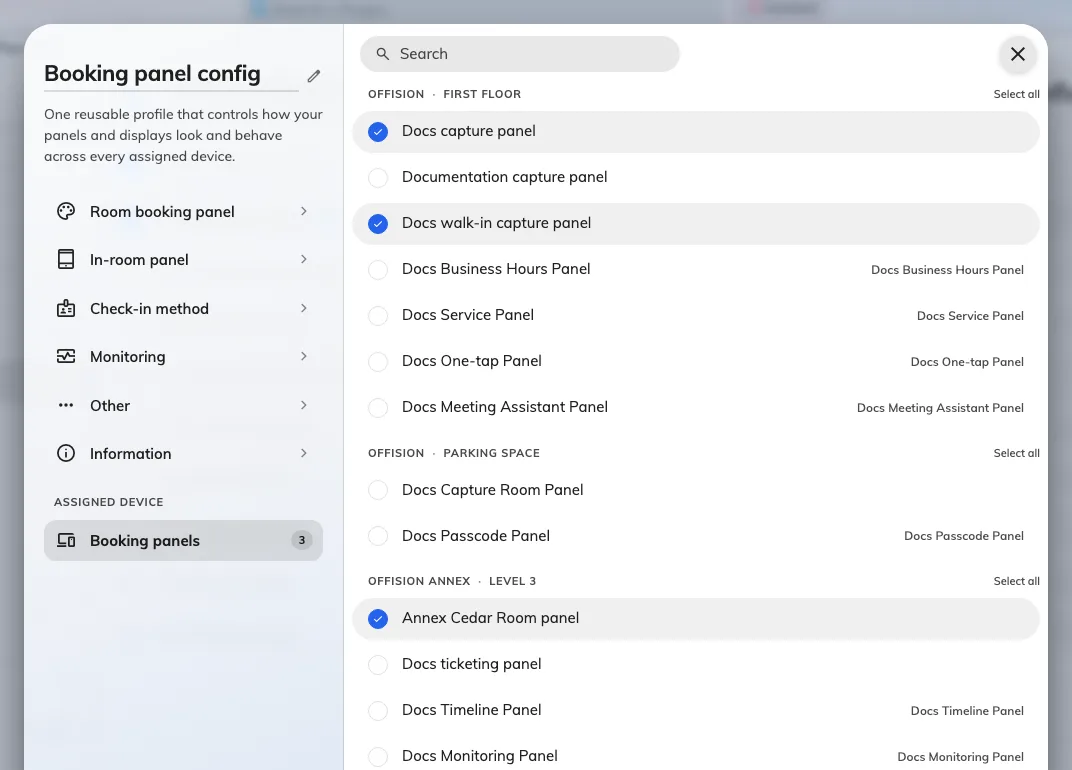
Every panel in the estate, by building and floor, with this configuration's ticked.
A lobby panel that should not let passers-by take the room, and a team-floor panel that should, are two configurations. So are a panel with a card reader and one without.
What this does not control
- Who may book the room, and for how long. That is the resource’s policy — see Resource policy settings.
- Whether check-in is required, and how long somebody has to do it. Also the policy — see How check-in and no-show work.
- Which credentials exist at all. The organisation-wide Check-in method screen sets the default for every panel; a configuration may override it, and that is the subject of How somebody proves who they are at the panel.
- Which room a panel shows. That is the panel’s own resource assignment, not a configuration setting.