

Panels and screens update the moment something changes
Whether panels, signage screens and check-in kiosks update on their own, and how quickly. Nothing is on a refresh timer — bookings, status colours and the screen's own settings all arrive in about a second, including at the door of the room a booking has just left. The same for an event session moved on the agenda: the door panel, the lobby screen's list and the Event list widget follow it.
Nothing on a screen is on a refresh timer. Every room panel, signage screen and check-in kiosk opens a connection to Offision when it starts and holds it open, and each change travels down that connection as it happens. A booking made, moved or cancelled is on the door in about a second — nobody touches the screen, and nothing has to be sent from the console.
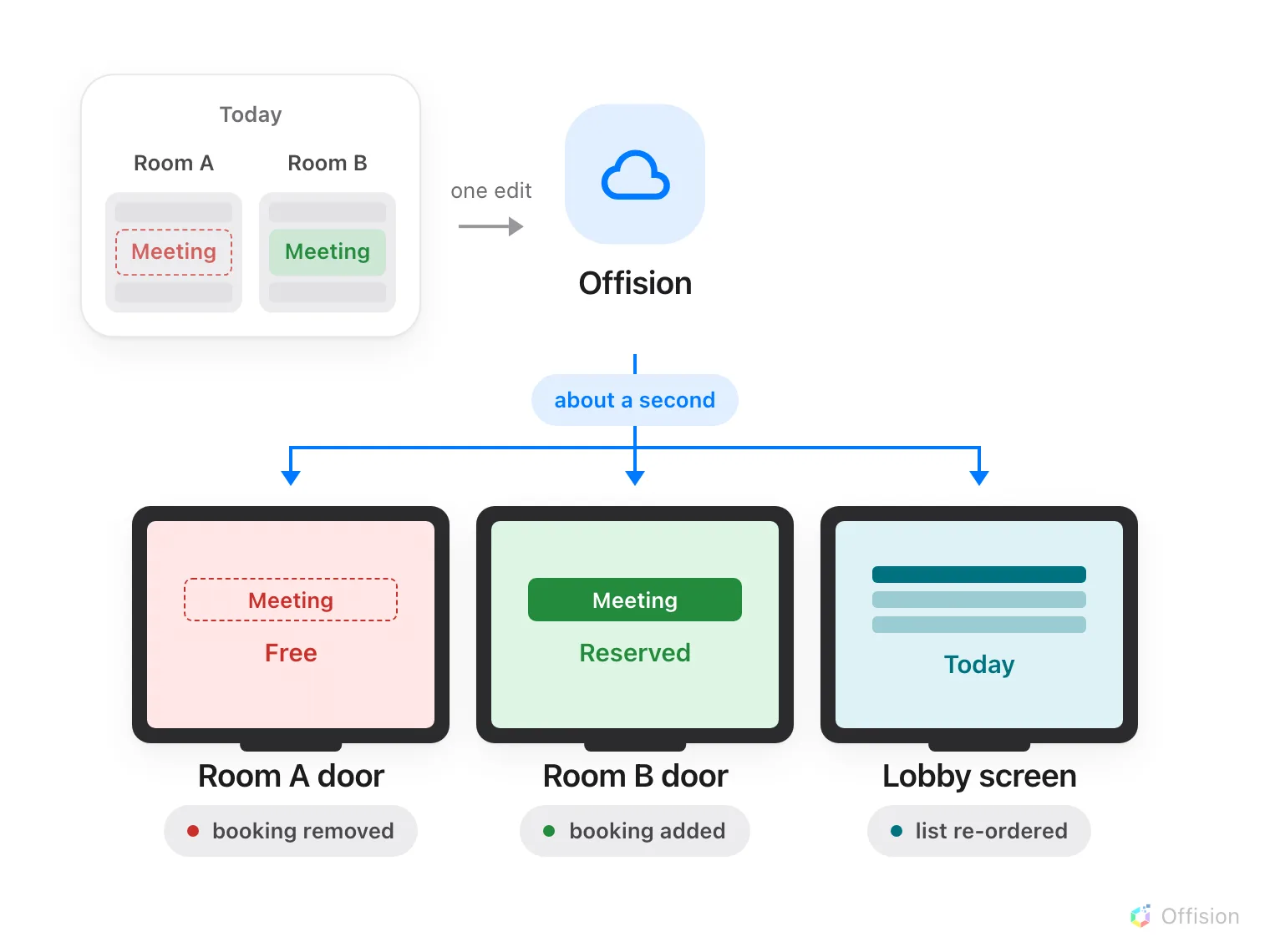
One edit, sent once and delivered to every screen it affects — including the room the meeting has just left.
What arrives this way
Everything a screen shows. Bookings made, moved, cancelled, checked in or ended early; the room’s status colour; occupancy and air quality from the ceiling; visitors arriving and badges printing; announcements and emergency messages.
A screen’s own settings arrive the same way — its design, your logo, which buttons it offers, its language, how it is mounted, its time zone. Saving a panel configuration reaches every panel on that configuration in about a second, and saving signage content reaches every screen already playing it. There is nothing to refresh, reboot or re-pair afterwards.
The room a booking leaves changes too
Moving a meeting from one room to another changes two doors, not one. Offision sends the removal to the room the booking left and the booking itself to the room it arrived at, so both panels are right within about a second of the change being saved. A lobby or signage screen carrying a booking list is sent the same change and re-orders itself.
This holds wherever the change was made — the resource calendar, the management calendar, somebody’s phone, or a person standing at another panel.
An event session is a booking too. A session that was given a room holds that room’s booking, so moving the session on the event’s agenda moves the booking, and the two door panels, a lobby screen showing a booking list or the Event list widget, and the Event information widget all follow within about a second. There is no publish step and no refresh interval on the screens; the agenda is the one place the change is made.
If a screen was offline when you saved
Bookings catch up on their own. As well as being sent changes, a panel keeps checking about every half a minute whether what it is showing is still current, so a change that arrived while it was unreachable lands shortly after it returns.
Settings do not catch up. A panel that was offline at the moment you saved a configuration comes back showing the old one, and goes on showing it.
What this does not cover
A visitor’s own phone. An invitation link opens an ordinary web page rather than a device, so it re-checks about every thirty seconds instead of being sent changes.
E-paper tags. A change is sent to a tag immediately, but the ink itself takes time to turn — see How fast e-paper tags update.
A screen with no network. Nothing can be sent to it at all, though it keeps showing the day it already has — see A booking panel keeps running when the network drops.
An allowlist that is missing one name. Live updates travel over a different address from the app, and blocking it is the one fault that looks like nothing is wrong: screens load, then never change. See Every address Offision connects to.