

Use a tablet as a booking panel
An iPad, an Android or Windows tablet, or a third-party screen with a web view, runs the same panel as certified hardware and books the same rooms. What each one needs, what it gives up, and why the socket usually decides.
Under Certified devices in the connect wizard sits Other devices. A tablet there runs the same panel as certified hardware, pairs with the same six-character code, and books the same rooms. What it does not have is the hardware around the screen.
What each one needs
| Tile | What it needs | Runs the panel as |
|---|---|---|
| iPad | iPadOS 13.0 or later | The Offision app |
| Android | Android 5 or later | The Offision app |
| Windows | Windows 10 or 11, 12th-generation Core i5 or above | The Offision desktop app |
| Web | A web view | A browser |
Web is the tile for a third-party system rather than a tablet you hold: a signage player, a room system, anything that will load a page and keep it on screen. It is also the tile with the fewest capabilities, because a browser is all Offision gets.
Connect it
The steps are the ones every panel follows — see Connect a booking panel. Get the app onto the tablet first, or open the browser on the third-party screen; the panel shows six characters, and you type them into the console.
Open Booking panel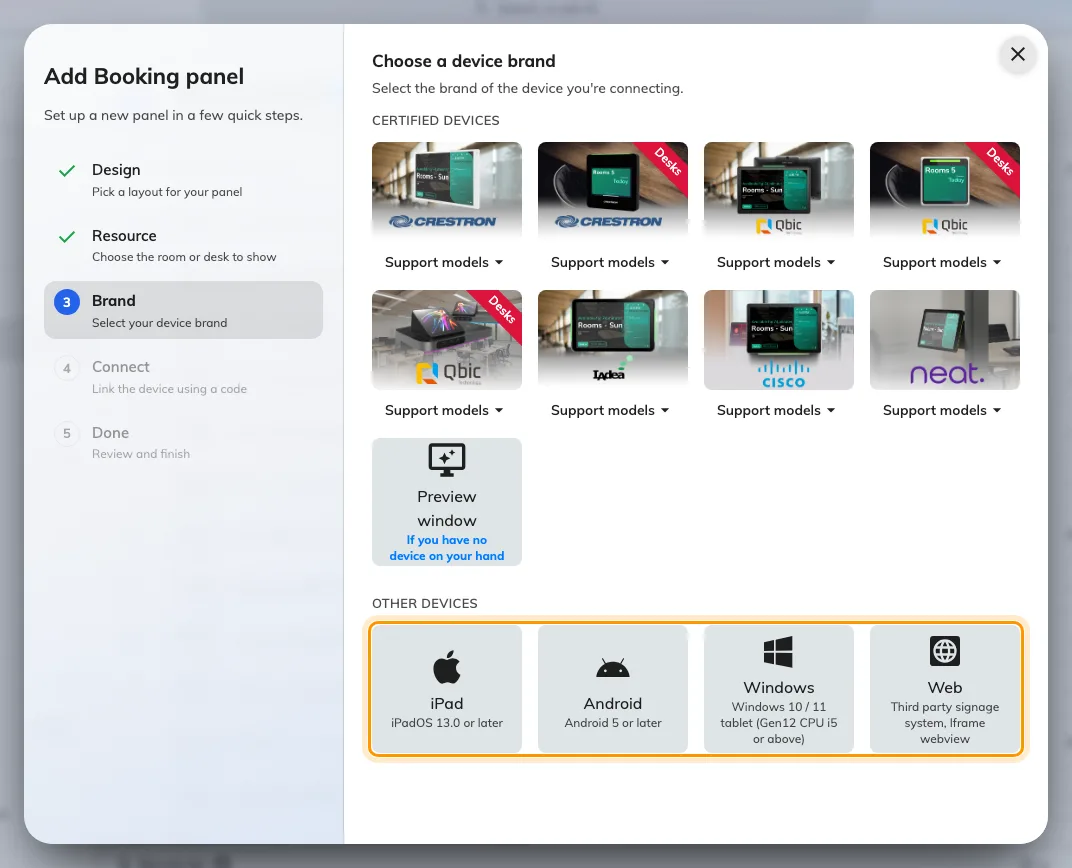
Other devices, under the certified tiles.
At the Brand step, take the tile for what you have. Other devices sits under the certified tiles, and the guideline it shows is the one for that platform.
What a tablet gives up
No PoE. A tablet needs a power socket at the mount. That is usually what decides whether a tablet is actually cheaper than a panel, because on a wall with no socket the electrician is the expensive part of the install — not the panel.
No light bar. The room’s status is carried by the screen alone, so it cannot be read from the end of a corridor. Everything the colours say is still said — see What the panel colours mean — it is just said only to somebody standing at the door.
Cards, on Android only. With the Offision app on an Android tablet that has NFC hardware, a card is tapped on the tablet’s own face: the reader is Android’s, not a panel vendor’s. iPadOS has no card-reading path, so an iPad takes a USB reader like everything else, and so do Windows and a browser. HID Global cards decode on IAdea panels only, whatever the tablet.
Which reader a device ends up with, brand by brand, is in Which booking panel hardware Offision supports.