

See your desk day on the home screen
What the Desk filter on the home screen does besides filtering, why today's desk turns into two cards once you are sitting at it, and what the empty state does and does not mean.
The home screen answers one question — what is happening to me today — and on a day you have a desk, most of the answer is which desk and until when. The Desk filter along the top is how you ask it, and it does slightly more than filter.
It narrows the day, and re-aims the buttons
Choosing Desk hides everything that is not a desk booking — meetings, visitors, tickets — leaving the day with only your desks on it.
At the same time the two buttons under the filter row change: instead of Booking with a menu to open, they become Book a desk and Find a desk now. That is the shortcut worth remembering, and it is why this filter is worth choosing even on a day the timeline is empty.
Choosing Desk again puts it back to All.
One desk, up to two cards
A desk booking appears as My desk, with the desk’s name beside it and how long it runs for.
While it is waiting for you to turn up it carries a Check in chip counting down — that is how long you have before the booking is treated as a no-show and the desk handed back.
Once it is running a second card appears under it, Leave seat reminder, with the time left and the hour it ends. The first card dims at that point, and that is deliberate rather than a duplicate: getting to the desk is done, and the only thing still to act on is giving it back.
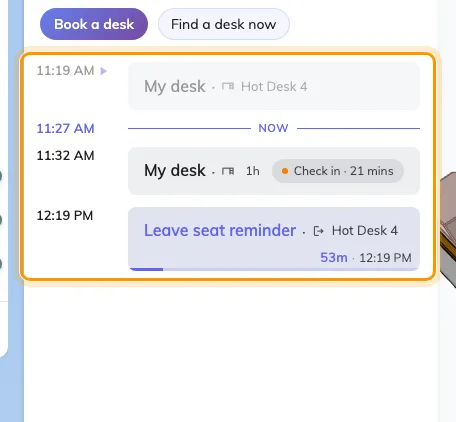
A desk day: the booking, its check-in countdown, and the leave reminder under it.
Answering the leave reminder is the whole point of it. A desk booked until six and left at three is three hours nobody else can use, and nothing about the booking notices you have gone. Ending it — from this card, or by scanning the code on the desk on your way out — is what puts it back in the pool. See Check in and out by scanning the sticker.
When it says you have no desk
“No desk reserved for this day.” means exactly that, and it is worth being precise about what it does not mean:
- It is about the day you are looking at, not about today. Move the date and the answer changes.
- It is not a permissions message. If you were not allowed to book desks at all, the Desk filter would not be there — the whole desk surface is hidden on a tenant with no desks, or an account with no desk access, rather than shown empty.
- It says nothing about a desk that is permanently yours. An assigned seat is not a booking, so it never appears here.
What this does not cover
- Making the booking. See Book a desk.
- Choosing where to sit. The map beside this panel is the better tool for that — see Find a desk on the floor plan.
- Your bookings in general. My calendar carries all of them, desks included — see Reschedule a booking on my calendar.