

Join an event, or register for one
Some events take one tap and some open a form — what decides which, and what the button says when you cannot sign up at all.
Signing up is one of two things, and the event decides which.
Join is a single tap in the list, confirmed with a second. Nothing opens and you stay where you are — this is what you get when the organiser needs nothing from you beyond your name.
Register opens the event, because the organiser is asking you something: a question of their own, or which sections of a course you want. Answer it and confirm.
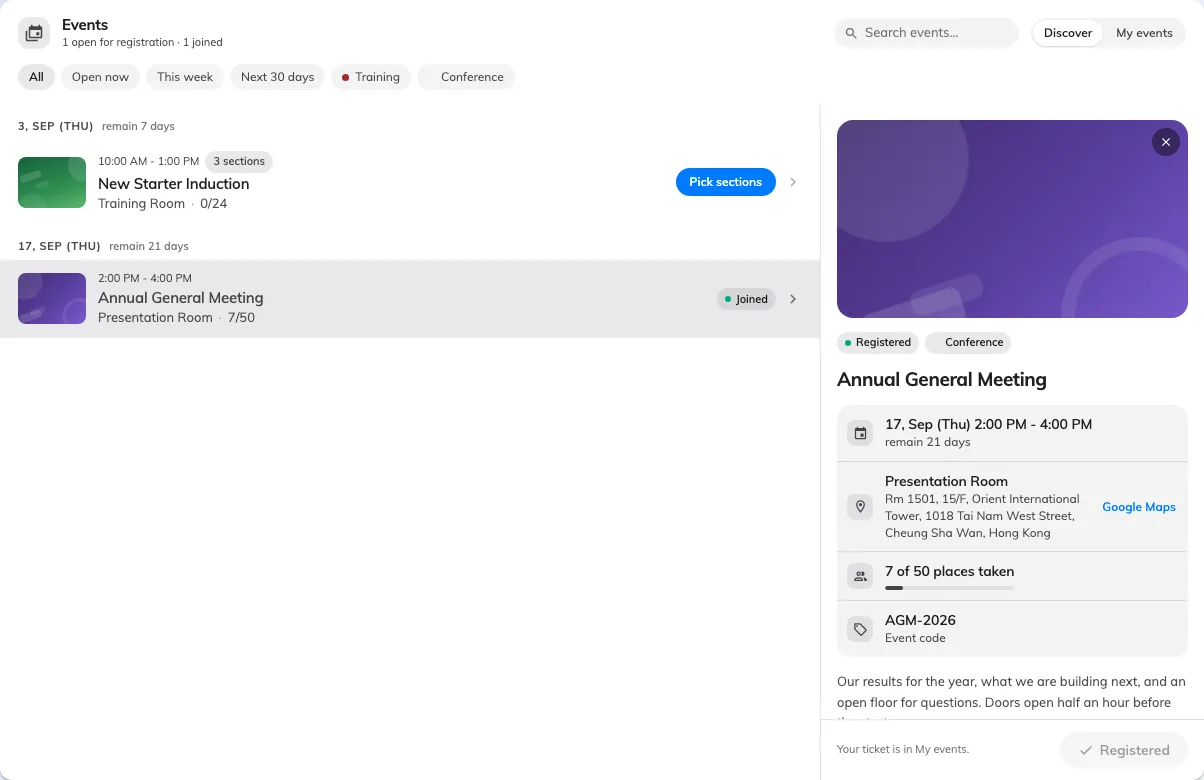
Picking an event opens its details beside the list, with the button that joins it.
When the button is something else
The control tells you what is going on before you press it:
| It says | What it means |
|---|---|
| Joined / Registered | You are already in. Your ticket is under My events |
| Full | Every place is taken |
| Open now is missing, and sign-up is closed | The registration window has ended, or has not opened yet |
| Nothing to press | The event is shown for information only — the organiser is not taking sign-ups here |
That last one catches people out. An event with no sign-up control is not broken; it is being advertised rather than filled, and anyone attending is being invited by name instead.
Changing your mind
There is no cancel button. The app says so plainly — To withdraw from this event, contact the organiser — so tell whoever is running it and they will take you off the list. See you can’t cancel your own registration.