

Find a room right now
The meeting starts in a minute and nobody booked anything. Two ways to take a room without the booking form: Find now in the app, which picks the first room free for the length you ask for, and Walk in on the panel outside a room you are already standing at.
A room you did not book can be taken two ways, and neither of them opens the booking form. Which one you use depends on where you are standing.
From the app: Find now
For the meeting that starts in a minute, Find now sits beside the Booking button and skips the form entirely: pick a duration, and Offision lists the rooms free for it. Each row has its own Book button, and one tap takes the room.
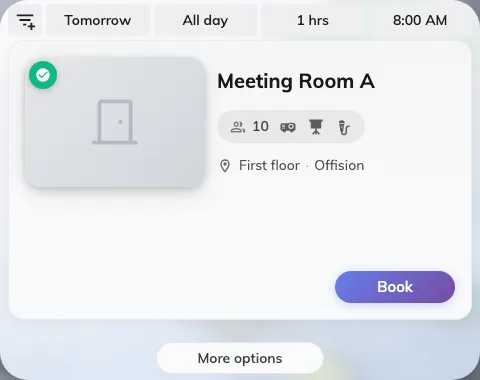
Find now: rooms that are free for the length of time you asked for.
If nothing comes back — “No available resource found, you may change the filters to check the other time slots” — widen the filters or move the time. More options hands the same booking over to the full form, with everything you have chosen so far carried across.
At the room door: Walk in
If you are already outside a room and it is free, its panel offers Walk in, and you never have to reach for the app at all. Press it, pick how long you need, and identify yourself with a card, the QR code in the app, or your passcode — some panels ask for nothing at all.
The room is then yours from that minute, and there is nothing to check into afterwards: standing at the door is the proof a check-in would have asked for. The booking lands in the room’s calendar under your name, or with no organiser where the panel let you identify as nobody.
Take a free room at the panel outside it walks the whole thing, including the four reasons the Walk in button is sometimes not there.