

Screen visitors against a black list
Somebody your organisation will not admit turns up at the gate. Offision holds a black list, marks that person for the host who invites them, the approver who decides and the desk that checks them in, and emails your visitor managers when they arrive — but it never refuses entry by itself, so the refusal has to be approval.
Somebody your organisation has already decided should not be on site walks up to the desk and asks to be let in. The question behind this page is whether Offision can recognise them before a badge prints, and turn them away by itself.
It recognises them. It does not turn them away. The black list marks a person on their visitor record and puts that mark in front of everyone who could stop the visit — the host inviting them, the approver deciding, the receptionist checking them in — and emails your visitor managers the moment they arrive. What it never does is fail a scan or hold back a badge. Refusing is somebody’s decision, and the way to make that decision reliable is to require approval, so that no badge exists until the decision has been made.
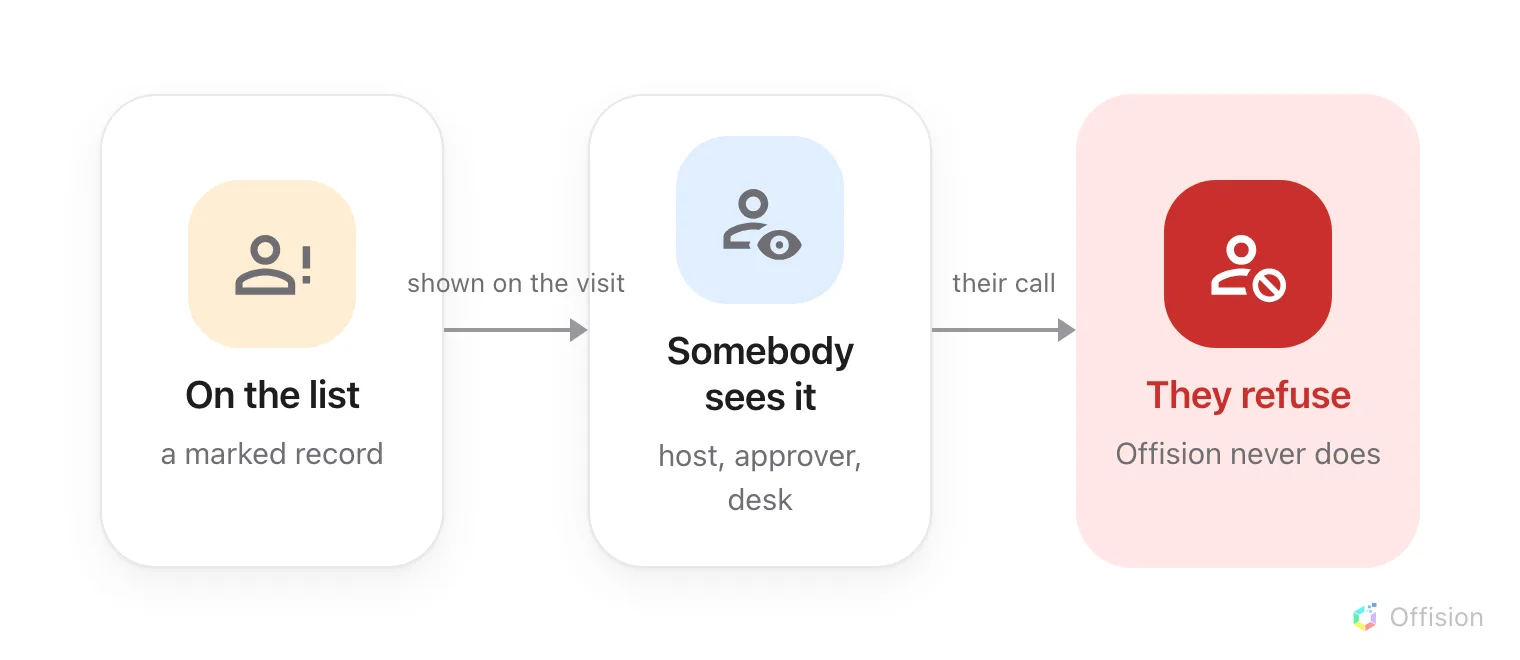
Offision holds the list and shows the mark. Refusing is a person's decision, every time.
1. Build the list before anybody arrives
You do not have to wait for someone to visit before you can list them. Add, beside the title on Visitor data, creates a visitor record from nothing.
Its first field decides everything downstream. Identifier type — Email address, Mobile number or Lookup key — is what a later arrival is matched against, so it has to be the detail the person will actually give at the door. Match it to the key on the visiting purpose they will arrive under: how Offision knows two visits are the same person explains which key resolves what.
Then select the row and choose Add to black list, which asks “Confirm adding to black list”. Several at once: tick the rows and use Blacklist selected visitors on the toolbar that appears. Remove from black list reverses it.
The list is in two halves, and the toggle above it switches between Normal and Blacklisted. Add only exists on the Normal side, so create the person first and mark them second.
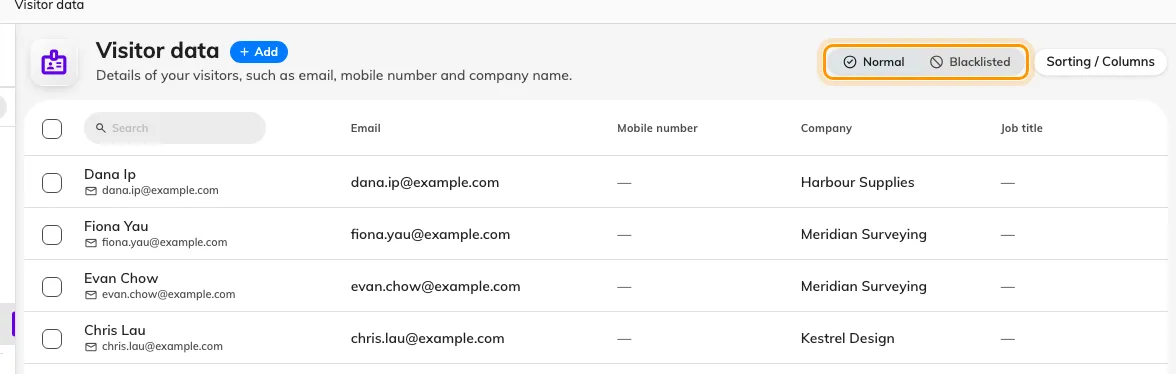
Visitor data. Blacklisted is a separate view, not a column — a listed person is not in Normal at all.
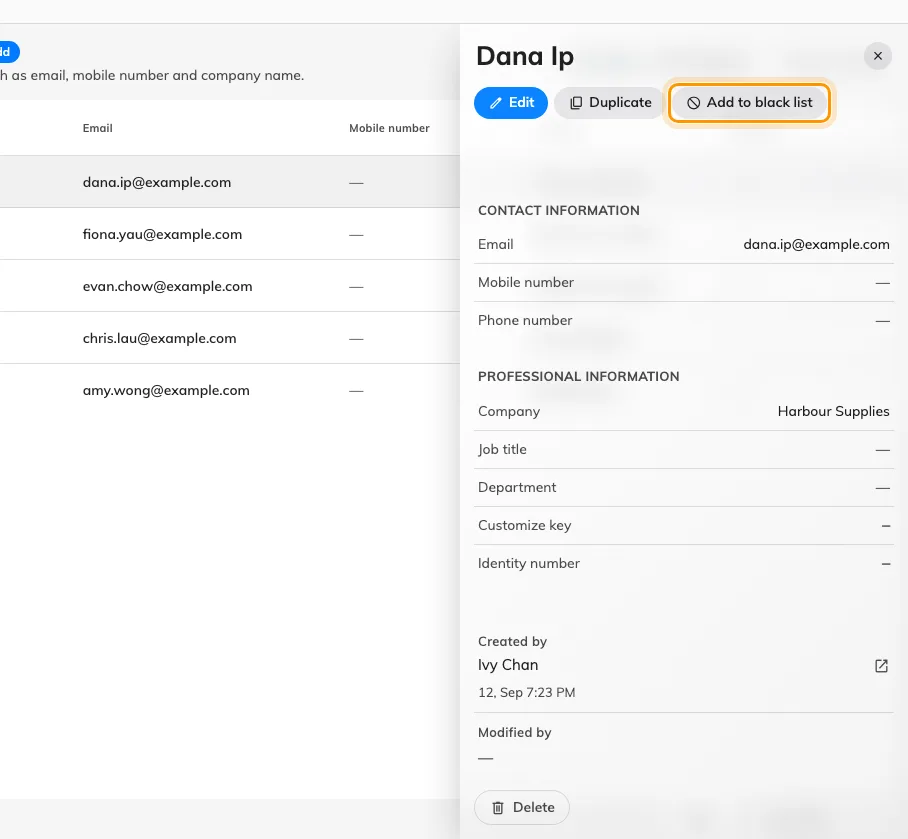
Add to black list, on the record's own panel.
2. Turn on the arrival alert
On the visiting Settings page, under Security, turn on Enable blacklist visitor warning email — “Send warning email to visitor manager when blacklist visitor check in”. Everyone holding Visitor manager then receives Blacklisted visitor alert naming the person and the building.
It fires on a badge check-in: a visitor scanned in at a lobby screen, at a panel, or found and checked in at the desk. A walk-in registered from scratch at reception is not a badge check-in, and raises no alert — the desk sees the warning on the visitor’s card instead, at the moment of registering them.

The alert is off until you turn it on, and it reaches every visitor manager rather than the host.
3. Make the refusal a decision
This is the step that turns a warning into a refusal. Turn on approval for the visiting policy covering the building — see Require approval before a visitor is invited. Nothing is then issued until somebody decides: no invitation, no code, no badge.
In the approver’s queue each guest carries their own tick and cross, and a listed guest carries a Black list tag beside their name. Reject them and the visit never reaches them — a rejected guest is told nothing, then or ever. A guest rejected after already being approved keeps a badge that no longer works, and finds out at the door.
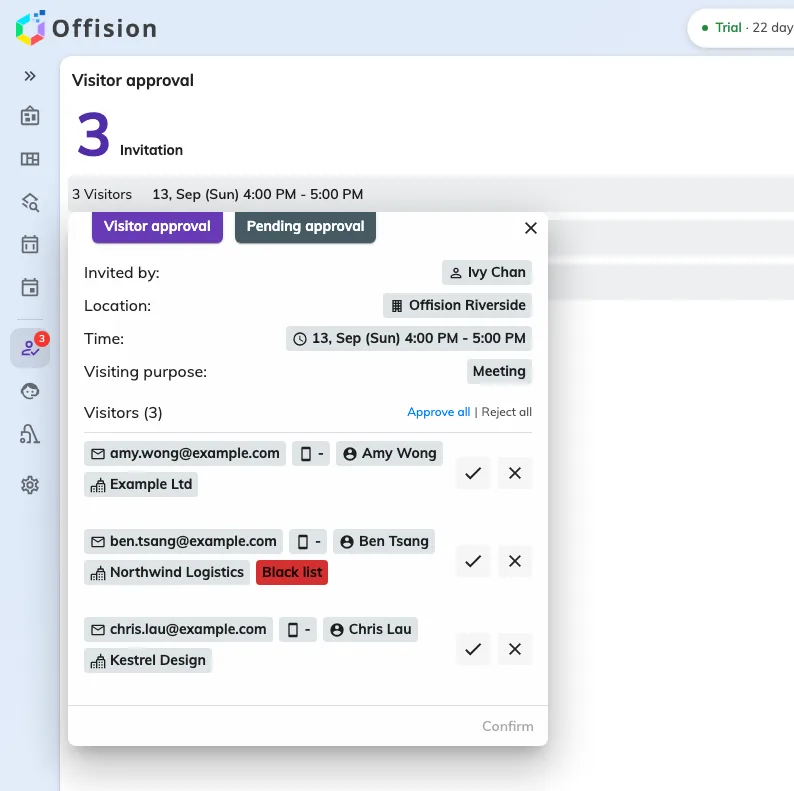
A request with a listed guest. The tag is the only thing that distinguishes them — the decision is still yours.
4. What the host sees
A host who adds a listed person to an invitation is asked “Some of the visitor(s) are blacklisted, are you sure want to create current invitation?”, and the guest’s row carries the same Black list tag as the approver sees.
It is a confirmation, not a refusal. Answering yes creates the visit. Where the answer has to be no whatever the host does, step 3 is what enforces it.
5. Check it worked
Switch the list to Blacklisted and confirm the person is there and gone from Normal. Then, signed in as somebody else, invite them: the confirm prompt should appear. If the location requires approval, open the request and look for the tag beside their name.
What the black list does not do
Each of these is worth knowing before you rely on the list, because each is a place a reasonable assumption is wrong.
- It does not hold back a badge. A listed guest on an approved visit is badged and printed like anybody else.
- It does not refuse a gate. A scanned code is judged on the badge — not yet valid, expired, wrong building, already checked out, waiting for approval, rejected, cancelled, or not found — and never on the person. A listed visitor holding a valid, approved badge is admitted. See what the visitor badge API answers.
- It does not hold a door. Where checking in opens a door, that door opens.
- It marks a record, not a human being. It catches someone only when their arrival resolves to the record you marked. The same person arriving under a different email address is a different record, and carries no mark.
- Deleting a record bars nobody. A deleted record stops claiming its email or number, so the same person can be invited again and simply gets a fresh one.
If the refusal has to be automatic
Two routes exist, and neither is the black list.
The visiting policy can refuse an entire email domain — a public mail provider, or a list of your own. That admits or refuses by where an address comes from, never by who the person is, so it cannot bar one named individual.
Or refuse at your own gate. A turnstile you control can ask Offision whether a badge is good, apply your own list to the answer, and only then open the barrier — see Open your gates with an Offision visitor badge. An automation that runs on a visitor event can raise an alarm, notify security or write a record, but it cannot veto: by the time it runs, the arrival has already been accepted.