

Visitor badge settings
Turn on visitor badges and choose how they are issued — every field on the visitor badge card, what it changes, and the badge settings that live on other screens.
The badge card sits on the visiting Settings page, under Visitor badge setting. Everything here applies to the whole company — there is no per-location or per-visiting-type variant of any of it.
Open Visitor managementThe badge card
| Setting | What it does | When to change it |
|---|---|---|
| Visitor badge mechanism | Independent badge gives every invitation its own badge. Daily badge gives a visitor one badge per day, shared by all of that day’s invitations | Switch to daily where the same people attend several meetings a day and should not be re-badged for each |
| Enable pre-registration page for visitor | Embeds a registration link in the badge email so visitors can fill in their details before they arrive | Turn on where reception would otherwise type those details at the desk |
| Send visitor badge time | How many days before the visit the badge email goes out, and at what time — 1 to 365 days, 7 days at 17:00 until you change it. It moves the email only: the code still works on the day of the visit alone | Send further ahead where visitors need time to pre-register. A visit booked closer than this is sent its badge immediately |
| Visitor label design | The layout of the printed badge, chosen from a fixed gallery. See Change the visitor badge design | Whenever the printed badge should look different. One design covers everyone |
| Visitor label logo | A 200 × 200 image drawn on the badge. Left empty, badges print the Offision logo rather than no logo | Set it once, before you judge any design. The photo and Wi-Fi design prints no logo either way |
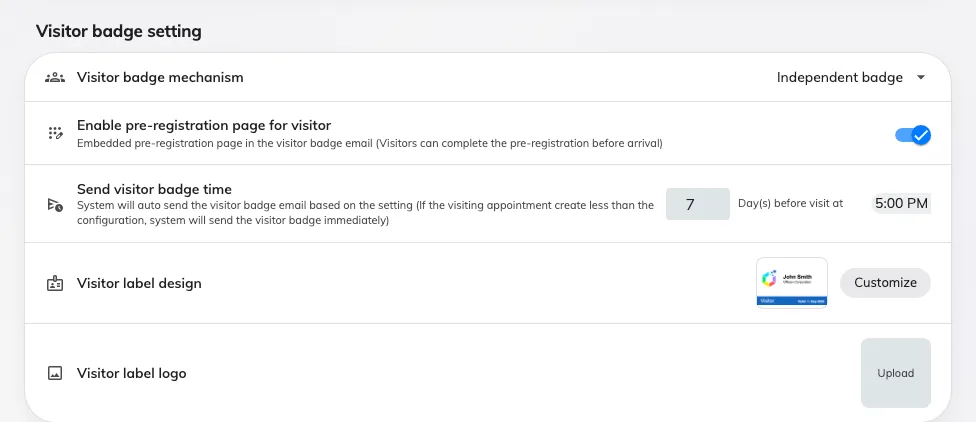
The badge card on Visitor management: the mechanism, pre-registration, when the email goes out, and the label design.
Badge settings that live elsewhere
Several things people look for on this page are set somewhere else, because they vary by location or belong to another feature.
| What you are looking for | Where it is |
|---|---|
| Hide the QR code on the badge | Visiting policy, on the policy attached to that location — Hide QR code on visitor badge |
| Remove the visitor code from the badge, email and pass | Same policy — turn off Show external badge code. Only applies where Require external badge code is on; an Offision-generated code always shows. See Show or hide the visitor code |
| Take the badge code from an external system instead of generating one | Same policy — Require external badge code |
| The Wi-Fi network and password printed on the badge | Visitor WiFi |
| Apple and Google wallet pass artwork | Apple pass / Google pass — see The Apple and Google wallet pass |
| What the visitor is asked for at the door | The visiting type |
| When a badge starts and stops working | Nowhere — it is the day of the visit, and cannot be widened. See When a visitor badge starts and stops working |
| A code that works on more than one day | A long-term badge, which carries its own period — see Give a contractor a long-term badge |
Not configurable
Worth stating, because the gallery invites the question:
- Badge size and orientation. Every design is drawn portrait. Physical size is decided by the label stock in the printer.
- Colours, fonts and field placement. Each design is a complete fixed layout. Choosing a different design is the only way to rearrange a badge.
- A different design per location, building or visiting type. There is one design for the whole company.