

Visitor invitation settings
Choose how visitors are invited — every field on the invitation card: the email and mobile channels, the accepted country codes, and who may invite a visitor.
The invitation card is the first card on the visiting Settings page, under Invitation. Everything here applies to the whole company.
Open Visitor management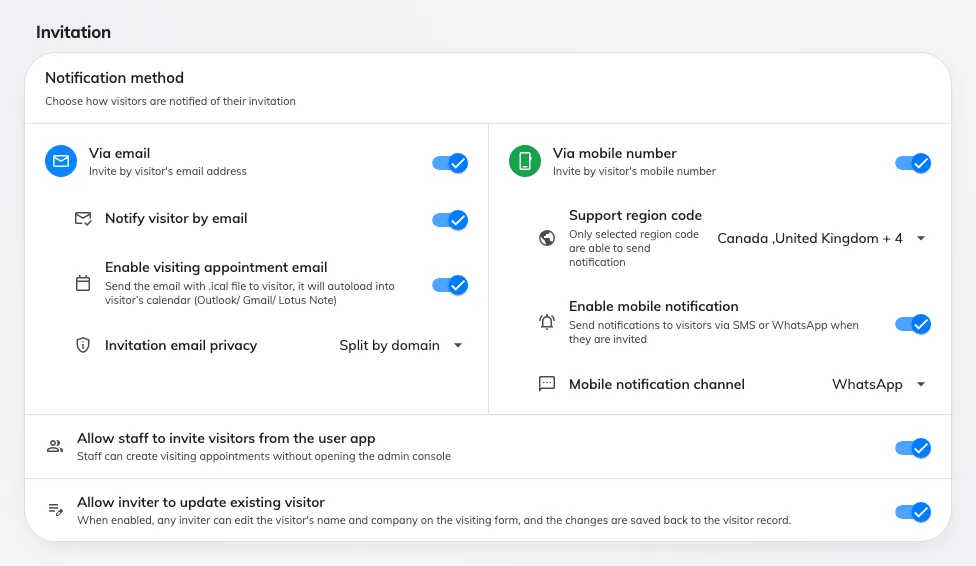
The invitation card: the two notification channels, then who may invite.
Notification method
Two cards side by side decide how a visitor can be identified and reached. Each one’s rows appear only while its own switch is on.
Via email
| Setting | What it does | When to change it |
|---|---|---|
| Via email | Lets an invitation identify a visitor by email address. Off, the invitation form has no email field | Turn it off where visitors are only ever invited by mobile number |
| Notify visitor by email | Sends the visitor their badge email. This is the switch that stops that mail — leaving Via email on and this off records the address without writing to it | Turn it off where the host passes the badge on themselves |
| Enable visiting appointment email | Adds a calendar attachment to the invitation, so the visit loads into the visitor’s own Outlook, Gmail or Notes calendar | Turn it on where visitors should get a diary entry rather than just a badge |
| Invitation email privacy | Whether one appointment email goes to everyone (No split), one per email domain (Split by domain), or one to each visitor (Send individually). It decides whether visitors can see each other’s addresses. Appears while the appointment email is on | Send individually, or split by domain, where guests from different companies attend the same visit |
Via mobile number
| Setting | What it does | When to change it |
|---|---|---|
| Via mobile number | Lets an invitation identify a visitor by mobile number. Off, the invitation form has no phone field | Turn it on where you invite visitors who have no work address |
| Support region code | The country codes the invitation form offers, and the only ones a visitor may be reached on. Left empty it accepts every country; a list holding one code offers only that one — and an unchosen list is pre-filled with the country the console was opened from | Whenever visitors arrive from a country the form does not offer. See Add a country code to visitor invitations |
| Enable mobile notification | Sends the visitor a message when they are invited. Off, the number is recorded and nothing is sent | Turn it off where the phone number is only there to identify the visitor |
| Mobile notification channel | Whether that message goes by WhatsApp or SMS. It also narrows the country picker above: WhatsApp offers every country, while SMS greys out the ones your account cannot send an SMS to | Match it to the channel your visitors actually read |
Who may invite
| Setting | What it does | When to change it |
|---|---|---|
| Allow staff to invite visitors from the user app | Staff can create a visit without opening the admin console | Turn it off where reception should be the only one raising invitations |
| Allow inviter to update existing visitor | Any inviter may edit a returning visitor’s name and company on the form, and the change is written back to the visitor record | Turn it off where visitor records are maintained centrally and should not drift with each visit |
What this does not control
- What the visitor is asked for. The fields on the invitation form come from the visiting type and the form — see Visiting form reference.
- The badge itself — its design, its logo, and when the badge email goes out — is the next card down, Visitor badge settings.
- Whether an invitation needs signing off before it is sent. That is Require approval before a visitor is invited.
- Anything per location. There is no per-building or per-visiting-type variant of these settings.