

Export the visits you are looking at
Turn the visiting calendar into a spreadsheet: group the rows by building, room or visit, pick a period from a named range, choose the columns — the inviter, the visitors, your own form fields — and download XLSX, XLS or CSV.
The dashboard and the daily report answer questions. This hands over the visits themselves — one row each, the columns you choose — for the security desk, the building landlord, or whoever asked for the list.
1. Open Export
Export sits on the visiting calendar’s header, beside the view menu.
Open InvitationChoices down the left, a live sheet on the right — real columns with real rows in them, redrawn as you change your mind.
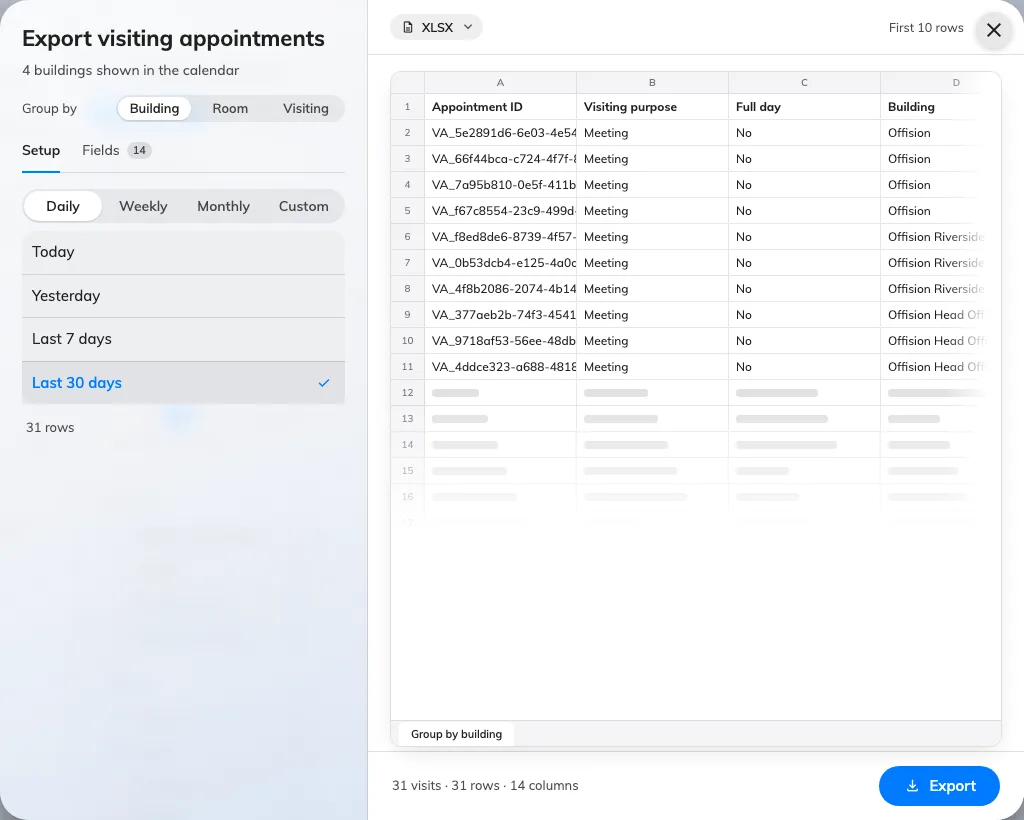
Export visiting appointments: the choices on the left produce the sheet on the right.
Searching first gives you a second Export, beside the result count, which opens this dialog on what you searched for.
2. Choose what a row is
Group by at the top decides the shape of the file, and with it which columns are on offer:
- Building — a row per building per visit. The one for a landlord or a security desk that works a single address.
- Room — a row per room, with its floor and building beside it. For visits that were hosted in meeting rooms.
- Visiting — one row per visit, however many buildings and rooms it touched.
3. Choose the period
Pick the grain — Daily, Weekly, Monthly or Custom — and only that grain’s named ranges are listed: Today and Yesterday under Daily, This week and Last week under Weekly, and so on. Both directions are offered, because the same dialog reports on last month and hands reception the list for next week.
Custom range takes two dates of your own. There is no cap on how long a period may be: under the range, the dialog counts the rows the sheet would hold and recounts them whenever you change the grouping. Past 50,000 it calls the file large and still downloads; past 200,000 it refuses and asks you to shorten the period or turn fields off.
4. Choose the columns
Fields groups them: Visit, Location, Time, Inviter, Visitors, and Form fields for the extra questions your own visiting form asks. Each has a switch; drag a row to reorder it, since the sheet is written in the order you leave them.
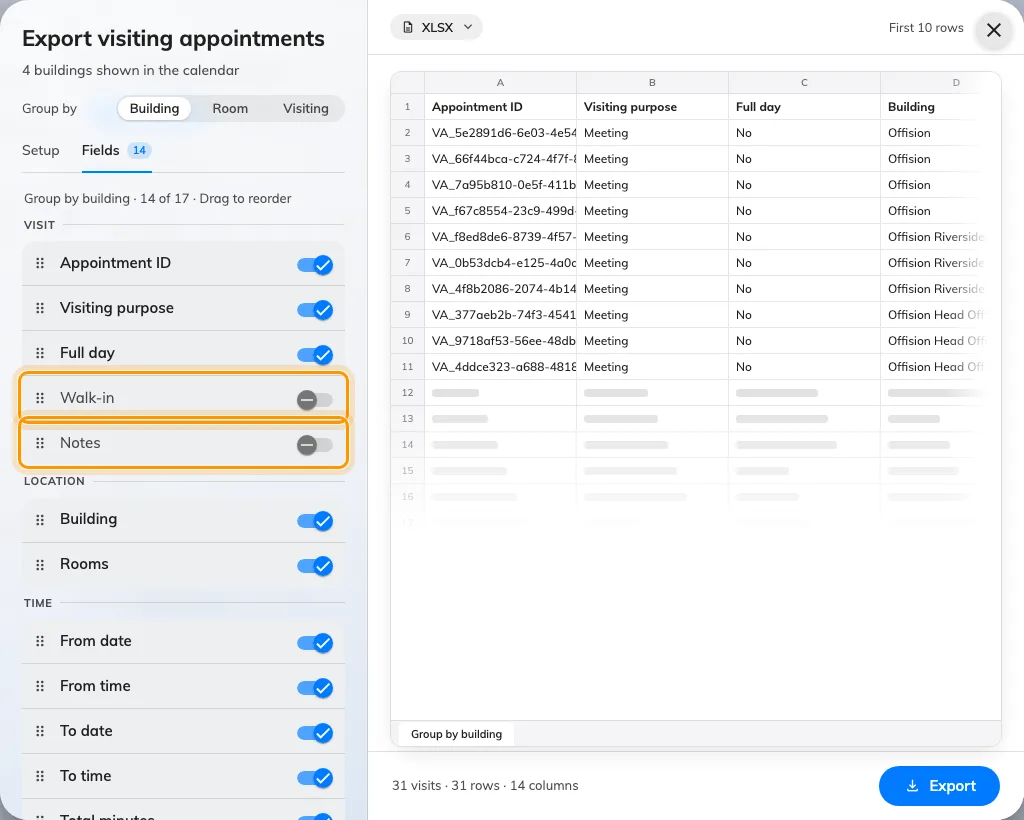
Every column, grouped, with a switch each and a handle to reorder them — Walk-in and Notes are two of the three that start off.
Three start switched off, because most files do not want them: Inviter (staff ID), Walk-in and Notes.
Your column choice and order are remembered per grouping, so the next export of the same shape opens the way you left it. A faster way to drop a column you can see: click its header in the sheet.
5. Pick the format and export
The format chip sits on the sheet — XLSX, XLS or CSV. The footer counts the visits and the columns you are about to get. Export downloads it. XLS holds 65,535 rows and no more, so a bigger export is refused up front and asks for XLSX instead.
What this does not cover
- A scheduled file. This is a download. To have the same records arrive by email on a timetable, see Email a summary of visiting records.
- One day’s desk list. The visiting daily report is built for that, and exports as PDF as well as Excel — see Read the visiting daily report.
- Rates and charts. Totals, trends and breakdowns are the dashboard’s job — see Read the visitor dashboard.
- Bookings. Room bookings export from their own calendar — see Export the bookings you are looking at.