

Stop a long-term badge that should no longer work
Cancel a contractor's standing pass when the contract ends — disable it and keep the record, delete it outright, or set a period and let it expire by itself. The badge actions one by one, and the access none of them closes.
A long-term badge is the one visitor credential that outlives the visit, so it is also the only one somebody has to end. There are exactly three ways it happens:
- its period runs out — the badge stops working at the end of the last day, and nobody has to remember anything
- somebody disables it — blocked at once, reversible, and the record stays
- somebody deletes it — gone, along with the row
Nothing else ends a badge. It carries no employment status and belongs to a visitor rather than to a staff account, so nothing that happens to somebody’s Offision account, their access card or your directory reaches it — see Can access be revoked automatically when somebody leaves?.
The badge actions
Selecting one or more rows swaps the Create, Import and Export all buttons for the actions below. Most of them make more sense in bulk than one at a time — a contract that ends is a batch of thirty badges to disable.

Selecting rows swaps Create and Import for the badge actions, Disable and Delete among them.
| Action | What it does | When to use it |
|---|---|---|
| Update Validation Period | Sets a new period, or removes the limit | A contract is extended, or a badge was issued open-ended by mistake |
| Regenerate Visitor Codes | Issues a new code and rebuilds the mobile pass | A code has been shared or a phone was lost. The old code stops working |
| Generate mobile passes | Builds the Wallet pass for badges without one | Badges created before Wallet passes were switched on |
| Send Emails | Sends the badge email again | The visitor never received it, or the code was regenerated |
| Disable | Blocks the badge without deleting it | Someone is off site for a while, or under review. Reversible |
| Enable | Puts a disabled badge back in service | The reason for disabling it has passed |
| Delete | Removes the badge entirely | Housekeeping. Prefer Disable where you may need the record |
Four of them appear only when they apply, which is why the bar is a different length from one selection to the next: Disable and Send Emails need a live badge in the selection, Enable needs a disabled one, and Generate mobile passes a badge without a pass. Select a mixture and you get both Disable and Enable at once.
Export all writes the whole list to a spreadsheet, which is the quickest answer to “who from that firm still has access”.
Open Visitor Long-Term BadgeLet the period do it instead
Update Validation Period is the action to reach for when there is a date rather than a decision. It opens Edit Validity Period, and setting the period to match the contract ends the badge on its own — an expiry that looks after itself is better than one that depends on being remembered.
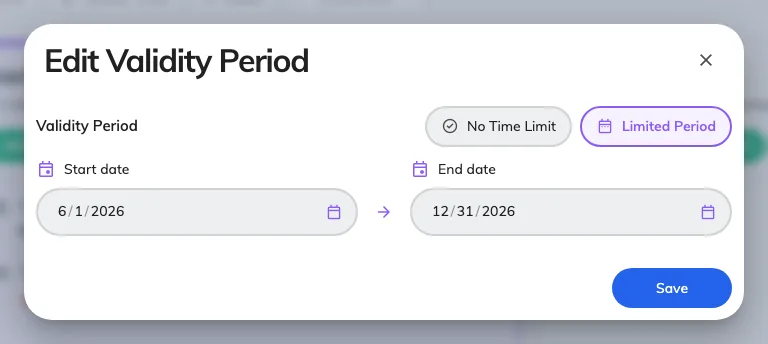
Edit Validity Period, applied to every badge selected. No Time Limit removes the dates again.
It applies to the whole selection, so thirty badges from one firm take one edit. The same dialog removes a limit: switch to No Time Limit and the badge works until somebody disables or deletes it.
Disable, or delete
Disable is the everyday one and the safe one. The badge stops working immediately, the row stays on the list, and Enable puts it back with the same code — so a contractor between engagements keeps their pass rather than being re-issued one.
Delete removes the badge outright. Use it for housekeeping, not for withdrawal: a deleted badge cannot be put back, and the visiting records that holder already has are the only trace left that they ever had a pass. Deleting a badge does not delete the visitor, whose record and visit history are removed separately — see Find, blacklist and delete a visitor’s record.
The holder sees the result themselves, in the visitor app under Regular passes, where a stopped badge reads Invalidated or Expired rather than disappearing.
Check it worked
Present the code at a lobby board. A badge that has been disabled or has run out of period is not refused with an explanation — the board answers Visitor record not found, exactly as it would for a code it has never seen. That is the check: a code that still opens Quick walk in is still live.
What happens to the Wallet copy
Disabling or deleting the badge also invalidates its issued Wallet pass. Re-enabling a disabled badge restores the existing pass. Updating the validity period or regenerating the visitor code refreshes the pass contents. A phone can show the previous card until it receives the update; the current badge state is still what the lobby validates.