

Visitor data protection settings
Choose how long visitor data is kept and how much of an identity number is shown — every field on the Data protection card: the mask length, the two purge schedules and their 1 to 2555 day range, what each purge actually removes, and what Purge now does before it does it.
Data protection is the last card on the visiting settings screen. It holds one masking rule and two scheduled deletions — and the two deletions are not variations of one setting. One erases visits, the other only hides a number.
Open Visitor management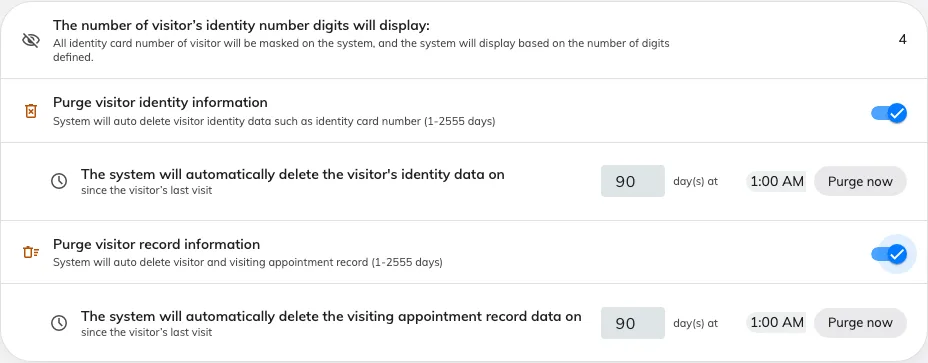
The Data protection card: the mask length, then each purge with its own day count, time of day and Purge now.
The card
| Setting | What it does | When to change it |
|---|---|---|
| The number of visitor’s identity number digits will display | How many digits of a recorded identity number stay readable on screen; the rest are masked from the visitor’s first day. 1 to 100, 4 until you change it | Lower it where reception should be able to confirm a document without reading the whole number |
| Purge visitor identity information | Masks the identity numbers of visitors whose last visit is older than the window. It deletes nothing else, and the visitor, their visits and their badges all stay | Turn it on where identity numbers are collected at the door but are of no use once the visitor has gone |
| Purge visitor record information | Deletes visitor badges and visiting appointments whose period ended before the window, then the visitors nobody still refers to. Off until you turn it on | Turn it on where a retention policy says visit history must not outlive a stated period |
| …day(s) at… | Both schedules take a number of days since the visitor’s last visit, and a time of day to run at. 1 to 2555 days — seven years — and 90 days when you first switch one on | Match the days to your own retention policy; move the time to a quiet hour |
| Purge now | Runs that schedule immediately. It counts first and tells you what it will remove, and asks before it does | Use it once after setting a window, so the backlog goes in a run you are watching rather than overnight |
What each purge leaves behind
The record purge is not reversible and does not use the recycle bin. It removes, in this order:
- visitor badges whose period ended before the cutoff;
- visiting appointments whose period ended before it — a recurring series’ master is never taken while its occurrences remain;
- visitors with no surviving appointment, no live long-term badge, and no activity since the cutoff.
A visitor who still has a future visit, or a long-term badge that has not expired, survives however old their first visit was. A purged record reads This visitor data has been permanently deleted.
One run does not always finish the job. A visitor still counts as in use until the link between them and their last visit has been cleared, which happens shortly after the visit itself is removed — so the badges and the visits go on one run and the visitors on the next. Purge now is honest about this: run it again and it will tell you there is more to remove.
The identity purge only rewrites the identity number, so the visit history stays readable and attributable. Every purge that removed anything leaves one line in the audit trail saying what it took.
What this does not control
- Deleting one visitor is Delete on the visitor’s panel, which is a soft delete with a Deleted items view — see Find and delete a visitor’s record.
- Who may see visitor data is the Permissions page, not this card.
- Survey answers have their own Purge record, beside their export.
- Bookings and attendance keep their own retention rules — see Your data: retention, export, deletion and backup.