Open your gates with an Offision visitor badge

Your turnstile scans an Offision visitor badge, asks Offision whether it is good right now, and records the arrival. Three API calls, one credential, and a verdict you can act on rather than a state you have to interpret.

Updated 18 Aug 2026

This is how a building’s own access control — a turnstile, a gate, a lobby reader, another visitor management system — works with Offision visitor management. Offision issues the badge; your reader scans it and asks Offision whether it is good right now; your system opens the barrier; and a second call records that the person walked in.
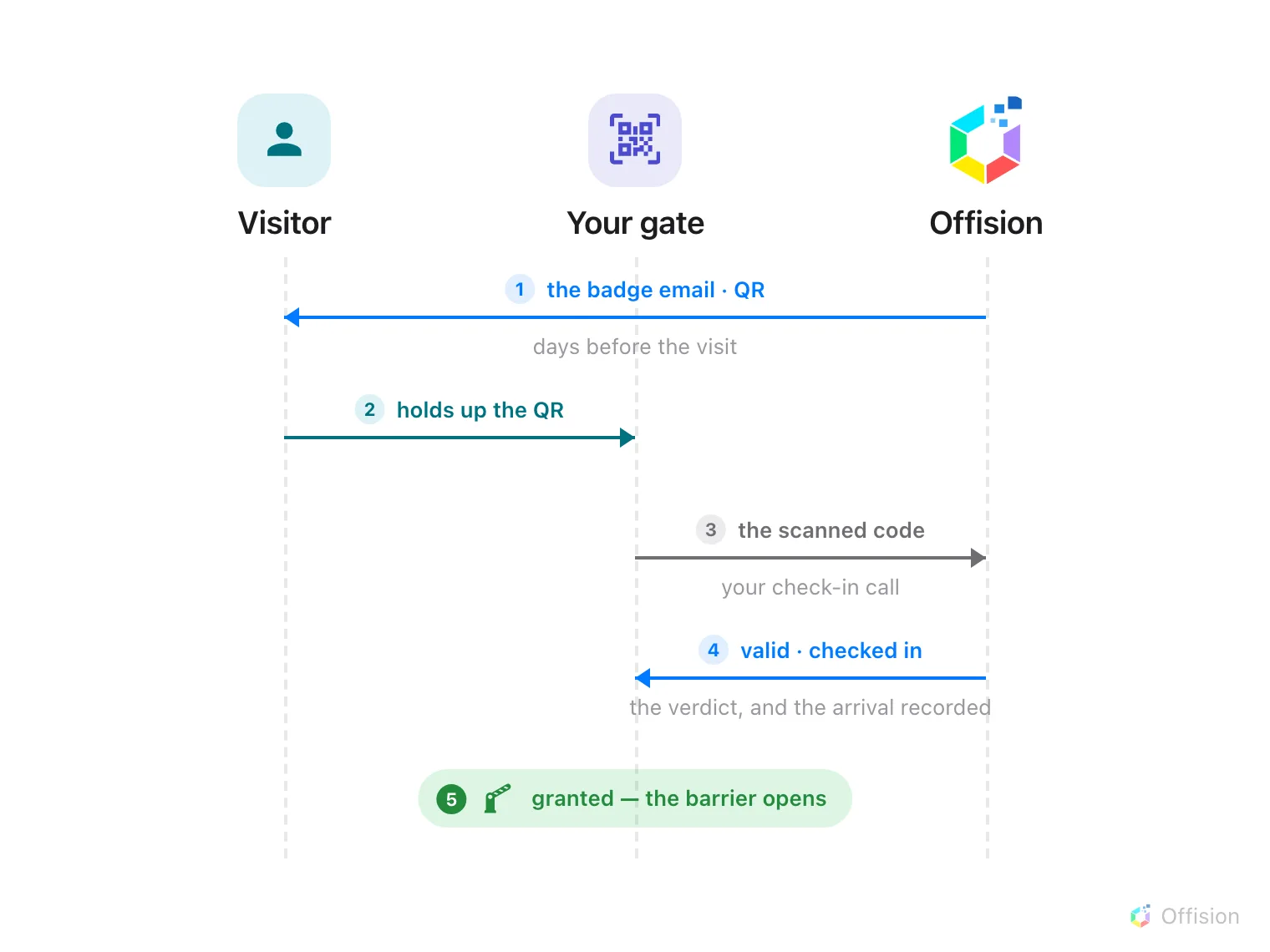
Five numbered steps, time running down the page, across three lanes: the visitor, your gate and Offision. 1, days before the visit, Offision emails the visitor the badge and its QR code. 2, at the barrier the visitor holds up the QR. 3, your gate sends the scanned code to the Offision check-in call. 4, Offision answers with a verdict — valid, expired, cancelled — and records the arrival when the verdict is valid. 5, on a granted answer your gate is the one that opens the barrier.

The badge reaches the visitor by email days before anyone arrives. At the barrier one call both asks the question and records the answer — your gate opens on the verdict it gets back.

What to have ready

  • An access control system whose readers can call an HTTPS API when a code is scanned, and act on the answer
  • The fixed outbound IP addresses that system will call from
  • An hour on the Offision side, plus whatever your access control vendor’s own work takes
  • A test visit already booked in Offision, so there is a real badge to scan

1. Create the API credential

Open API authentication

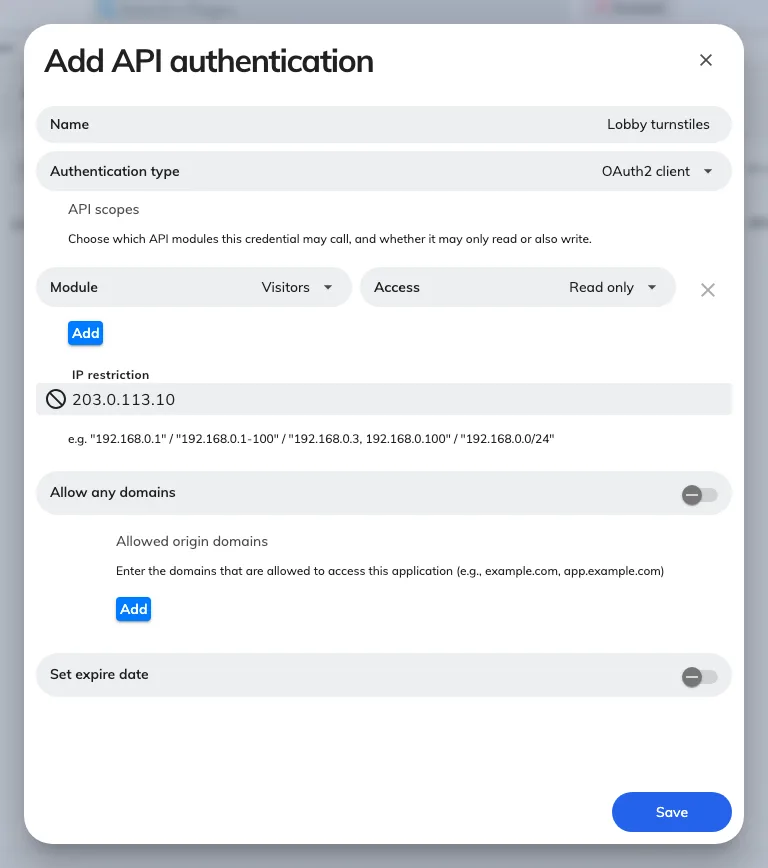
Choose Add. Name the credential after the system that will use it — you will be reading this name in an audit trail later, and Lobby turnstiles is easier to place than API key 3.

A new credential, with its API scopes and IP restriction.

A new credential, with its API scopes and IP restriction.

API scopes are rows, each one a module plus an access level. A gate needs exactly one:

ScopeNeeded for
visitor.readwriteChecking a scanned code, and recording arrivals and departures

Grant user.readwrite and bookableResource.read as well only if you are also doing room doors, in step 4.

Scopes fail closed: a call into a module with no row comes back 403, and the token itself still looks perfectly valid. Fill in IP restriction with the addresses that system calls from.

The client id and client secret are not in this form — Offision generates them, and they appear in the detail panel once the credential is saved.
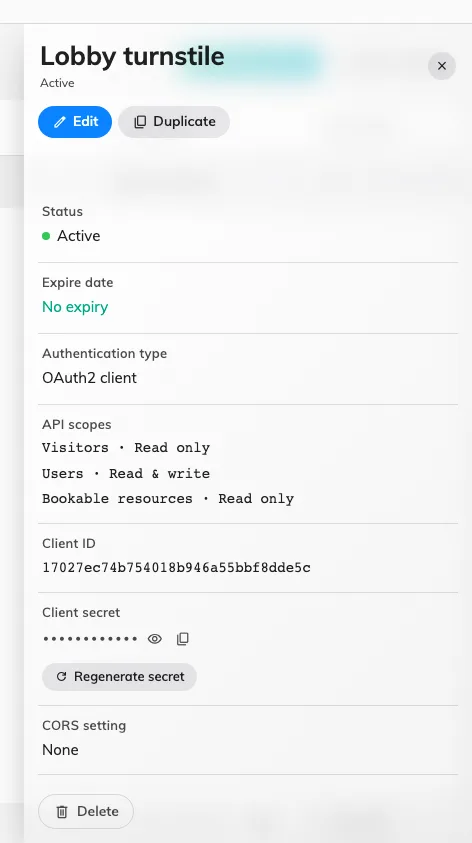
Client id and secret, with the action that mints a new secret.

Client id and secret, with the action that mints a new secret.

Your side then exchanges those for an access token at the OAuth endpoint, with grant_type=client_credentials, form-encoded, sending the client id and secret either as HTTP Basic credentials or as form fields — see the token endpoint in the API reference.

2. Check a scanned code

Send whatever the scanner read to the verify call, along with the building the gate stands in. You do not have to work out which kind of code you are holding — the badge uid inside the QR, the six-character Visitor code printed on the badge, a code your own system issued, or an eight-digit long term badge code all resolve the same way.

The answer is a verdict, not a state to interpret:

verifyWhat it means
validGood now, at this building
notYetValidA real badge, but the visit has not started
expiredThe visit has passed
cancelledThe visit or the badge was cancelled — or the badge is still waiting for a code from your own system
rejectedAn approver turned this visitor down
waitingForApprovalNobody has approved this visitor yet
wrongLocationA real, live badge — for a different building
alreadyCheckedOutThis visitor has already left
notFoundThe code matches nothing

Alongside it comes isGranted, which is the field your barrier actually acts on, and the visitor and badge behind the code, so the screen beside the gate can show a name rather than a code.

3. Record the arrival

The check above changes nothing. Skip this step and every badge sits at Await forever: reception never sees the visitor arrive, the host is never told, and the visit reports stay empty.

The check-in call takes the same code and answers the same way, and records the arrival when the verdict is valid. So a gate that both admits and records makes one call, not two — the separate check in step 2 is for a reader that only validates, such as an exit-side scanner or a lobby display.

The check-out call is its mirror, for gates that read people out as well as in.

Both are safe to call on every scan. Alongside the verdict they return action, saying what was actually recorded:

actionWhen you get it
checkedInFirst arrival — the badge moves to Visiting
alreadyCheckedInThe visitor was already inside. Nothing was written
reCheckedInThey had checked out and came back. The check-out was cleared
checkedOutThe badge moves to Left
alreadyCheckedOutAlready recorded. The departure time was left alone
noneNothing was recorded — a refused scan, a long term badge, or someone leaving who never checked in

Two behaviours worth knowing before you write the gate logic:

  • Leaving is more permissive than arriving. Check-out accepts any badge it can resolve, expired ones included, so nobody is held inside a building because their pass lapsed during a meeting. The departure is recorded for anyone who actually checked in; for anyone who did not, the gate still opens and action comes back as none rather than inventing a visit.
  • Coming back after checking out re-admits, provided the visit covers that building. Verify reports alreadyCheckedOut and refuses; check-in on the same code re-opens the visit. That is the one place where the two calls deliberately disagree, and it is why a gate should call check-in rather than acting on verify’s answer itself.

A long term badge — the pass someone who comes every week carries — has no visit to open, so action is always none for one. A valid one still opens the gate, which is the point of it. Those have their own endpoints with validate and invalidate actions, so your side can switch a pass off without deleting the person.

4. Room doors from bookings

A different problem, and worth separating: not a visitor at a lobby gate, but a member of staff at a meeting-room door. Nobody scans anything — the door has to know, in advance, who booked the room and when.

  • Store each person’s card number against their Offision user with the set access card call (UserCard, UserCard2 or UserCard3, so someone can carry more than one), and clear it with remove access card when the card comes back. This needs user.readwrite.
  • Subscribe to booking changes with the resource appointment subscription, giving your callback URL and the resources you care about. Offision posts to that URL when a booking on them is made, moved or cancelled.
  • On each callback, match the bookable resource id to the door your side controls, read the organiser and attendees, and turn their card numbers into a permission for that window.
  • Re-read the day with the resource appointment query whenever your side reconnects. Treat the callback as a nudge and the query as the truth — a missed callback is otherwise invisible.

If the room door takes a code rather than a card, the bookable resource access keys are the other route: read a room’s one-time, daily or static keys, and subscribe to the daily and one-time keys to be pushed each new one as it rotates.

5. Check it worked

Test all four of these, because they fail independently:

  • A good badge. Scan a real one during its period. You should get valid, isGranted true and the visitor’s name, and the barrier should open.
  • The write-back. Look at that badge in Offision afterwards. It should have moved to Visiting, and the host should have been notified.
  • The same badge again. Scan it a second time. It must still admit, come back as alreadyCheckedIn, and leave the check-in time exactly as it was.
  • A bad badge. Deliberately scan a cancelled badge, and one for tomorrow. Both must be refused.

The last one is the test people skip. A reader that has only ever been tried with a valid badge is a reader that admits everyone.

When it goes wrong

What you seeUsual cause
invalid_client on the token callClient id or secret copied with surrounding whitespace, or the secret has been regenerated since
Every badge is admitted, including expired and cancelled onesThe gate is acting on the HTTP status. A refused scan is a 200 — the answer is isGranted in the body
The token works, every gate call returns 403The credential has visitor.read but not visitor.readwrite. All three gate calls are POST, so read-only is refused
Calls work from one server and 401 from anotherThe credential’s IP restriction does not list that server’s outbound address
notFound, for a code that is printed on the badgeThe code was mangled in transit — trimmed, upper-cased, or the scanner sent the whole URL rather than the code inside it. The call itself accepts any of the four code kinds
Every visitor’s check-in time is the time they last walked past the gateSomething is calling check-in on a schedule rather than on a scan. A scan on re-entry returns alreadyCheckedIn and writes nothing
Every badge stays at Await and reception sees nobody arriveThe gate is calling verify, not check-in. Verify records the scan and nothing else
A returning visitor is refusedVerify answers alreadyCheckedOut for someone who has left. Call check-in, which re-admits them
The arrival is recorded but the Offision door never opensDoor release follows a check-in made at an Offision panel only
A long term badge opens the gate but nothing is recordedExpected. A long term badge has no visit to open, so action is always none
Booking callbacks fire for an hour, then stopThe subscription expired. It lasts 60 minutes by default and a day at most, and has to be renewed
The room door opens for the organiser but not the attendeesOnly the organiser has a card number stored against their user