

Add a country code to visitor invitations
The invitation form offers only the country codes on the accepted list. Why a company usually ends up with one of them, and how to add the rest.
The invitation form offers exactly the country codes on the accepted list, and nothing else. Two things follow, and between them they explain almost every report of a missing code:
- An empty list accepts every country. A list holding one code is narrower than no list at all.
- An unchosen list is pre-filled with the country the console was opened from. So a company that finds one code on the list has usually not been limited to it — someone saved this page once, and that country was already in the field.
1. Open the invitation card
Go to Visitor management → Settings. Invitation is the first card, and Notification method is the block at the top of it.
Open Visitor management2. Turn on Via mobile number
Notification method has two cards side by side, Via email and Via mobile number. Turn Via mobile number on; the rows below it, Support region code among them, only exist while it is.
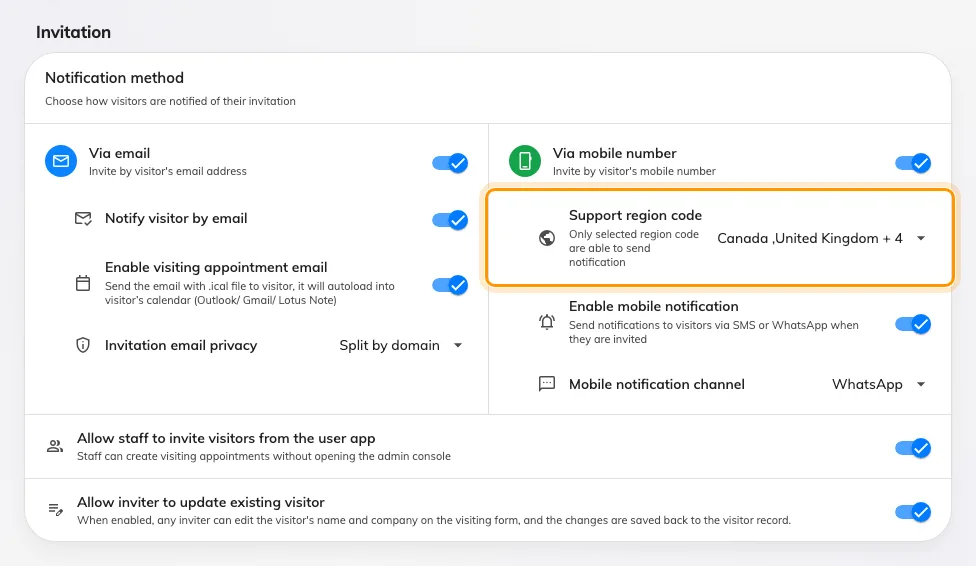
The invitation card. Support region code is the first row under Via mobile number.
3. Choose the countries
Open Support region code and tick every country your visitors come from. Search by country name or by the code itself. Nothing here is ordered by importance — the list a visitor sees follows the country list, not the order you picked them in.
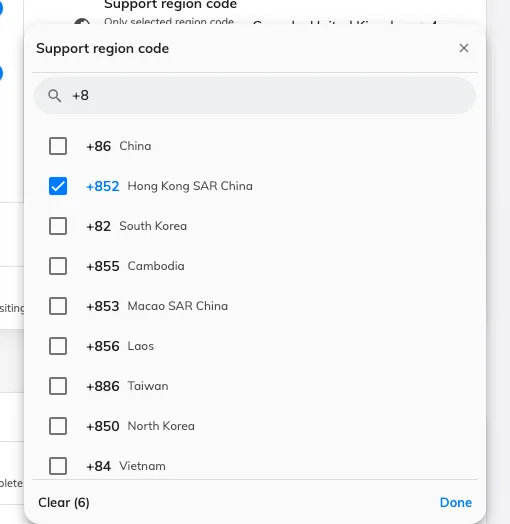
The country picker, narrowed by typing a code. Ticked rows are already accepted.
Leaving the field empty is also a valid answer, and the widest one: with nothing selected, every country is accepted. Be aware that the field fills itself in again the next time someone opens this page, so an empty list is only kept by leaving the page alone.
4. Save, then check the form
Save, then open a new visitor invitation and add a visitor. The code button beside the mobile number should now offer the countries you picked.
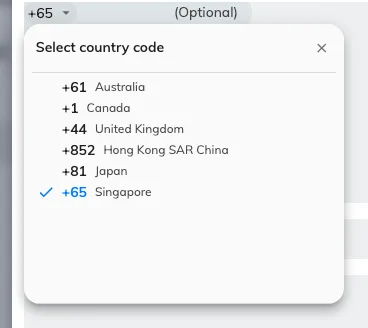
The same list, on the invitation form — this is what the person inviting a visitor sees.
What else this list decides
It is not only the invitation form. A visitor whose country code is not on the list is not sent an SMS or WhatsApp badge, and a spreadsheet import rejects their row with This country code is not enabled in the visitor management settings — see Import visits from a spreadsheet.
The rest of the invitation card — the email channel, the notification channel, who may invite — is in Visitor invitation settings.