

Collect a visitor's vehicle plate
Recording the car a guest arrives in, from the switch that creates the field to the plate on the pass they show at the barrier. Includes where a plate can be looked up, and why turning the setting off hides plates already on file.
A guest who drives in has a plate somebody at the barrier needs to recognise. Offision records it on the visit, prints it on what the guest receives, and shows it to the reception desk — but none of that exists until an administrator turns it on for the location, and the field is simply absent everywhere until they do.
1. Turn vehicle registration on
Open Visiting policy, pick the policy that governs the building where guests park, and open Vehicle registration — the second entry in the list down the left of the dialog.
Open Visiting policyTwo switches sit there, and they are independent:
| Switch | What it does | When to change it |
|---|---|---|
| Allow invited visitors to register vehicle | Adds Visitor Vehicles to the invite form, so the host records the car when they book the guest in | On wherever guests park. This is the one most companies want |
| Allow visitor self-service walk-in to register vehicle | Adds the same fields to the lobby screen and the visitor app, so somebody arriving without an appointment enters their own plate | On where the car park admits walk-ins. Leave it off if the barrier is staffed and the desk enters plates |
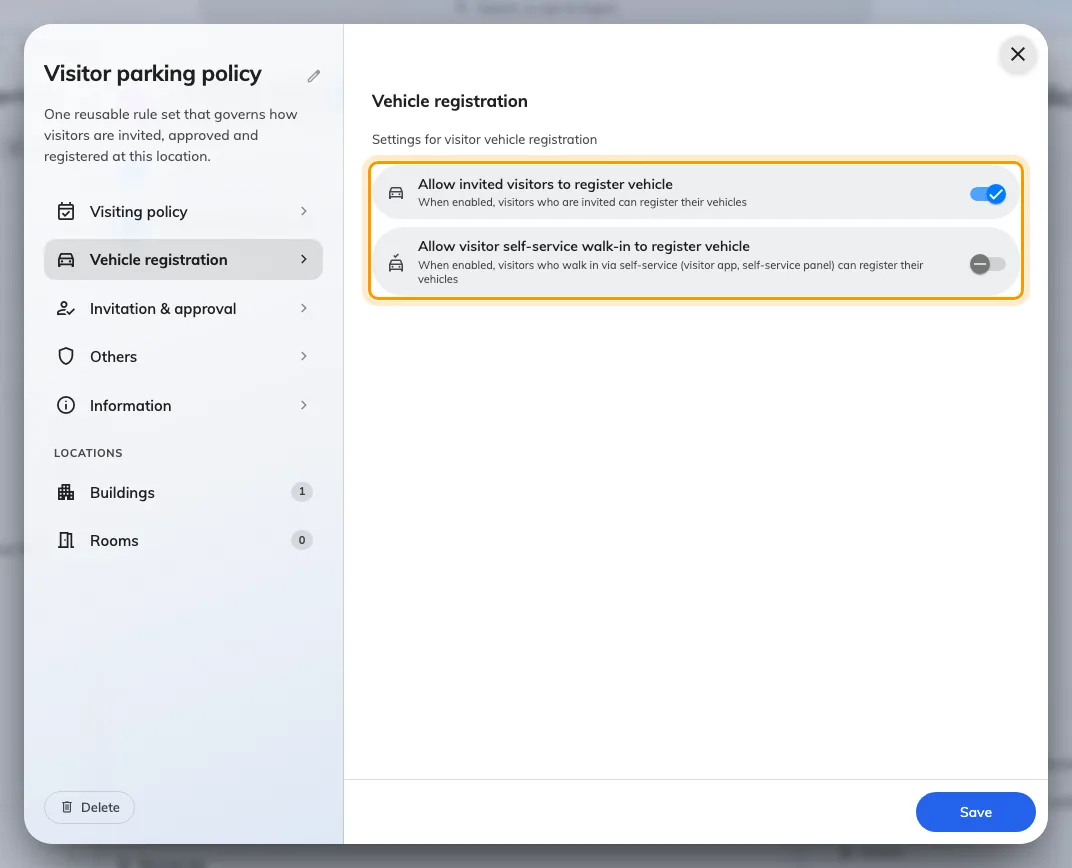
Vehicle registration on a visiting location policy. The two switches govern different arrival routes.
Turning a switch off does more than hide a field on new visits: plates already recorded stop appearing too — in the emails, at the reception desk, everywhere. Nothing is deleted, and switching it back on brings them back. That is deliberate, so withdrawing the setting actually withdraws it rather than leaving every visit booked last month still showing a car.
2. Invite a guest with their car
In the user app, start an invitation as usual and choose the location. Once you pick a location whose policy allows it, Visitor Vehicles appears with the other optional rows below the visitors.
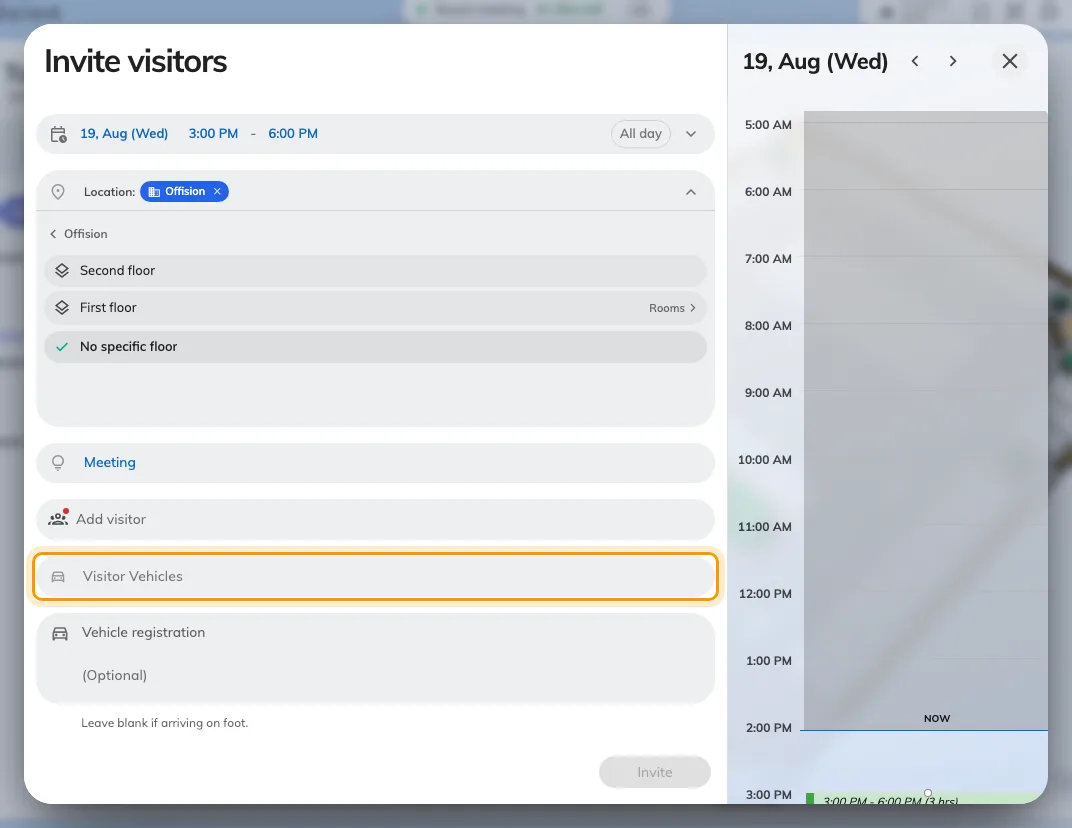
Visitor Vehicles, offered once the chosen location allows it.
Add Vehicle asks for two things: the Registration Plate and the Vehicle Type — Car, Motorcycle, Bus, Minibus, Truck or Other. Add it again for a second car; a guest bringing a van as well as their own is two entries on one visit.
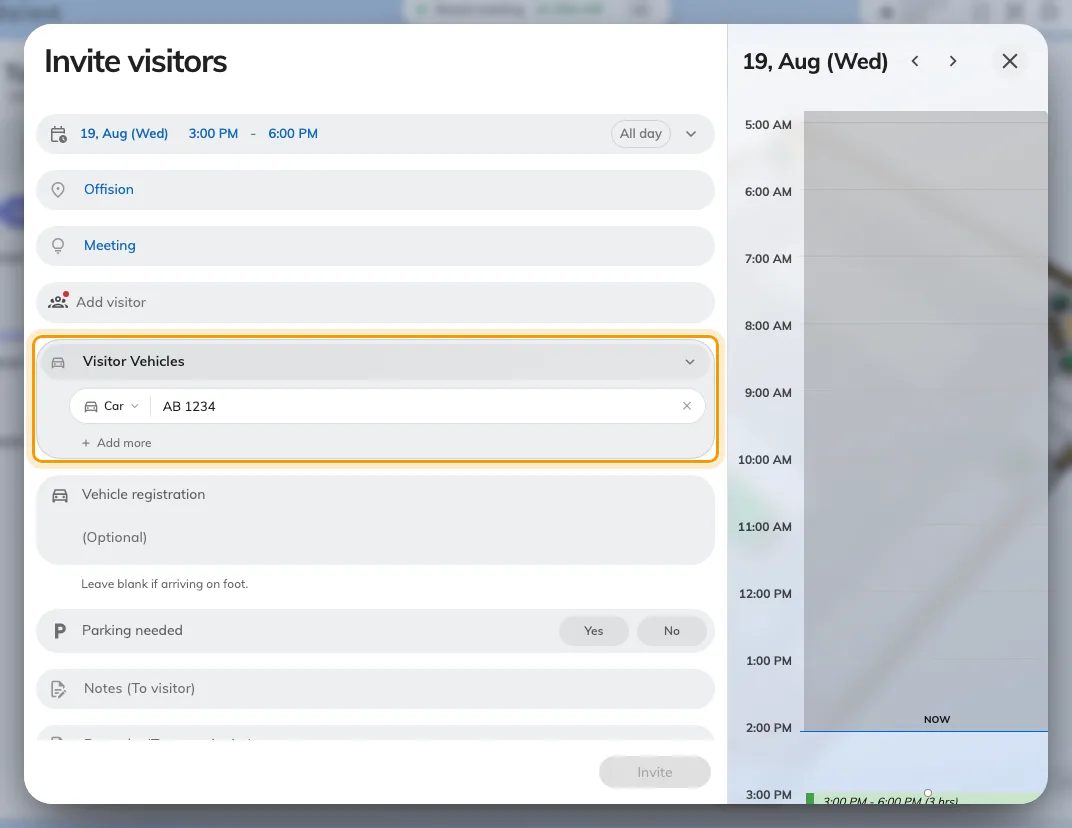
One vehicle: the plate, and the type that follows it everywhere it is shown.
Type the plate however it is painted on the car. Spaces, dashes and dots are
removed and the rest is upper-cased, so ab-1234, AB 1234 and AB1234 are all
the same plate — which is what lets someone at the barrier find it however they
type it back.
3. A guest who registers their own
With the second switch on, a visitor arriving without an appointment enters their own plate — on the lobby screen’s walk-in form, or in the visitor app on their phone. The fields are the same two, and the result is the same record: reception sees the plate whichever way it was entered.
Registering a plate is not a parking booking. It records which car a guest is in; it does not reserve them a space. Parking spaces are booked as resources, in Booking.
4. What the guest receives
The plate appears on every message the visit sends them:
| Message | Carries the plate |
|---|---|
| The visiting invitation, sent when they are invited | Yes, with the vehicle type beside it |
| The visitor pass — the QR code they show at reception | Yes. This is the one they will be holding at the barrier |
| An update, if the visit or the car changes | Yes, showing the new plate. A corrected plate reaches them |
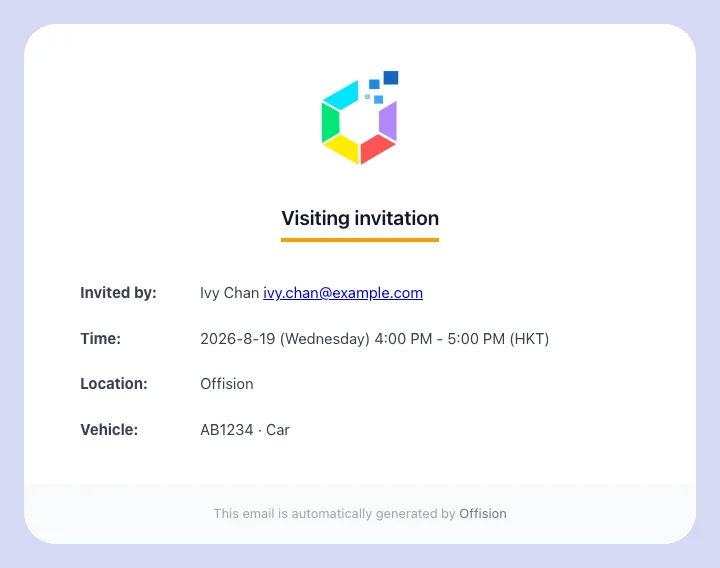
The visiting invitation, with the registered vehicle under the location.
Two people who are not the guest also see it: the host gets it on their own confirmation, and where the visiting purpose needs approving, whoever approves the visit sees the car before they decide.
A visit with no vehicle gains no vehicle line — the row is absent, not blank.
5. At the reception desk
Open Reception from the app home menu. A visitor who registered a car carries their plate on their row, so the person at the desk can match the car in front of them to the visit without asking.
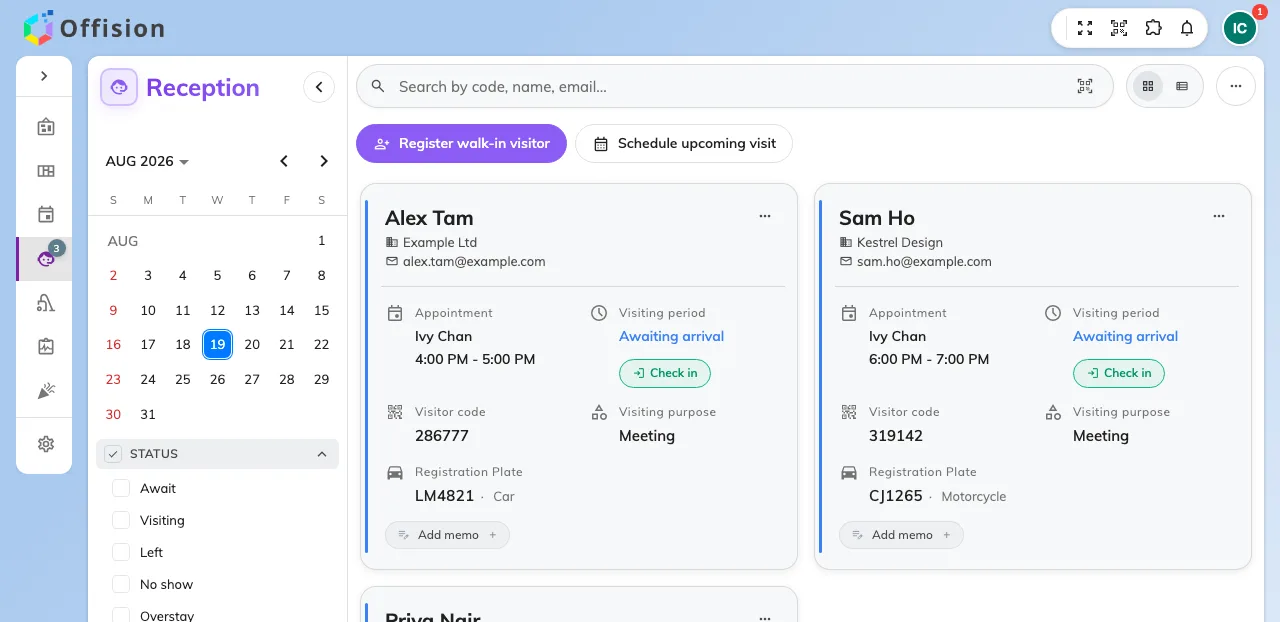
The reception list. A visit with a registered car shows its plate.
The search box takes a plate as well as a name, an email, a phone number, a
visitor code or the host’s name — and it accepts the plate however it is typed,
so reading AB 1234 off a windscreen finds a visit stored as AB1234.
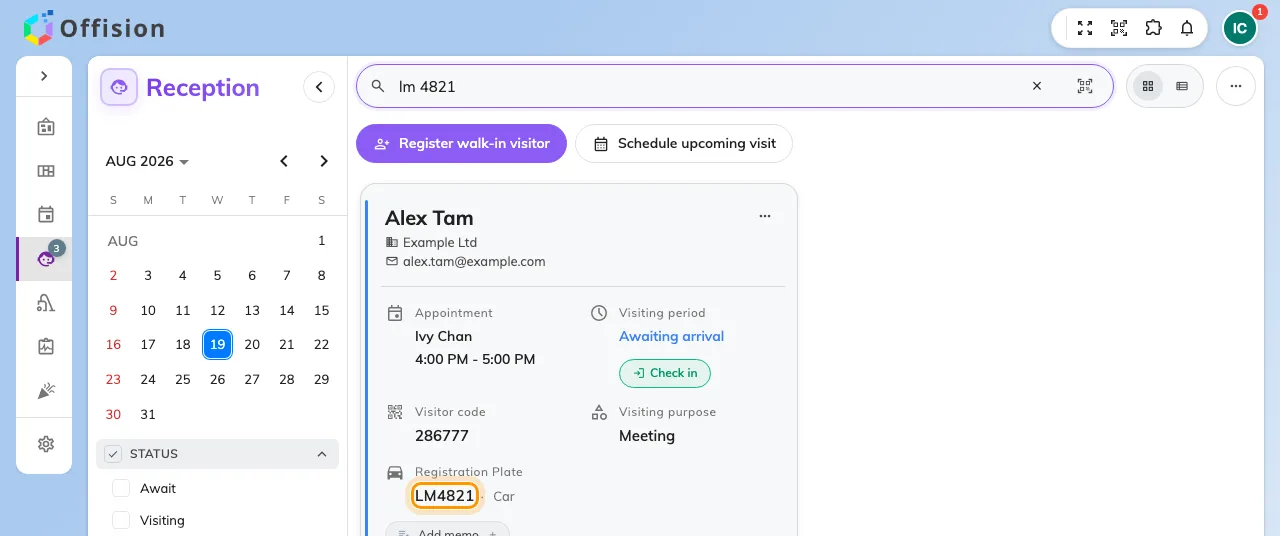
Searching the desk by plate. Spaces and dashes make no difference.
When the receptionist checks that visitor in, the vehicle step opens with the registered plate already filled in, to confirm or correct. It is a confirmation, not a fresh entry — re-typing a plate that is already on file is what creates a duplicate record of the same car.
6. Look a plate up
Visiting vehicles in the admin console lists every plate on file, with the plate as the first column and a search on it. It is the place to answer “whose car is this” from a plate alone, rather than from a visit.
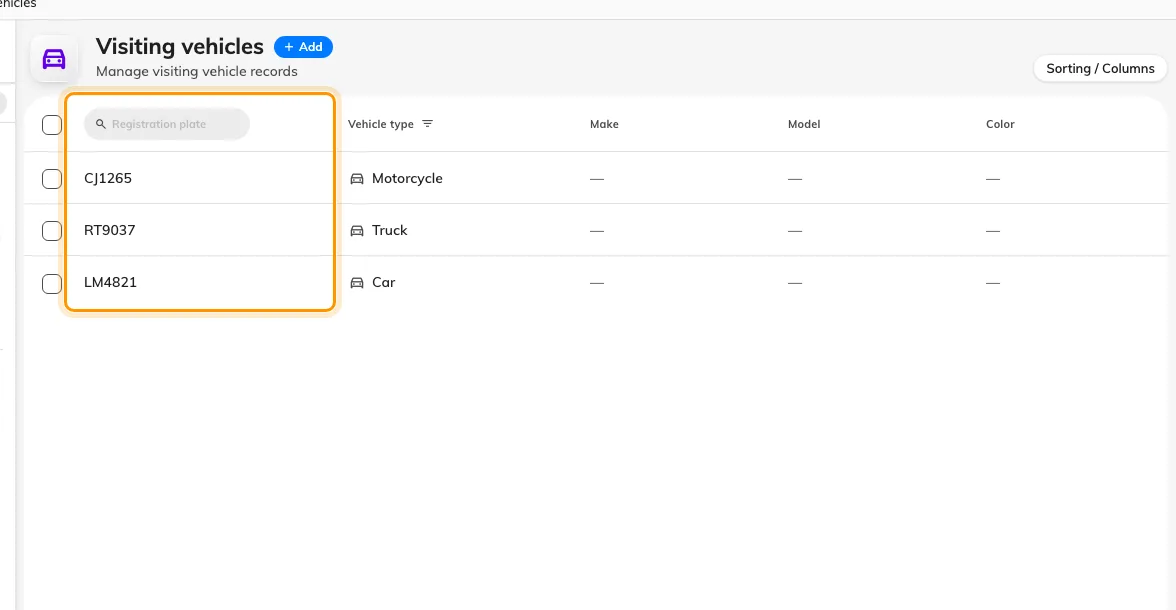
Visiting vehicles. Every plate on file, searchable on its own.
This page needs the Visitor manager permission, which a receptionist does not normally have. Somebody working a barrier gets the plate from the reception desk in step 5; this page is for the administrator answering after the fact.
7. Check it worked
Invite yourself, with a plate typed with a space in it. Three things should follow, and each covers a different half of the setup:
- The invitation in your inbox names the vehicle, with the space removed.
- The visit’s own panel in the user app shows the plate under the visitors.
- The reception list finds you when you type the plate back with the space.
If the first two work and the third does not, the visit is at a building whose reception you are not looking at — the desk lists one building at a time.
What this does not control
- Whether the guest has anywhere to park. A plate is a record of the car, not a reserved space. Book a parking space as a resource if you need one.
- Opening the barrier. Offision does not talk to a car-park barrier; the plate is for a person to read.
- Timing a car in and out. The visit is checked in and out, the car is not.
- What reception asks a walk-in for. That comes from the visiting purpose — see Register a visitor who arrives without an appointment.