

Your data: retention, export, deletion and backup
How long each kind of record is kept and which of those windows you can set — bookings in months, visitor data in days up to seven years, attendance records for as long as the tenant exists — plus what deactivating or deleting a person or a visitor really removes, where the export buttons are, and why there is no backup page to look for.
Offision keeps most records until a retention window ends, and a few for as long as the tenant exists. The part that surprises people is which of those windows an administrator can move: five of them. Everything else runs on a fixed schedule.
How long each record is kept
| Record | Kept for | Set on |
|---|---|---|
| Bookings and their appointments | Booking retention period, 3–84 months, 36 by default | Booking › Settings, Data retention |
| Booking logs | Booking log retention period, 3–36 months, 6 by default | same card |
| Attendance records and the Attendance log | as long as the tenant exists | fixed — nothing purges them |
| Attendance selfies | Selfie retention period, 1–90 days, 30 by default | Attendance settings, Selfie privacy |
| Visitor identity numbers | Purge visitor identity information — 1 to 2555 days (7 years) after the last visit, at a time of day; 90 days until you change it | Visiting › Settings |
| Visitor and visit records | Purge visitor record information — the same range, off until you turn it on, and 90 days when you do | Visiting › Settings |
| Audit trails | 180 days | fixed |
| Visiting, access and event action logs | 90 days | fixed |
| Sensor readings | 30 days | fixed |
| Deleted rooms, user groups and devices | 30 days after deletion | fixed |
| Player and control-processor logs | 14 days | fixed |
Attendance is the one module with no retention window at all. Its records, and the edits to them in the Attendance log, are kept for as long as the tenant exists — there is no purge for them and no setting that adds one, so a record from years ago is still there to export. The selfies attached to them are not: those go on the schedule above.
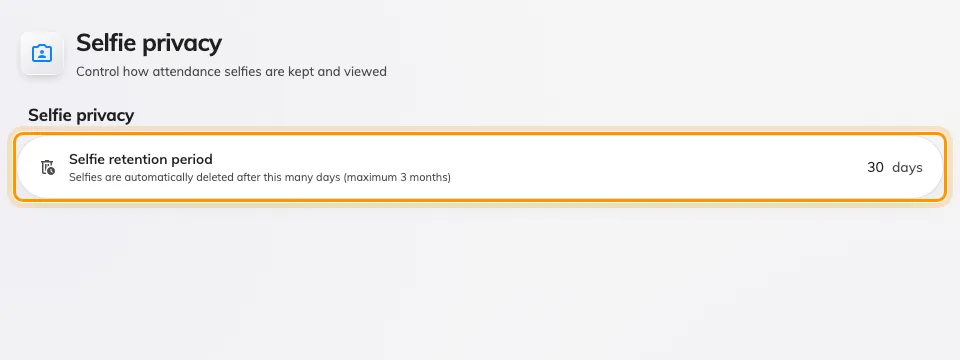
Selfie privacy — the one attendance window an administrator can move.
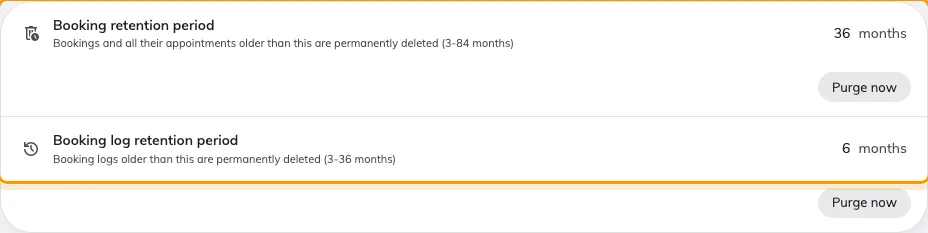
Data retention on Booking › Settings — the two retention periods.
Each of the five settings has a Purge now button beside it that runs the same clean-up immediately, after showing how many records it will remove. The two visitor purges differ in kind: the record purge deletes the visits and the visitors nobody else refers to; the identity purge only masks the ID numbers on visitors kept for other reasons. Every purge that removes anything leaves one line in the audit trail. Field by field, the two visitor schedules are Visitor data protection settings.
Open Visitor management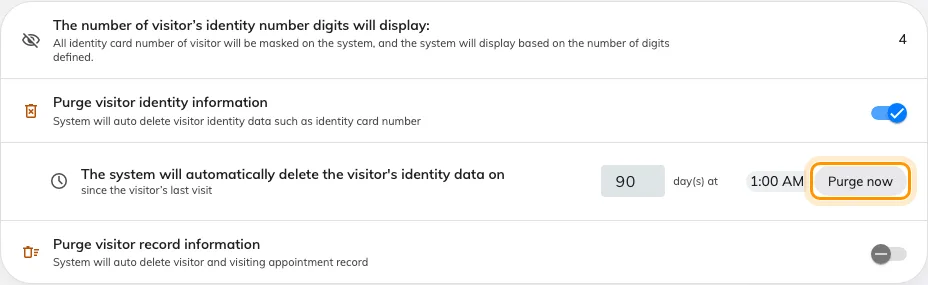
Data protection on Visiting › Settings, with the two purge switches ringed.
Deactivate or delete a person
Open UsersDeactivate user stops them signing in and stops them counting against your licence. Their name and everything they did stay exactly as they were, and Re-enable user reverses it.
Delete moves them to the Recycle bin, from which Restore brings them back. Their external sign-in links are removed at that point. What does not happen is erasure: a deleted person is kept, deliberately, so that every booking, visit and log entry that names them can still be traced to a real name. Nothing is anonymised, and no later job removes them. If a request to be forgotten reaches you, tell your Offision contact — it is not something the console does. See Remove someone who has left for the day-to-day procedure.
The last Global administrator cannot be deleted or demoted.
Delete a visitor
Delete on a visitor’s panel is the same kind of soft delete, with a Deleted items view to bring them back. ID numbers are masked on screen to the number of digits you allow, from their first day. Real erasure is the scheduled purge above, or its Purge now; a purged record reads This visitor data has been permanently deleted. Survey answers have their own Purge record beside Export.
Where you can export
There is no single “export everything” button. Each list exports itself, as Excel or CSV:
- Users — Export on the list; needs User manager Write.
- Bookings — the calendar toolbar, the booking list and booking report dialogs, and the usage and no-show analytics.
- Visitors — Export all on the visiting record list, Export on the badge and survey lists, and the visiting reports.
- Access cards, quota history and sensor data from their own pages.
- Audit trails — Download on the action menu, as csv, xls or xlsx, two months at a time. See The audit trail.
An export that is too large is refused with This export has too many records. Please narrow the date range or filters and try again — do exactly that.
Bookings and the usage figures are also readable over the REST API, which is how a BI tool pulls them on a schedule rather than by hand — see Get booking and usage data into your BI tool.
Backup and restore
There is no backup page and no restore page, because backups are not yours to run: Offision takes them as part of the service and keeps them in the same region as your tenant — see Where your data is hosted. Restoring a single deleted record is what the recycle bins above are for; restoring a whole tenant to a point in time is a request to your Offision contact.
What this does not control
- Who may see personal data is the Permissions page, not retention.
- Where the data sits is chosen when the tenant is created and does not change with any setting here.
- Emails already sent are in your mail system, not in Offision.