

The Booking list widget
Today's bookings as a live list — which resources feed it, how it splits into pages, and what each row prints, down to booking form fields in the title.
The bookings that exist, as a list that keeps itself current. It reads the same bookings people make in Booking — the screen reports them, it never decides them.
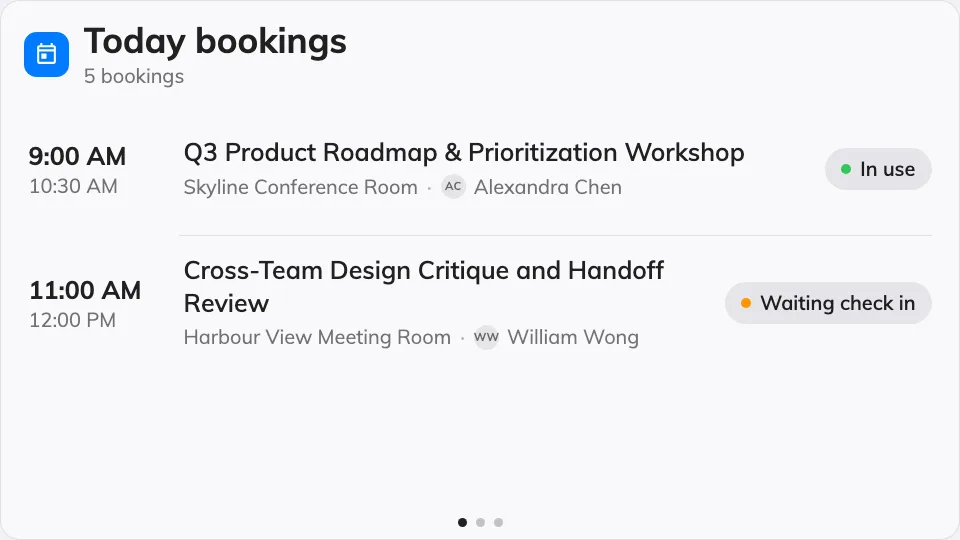
The Booking list on the main stage.
Can go on: Main stage · Side widgets · Info cards
Settings
The rail groups them the way the questions split: Bookings decides which bookings reach the list, Header captions the list, and Row content decides what each row prints.
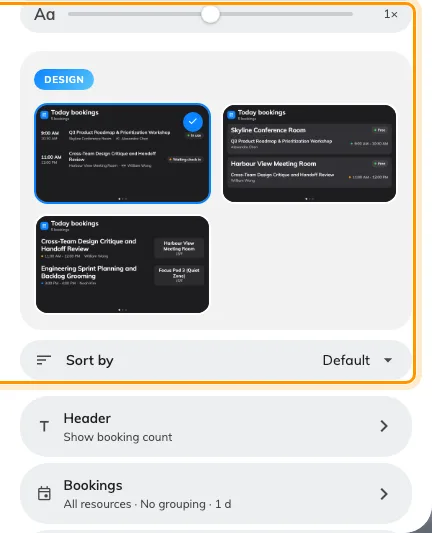
Sort by sits with the design picker, because Default means whatever order that design already used.
| Setting | What it does | When to change it |
|---|---|---|
| Design | The list’s shape: Timeline, By room or By name | Timeline is one run of bookings in time order; By room deals a card per room; By name leads with the people |
| Sort by | The order the bookings are listed in: Default, Room name, Subject or Time. Default follows the design and prints the order it resolves to — Earliest first under Timeline and By room, A to Z under By name. Under By room, Room name orders the cards while Subject orders the rows inside them | A reception board that wants its rooms alphabetical whatever the design does, or a chronological list on a design that leads with names |
| Resources | Whose bookings feed the list: Follow device location, All resources, By building, By floor or Specific resources, with a matching picker | The screen serves one room, one floor, or moves between sites |
| Type | Narrows to certain resource types; empty means Any resource type | A lobby screen that should show rooms but not desks |
| Group pages by | No grouping, Building or Floor — each page shows one location and names it in the header | A multi-site list where mixing locations in one column reads as noise. Hidden when one specific room is picked, and under By room and By name |
| Days ahead | How many days of bookings the list looks into | A quiet office where today alone leaves the screen empty |
| Show booking status | The status chip on each row | Off where the audience only needs what and when — see what a booking status means |
| Room status | The room’s own free-or-busy badge — the chip on a By room card, and the caption in the header of a list that resolves to a single room. Not the same as the row above, which is the booking’s state | Off on a screen where the room’s own state is obvious, or already shown by a panel at the door. The row is always offered, because a Follow device location list the console cannot resolve may still land on one room |
| Show resource | Names the room or desk on each row | Off when every booking is in the one place the screen stands. Hidden where the design already names the room |
| Show organizer | Who made the booking | Off on a public screen that should not show names |
| Booking title display | What the row’s title is: Booking title, Booking form fields or Title and form fields | The booking form carries the line the audience needs — a company name, a case number — instead of the raw title |
| Form fields to display | Which booking form fields print, in your order | Only with a form-fields title mode |
| Show field name | Labels each field value with the field’s name | Off when the values speak for themselves |
| Primary display language / Secondary display language | Which language of a multilingual field value leads, and which follows | A screen whose audience reads a different language from the form’s authors |
| Show autocomplete key | Also prints the field’s autocomplete key value | The key is the code the audience looks up — a booth or lot number |
The Header group is the caption line above the rows.
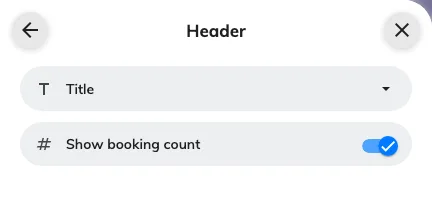
The Header group: the list's own title, and the booking count that rides beside it.
| Setting | What it does | When to change it |
|---|---|---|
| Title | The heading the list carries, written per language. Left empty, a list bound to one room falls back to that room’s name | The screen wants a heading of its own — “Today in the East Wing” — rather than the room it happens to resolve to |
| Show booking count | A running count of the bookings listed, beside the title | On where the total is the point — “how busy are we today” |
What this does not control
- Which bookings exist. The list shows what was booked in Booking — cancelling or moving one happens there.
- Its size and colour. Font size, appearance and widget background come from the whole design — see Widgets and the places they go.