

The Event list widget
Upcoming events as a paging list with posters, venue and status — which venues feed it, how far ahead it looks, and what each entry shows.
What’s on: the events published in Events, as a list that pages through itself. Bookings and events are different things — a booking reserves a room, an event is the published happening people attend — and this widget shows the latter.
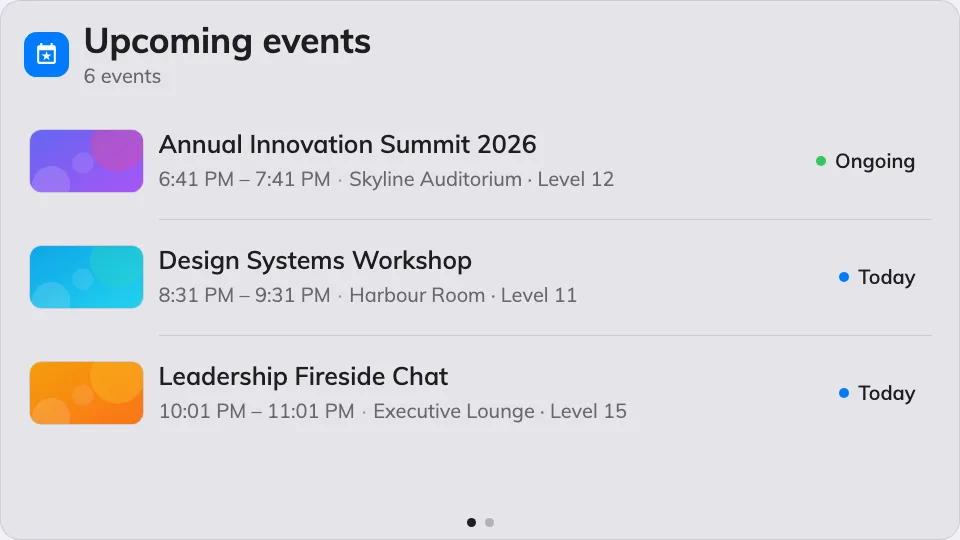
The Event list on the main stage.
Can go on: Main stage · Side widgets
Settings
| Setting | What it does | When to change it |
|---|---|---|
| Resources | Which venues’ events appear: Follow device location, All resources, By building, By floor or Specific resources, with a matching picker | The screen stands at one venue and should only announce what happens there |
| Type | Narrows the venues by resource type; empty means Any resource type | Only events held in rooms, say |
| Days ahead | How many days of events the list looks into | A screen that should tease the whole week, not just today |
| Seconds per page | How long each page holds before the next | Longer pages for a list people read from a distance |
| Show event posters | The event’s poster image on its row | Off for a dense, text-first list |
| Show venue | Where each event happens | Off when everything is in the one hall the screen stands in |
| Show status | The event’s status on its row | Off where every listed event is simply upcoming |
| Show organizer | Who runs the event | On when the audience picks sessions by speaker or host |
What this does not control
- Which events exist. The list shows the events published in Events — writing, scheduling and cancelling them happens there.
- Its size and colour. Font size, appearance and widget background come from the whole design — see Widgets and the places they go.