

The Hong Kong weather widget
The Hong Kong Observatory's readings, outlook and warning signals on a card or an action tile. The station, the unit, and how much forecast to show.
The Hong Kong Observatory’s own readings — a chosen station’s temperature, the day’s outlook, and the warning signals a Hong Kong office actually plans its day around. This is the weather widget for a screen in Hong Kong; the plain Weather widget covers everywhere else.
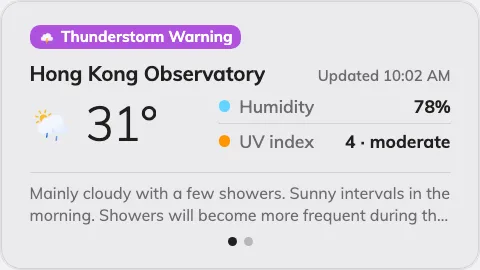
The Detailed card, with a warning signal chip on top.
Can go on: Info cards · Action buttons
Settings
| Setting | What it does | When to change it |
|---|---|---|
| Design | The card’s layout: Detailed, Minimal or Forecast | Detailed adds humidity, UV and the Observatory’s outlook text, Minimal keeps the reading alone, Forecast leads with the days ahead |
| Weather station | Which Observatory station the temperature comes from | The default Hong Kong Observatory reading is not the one outside your window — pick the station nearest the office |
| Temperature unit | Celsius (°C) or Fahrenheit (°F) | An audience that reads Fahrenheit |
| Show warning signals | Current warning signals appear as a chip on the card | Off only where a warning would be noise — most screens should keep it |
| Show forecast | The days-ahead strip on and off | The card is somewhere only “now” matters |
| Forecast days | 3 to 7 — how many days the strip covers, once Show forecast is on | A narrow card crowds at seven; five is what the card is drawn around |
On an action button the design choice disappears: the 3:4 tile shows the basic reading plus the single most severe warning in force.
What this does not control
- Any other city. The Observatory reports Hong Kong; everywhere else is the Weather widget.
- Its size and colour. The design’s font size, appearance and widget background apply here like everywhere else — see Widgets and the places they go.