

The Weather widget
Live conditions and forecast for one city, on an info card or an action tile. Three card designs, and a city that can follow the screen's own building.
What it is like outside, for one city — the screen’s own, or one on the other side of the world. Left alone, the widget finds the weather city nearest the building the screen stands in; nothing has to be typed for a lobby screen to be right.
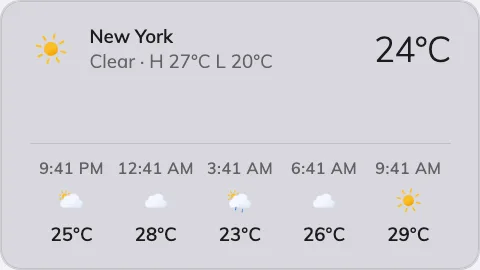
The Weather widget's Classic card.
Can go on: Info cards · Action buttons
Settings
| Setting | What it does | When to change it |
|---|---|---|
| Design | The card’s layout: Classic, Forecast list or Poster | Classic pairs the current reading with the hours ahead, Forecast list leads with the coming days, Poster centres the reading alone — pick what the glance is for |
| City | Follow device location uses the weather city nearest the screen’s own building; Choose… opens a search | The screen should show somewhere it isn’t — headquarters’ weather in a remote office, or a device whose location is not set |
On an action button the design choice disappears: the 3:4 tile always shows the basic form — city, icon, temperature, condition.
What this does not control
- Hong Kong’s warning signals. Observatory data, warnings included, is the Hong Kong weather widget.
- Where “follow the device” points. That is the device’s location, set in Devices — not anything on the content.
- Its size and colour. The design’s font size, appearance and widget background apply here like everywhere else — see Widgets and the places they go.