

The Service request list widget
The service requests from bookings — tea, cleaning, setup — grouped by floor with an escalating timer, so the staff delivering them work from one screen. Its filters, status toggles and thresholds.
Every open service request from Service — the tea, cleaning and setup ordered with bookings or asked for mid-meeting — grouped by the floor it is due on, with the room as the headline and a timer that escalates amber to red. It is made for the screen in the pantry or facilities room, where the people delivering the services stand.
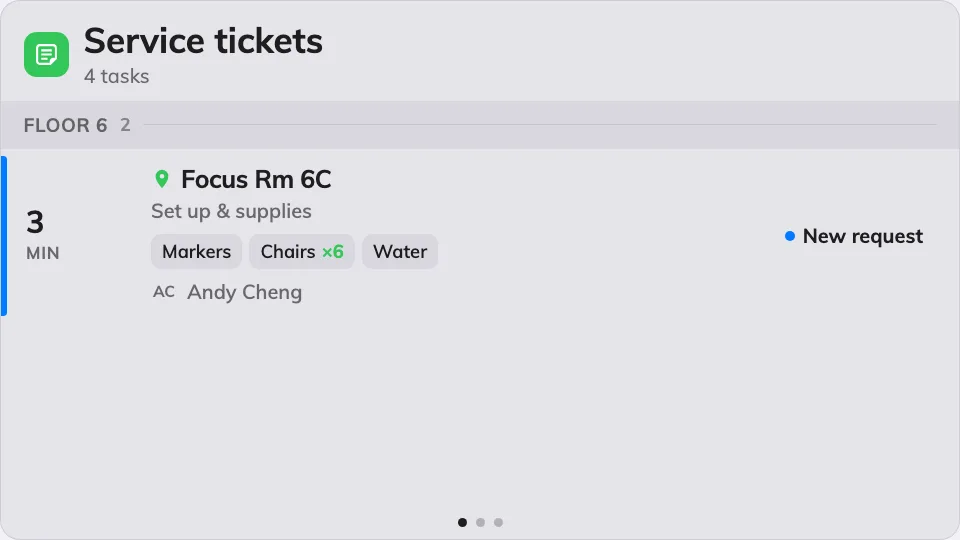
The service queue, grouped by floor, most urgent first.
Can go on: Main stage · Side widgets · Action buttons
Settings
| Setting | What it does | When to change it |
|---|---|---|
| Resources | Which rooms and desks the queue covers: Follow device location, All resources, By building, By floor or Specific resources — the last three add a matching picker, and the first adds an Auto scope row (Smart, This room, This floor, This building) | One screen per site: leave it following the device. A central kitchen serving everything: All resources |
| Type | Narrows those resources by type; empty means Any resource type | Services only ever go to rooms |
| Show new | Lists requests nobody has picked up yet | Almost never off — these are the queue |
| Show in progress | Lists requests being worked on | Off when the screen should only show what still needs an owner |
| Show finished | Lists recently finished requests | On when the team wants to see work land, off to keep the queue short |
| Show rejected | Lists rejected requests | Rarely on — rejected needs no delivery |
| Show organizer | Each row names the person whose booking asked for it | Off on a screen guests can read |
| Show options | Each row lists the ordered sub-items — how many pots, which setup | On wherever the staff prepare from the screen |
| Show remarks | Each row carries the free-text note on the request | On — the note is usually the point |
| Seconds per page | How long each page holds when the list overflows | More requests than fit, read from further away |
| Warn after (min) | The point at which a request’s timer turns amber; 0 turns the step off | Match it to how long preparation takes |
| Overdue after (min) | The point at which it turns red; 0 turns the step off | The moment a request becomes an escalation |
| Announce new request | A chime and a spoken phrase when a request arrives. Needs the board’s own Voice announcements switch on as well | A service desk that should hear the queue rather than watch it |
| Announce ending soon & ended | The same, five minutes before a service’s end and when it has passed | The team clears rooms on time; leave off where only arrivals matter |
On a touch screen, tapping a request opens its details — the full option list, and the actions that move it to its next status. On an action button the widget shrinks to a small tile that counts the open queue.
What this does not control
- Where requests come from. The catalogue of services, and who may order which, is Service’s job — the screen shows the queue, it never creates it.
- Reported faults — the broken chair, the dead panel — are the Support ticket list widget, not this one.
- Its size and colour. The design’s font size, appearance and widget background apply here like everywhere else — see Widgets and the places they go.