

The Visitor list widget
Today's guests as a list — who is expected or who has arrived, one row each — for a reception desk or a lobby column. Its heading, its checked-in/upcoming switch and the filters on which visits appear.
Today’s guests, one row each, under a heading of your own — the visits that were invited in Visiting, shown as a list rather than one big greeting. On the stage it is an arrivals display; in the side column it runs quietly beside whatever the stage is doing.
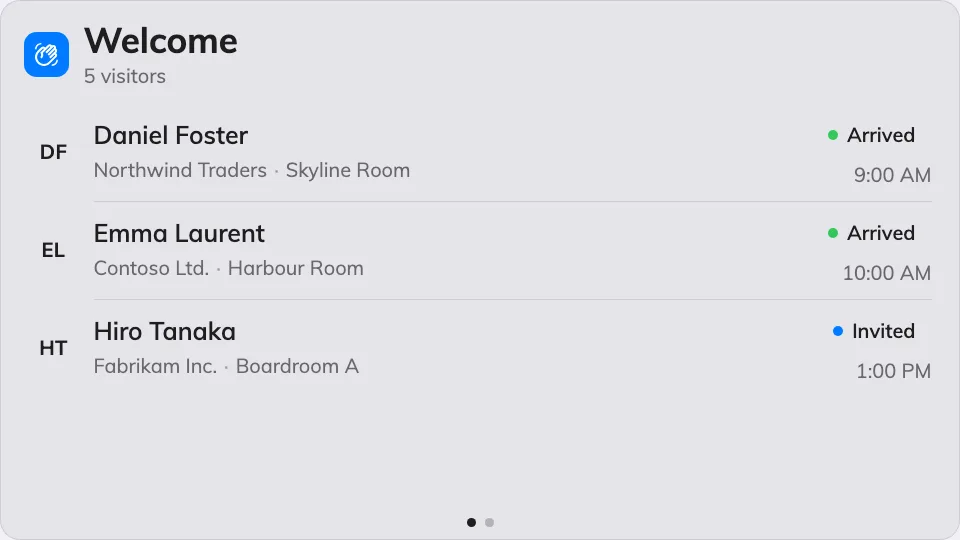
The day's guests as a list on the stage.
Can go on: Main stage · Side widgets
Settings
| Setting | What it does | When to change it |
|---|---|---|
| Welcome title | The heading over the list, in every display language | The company has its own words for it |
| Welcome message | A line under the heading | Directions, or a house greeting |
| Show | Checked-in visitors or Upcoming visitors — who the list is of | A screen behind the reception desk lists who has arrived; a screen at the door lists who is expected |
| Show minutes before appointment / Show minutes after appointment | With Upcoming visitors: the window around the appointment time a guest stays listed in | Guests habitually early, or habitually late |
| Keep showing seconds after check-in | With Checked-in visitors: how long a guest stays listed after checking in | Longer where the desk wants a running record, shorter for privacy |
| Seconds per page | How long each page holds when the list overflows | More guests than fit, read from further away |
| Location | Whose visitors count: Follow device location, All buildings or Choose… | Leave it following the device — one lobby, its own guests |
| Limit visiting types | On, plus a Visiting purpose picker: only visits of those purposes are listed | Contractors and deliveries should not share the guest list |
What this does not control
- Who is on it. The list shows the visits invited and checked in through Visiting — the screen reports them, it never registers anybody.
- Greeting one guest large. The full-stage name-by-name welcome is the Visitor welcome widget.
- Its size and colour. The design’s font size, appearance and widget background apply here like everywhere else — see Widgets and the places they go.