

The Booking status - Summary widget
A glanceable count of how many rooms or desks are free right now — the resource type it counts, and the floor or selection it counts them in.
One number, kept honest: how many of a resource type are free right now, counted from the live bookings in Booking. It is built for the fixed card — a readout, not a list.
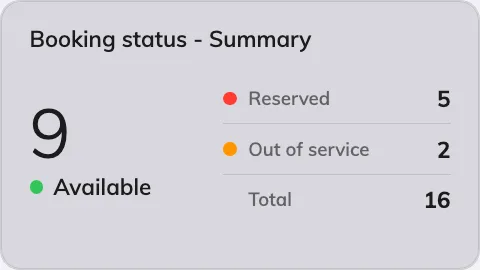
The summary on an info card.
Can go on: Info cards
Settings
| Setting | What it does | When to change it |
|---|---|---|
| Type | The one resource type the card counts | A desk-floor screen counts desks; a meeting corridor counts rooms |
| Location | Follow device location, or Choose… and pick a floor | Pin the card to one floor when the screen should not follow the device it plays on |
| Resources | Narrows the counted set: Follow device location, All resources, By building, By floor or Specific resources, with a matching picker | The count should cover one team’s rooms rather than the whole building |
What this does not control
- What counts as free. A resource is busy when a booking in Booking says so — the card only counts.
- Its size and colour. Font size, appearance and widget background come from the whole design — see Widgets and the places they go.