

Takeovers: when the screen interrupts itself
A takeover replaces whatever the main stage is playing when a visitor arrives or a booking or event is about to start, then hands back — which three exist, which screens greet an arriving guest, and why no screen can be narrowed to the visitors going to one meeting room.
A takeover is not another scene. It replaces whatever the stage is playing for as long as it has something to say, and then hands back. The section lives at the foot of the stage’s settings — click the stage in the preview to reach it.
Open Signage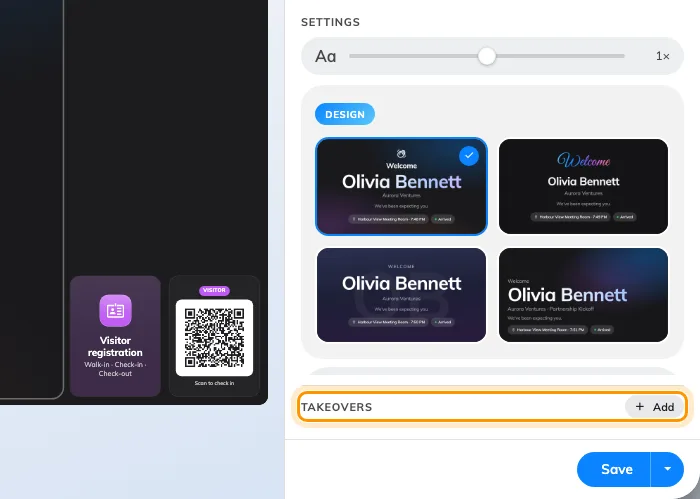
The takeover section: only what is already on is listed, and Add turns another one on.
The three takeovers
Where two are due at once, the one higher in this list wins:
| Takeover | Fires when | Default |
|---|---|---|
| Visitor welcome | Somebody checks in, or is expected | — |
| Event starting soon | An event is about to begin | 15 minutes before |
| Booking starting soon | A booking is about to begin | 5 minutes before |
The middle two are named the other way round from what most people expect: Event is an event from the Activity module, Booking is a room booking.
Being listed is being enabled
The list shows only the takeovers that are on. The Add pill on the heading turns another one on and opens it; Remove at the foot of a takeover’s page turns it off and keeps its settings for later. There is no on/off switch beyond that.
How a reception screen greets
Two settings on Visitor welcome decide almost everything about how a reception screen behaves. Show chooses between guests who have checked in and guests who are expected around their appointment time — a screen behind the desk usually wants the first, a screen at the door the second. Greet chooses between every check-in across the buildings this screen belongs to, and only the guests who scanned this screen’s own QR code.
A takeover outranks whatever mode the stage is in: it interrupts a single widget, a scene rotation and a weekly schedule alike, and hands back to whatever is due next rather than to what it interrupted.
Which screens greet an arriving guest
One check-in reaches two kinds of screen, and only two:
- Greet: All visitors — every screen whose Location covers a building the visit names. Several screens in that building all greet the same guest, at the same moment.
- Greet: This board only — the one screen whose own QR code the guest scanned to check in.
There is no third audience, and none of it is by room. A screen bound to a meeting room greets its building’s arrivals like every other screen there; it cannot be narrowed to the guests whose visit names that room. So a guest admitted at the entrance cannot be greeted by the screen at meeting room A alone — either every screen in the building greets them, or the guest checks in at room A’s own screen.
What this does not control
- What the welcome screen looks like — that is the Visitor welcome widget, whether it arrives as a takeover or is placed on the stage directly.
- Who counts as expected. Invitations, check-in and the visitor flow are Visiting’s job — the screen only reports them.
- The whole lobby setup, end to end — see Set up a lobby screen for visitors.