

The Image widget
One uploaded picture, anywhere on the design — with a suggested pixel size for the exact spot it fills, and a choice of how it meets the space.
One picture, uploaded once and shown still — a poster on the stage, a logo on a card, artwork on a tile. It is the most placeable of the media widgets because a picture fills any shape.
The Image widget on the main stage.
The same widget in a 16:9 info card.
And on a 3:4 action tile.
Can go on: Main stage · Info cards · Action buttons
Settings
| Setting | What it does | When to change it |
|---|---|---|
| Image | The file it shows — the row opens the file page to upload or pick one, and suggests a pixel size measured from the exact spot this widget fills | Upload at the suggested size and the picture is never scaled |
| Display mode | How the picture meets the space: Crop overflow, Fit to the space or Fill all space | Fit to the space when nothing may be cut off; Fill all space only when stretching is acceptable |
Choosing the file
The Image row opens the file page — a page in the rail, so the design stays visible behind it.
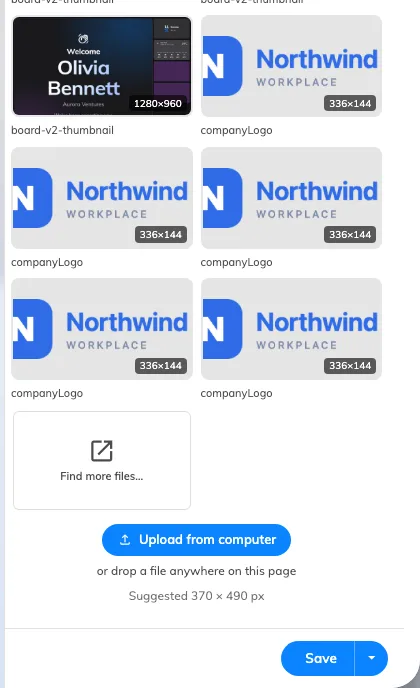
The file page: what is already uploaded, and the way to add more.
Recently used and Recently uploaded list what this tenant already has, and Find more files… opens the full browser with folders and search. Upload from computer takes a new one — or drop a file anywhere on the page.
It accepts PNG, JPEG, BMP, GIF and WebP, up to 500 MB. A file of any other type is refused before anything is sent, and a tenant that is out of storage is told how much it needs.
Uploads land in the signage media folder, which is what Signage › Uploaded media browses. Nothing is copied into the design: the widget keeps a reference, so replacing the file there changes every screen showing it.
Suggested … px under the row is measured from the exact box this widget fills on this screen, at twice its size, so it changes with the layout and with the screen the content was drawn for. Upload at that size and the picture is never scaled.
A QR code is where Display mode matters most: the default Crop overflow cuts the edges off a square code sitting in a 16:9 card, and a code with a corner missing does not scan. The whole walkthrough is Show your own QR code on a screen.
What this does not control
- The picture behind the whole design. That is the Background image setting on the content itself, not an Image widget — see Widgets and the places they go.
- Several pictures in turn. One widget shows one file — a rotation is the Playlist widget.