

Let your own system issue the visitor badge code
For sites whose gates will only admit a credential their own access control generated. Offision holds the badge unsent until your visitor management system supplies the code it will carry, then stamps it on and releases the email.
Some buildings will only admit a credential their own access control generated. At those sites an Offision-generated QR is useless at the barrier, so Offision has to be told to wait: the badge is created but held unsent, your visitor management system supplies the code it will carry, and only then does it reach the visitor.
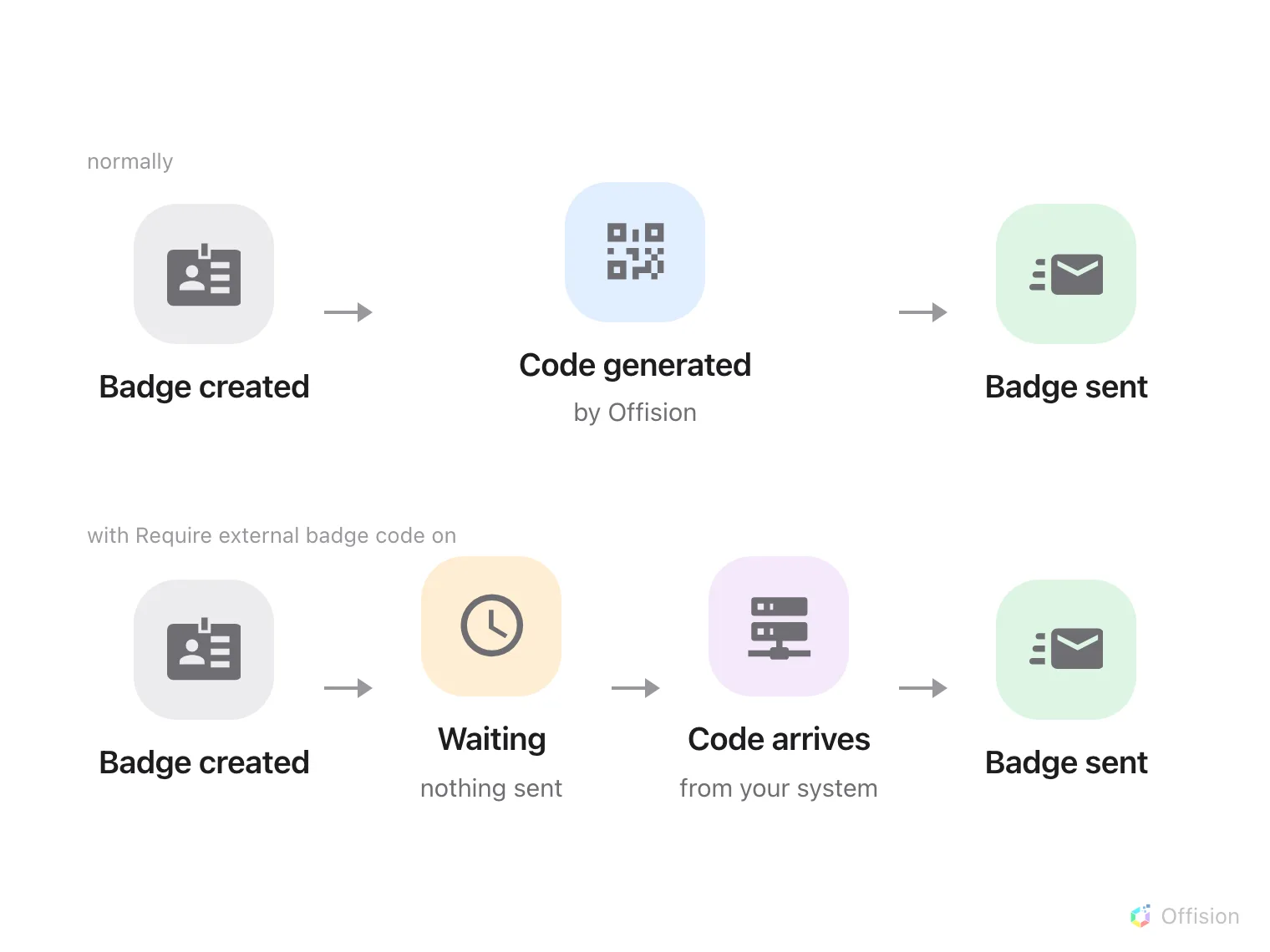
Require external badge code moves the moment of issue: the badge waits, unsent, until your system supplies the code it will carry.
What to have ready
- A visitor management or access control system that generates its own badge codes, and can be called when a visit is created
- The API credential from the gate article — the same one, no extra scope
- A location whose visits you are willing to hold up while this is tested. Every badge at that location stops going out the moment the setting is on
- An afternoon. Two calls have to meet in the middle, and each is easy to get wrong on its own
1. Turn on Require external badge code
Open Visiting policyOpen the visiting policy for that location and switch on Require external badge code. It sits in the visitor badge group on the Others page.
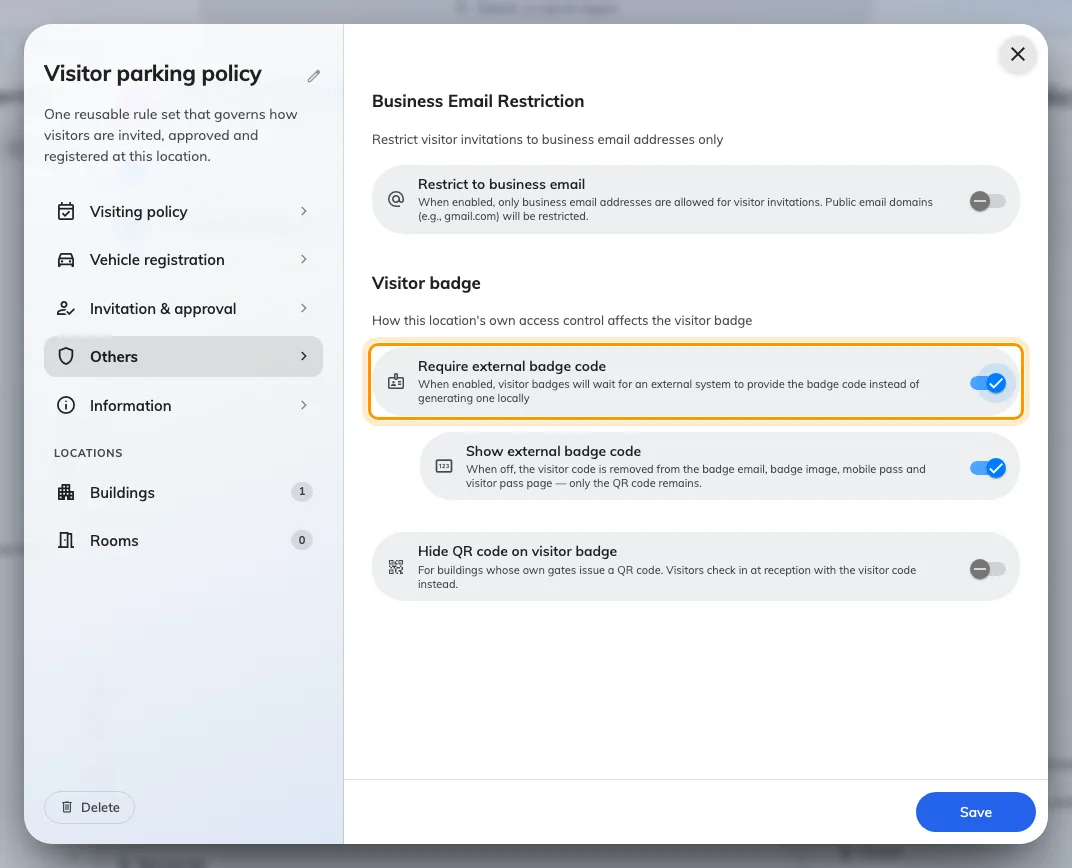
The visitor badge settings on a visiting policy.
2. Supply the code
Two calls, in opposite directions, built as workflows because the one coming back has to find its way to the right badge.
Open Workflow list- Out. A workflow on badge creation posts the visit to your system. Your side reads the visitor and the period from it and mints a code.
- Back. Your system calls a webhook with that code. An Update visitor badge action set to Record external code stamps it on the badge — which is also what releases the badge email.
Set the incoming trigger’s Response mode to Wait for completion. On the default, Fire and forget, the call returns 202 the moment Offision accepts it and your system never learns whether the code actually landed — so a badge that failed to take the code looks exactly like one that worked, and the visitor is the one who finds out.
3. Decide what the visitor sees
From here the badge’s QR carries your code rather than the Offision uid. That is the point: your readers can check it against your own system without calling Offision at all.
Two settings sit beside the toggle, and both are about the visitor’s copy of the badge:
| Setting | What it does |
|---|---|
| Show external badge code | When off, the code disappears from the badge email, badge image, mobile pass and pass page, leaving only the QR |
| Hide QR code on visitor badge | For buildings whose gates issue their own QR. The visitor checks in at reception with the code instead |
4. Check it worked
- A new visit. Create one at that location. The badge should appear in Offision and no email should go out yet.
- The round trip. Your system should have been called, and its code should appear on the badge within seconds. The badge email should follow on its own.
- The badge itself. Open what the visitor received. The QR should carry your code, and the printed code should match whichever of the two settings above you chose.
- A scan. Send that same code to the check-in call. It should resolve to the same visitor.
The last one is worth doing even at sites that never intend to call Offision after a scan — it is how you find out that the code stamped on the badge is not quite the code your system thinks it issued.
When it goes wrong
| What you see | Usual cause |
|---|---|
| Badges never reach visitors at all | Require external badge code is on and nothing is supplying a code, so every badge is sitting pending |
The gate refuses every badge at that location, as cancelled | Expected until your system supplies the code. A badge waiting for its external code is not a usable pass, so it is refused rather than admitted on its dates alone |
| The outgoing workflow fires but nothing comes back | Your side minted the code and never called the second webhook. The badge waits indefinitely — nothing times out and releases it |
| The webhook returns 202 and tells you nothing | The trigger is still on Fire and forget. Wait for completion is what turns it into an answer |
| The code lands on the wrong badge | The webhook identifies the badge by uid. A visit with several visitors has a badge each, and they are easy to cross |
| The visitor sees two codes and is confused | Show external badge code is on as well as the QR. Most sites that issue their own code want one or the other |
| Show external badge code is off but the code still shows | Require external badge code is off — the setting only applies to externally-issued codes — or another location on the visit is not opted out. See Show or hide the visitor code |
| Offision cannot tell you what code it holds | Expected. The external code is stored and searchable but never returned — keep your own record |
| The code works at the gate but reception cannot find the visitor | Reception searches the six-character visitor code, which is unchanged. Your code is a third identifier alongside it, not a replacement |