

What Milesight sensors report into Offision
Which Milesight gateway and sensor models Offision works with, which firmware it needs, what each model measures — and why this connection runs the opposite way to every other one in the manual.
Milesight sensors are small battery devices that watch one thing each — a desk, a room, the air — and report it over LoRaWAN to a Milesight gateway on your own network. Offision reads them through that gateway, and only through it.
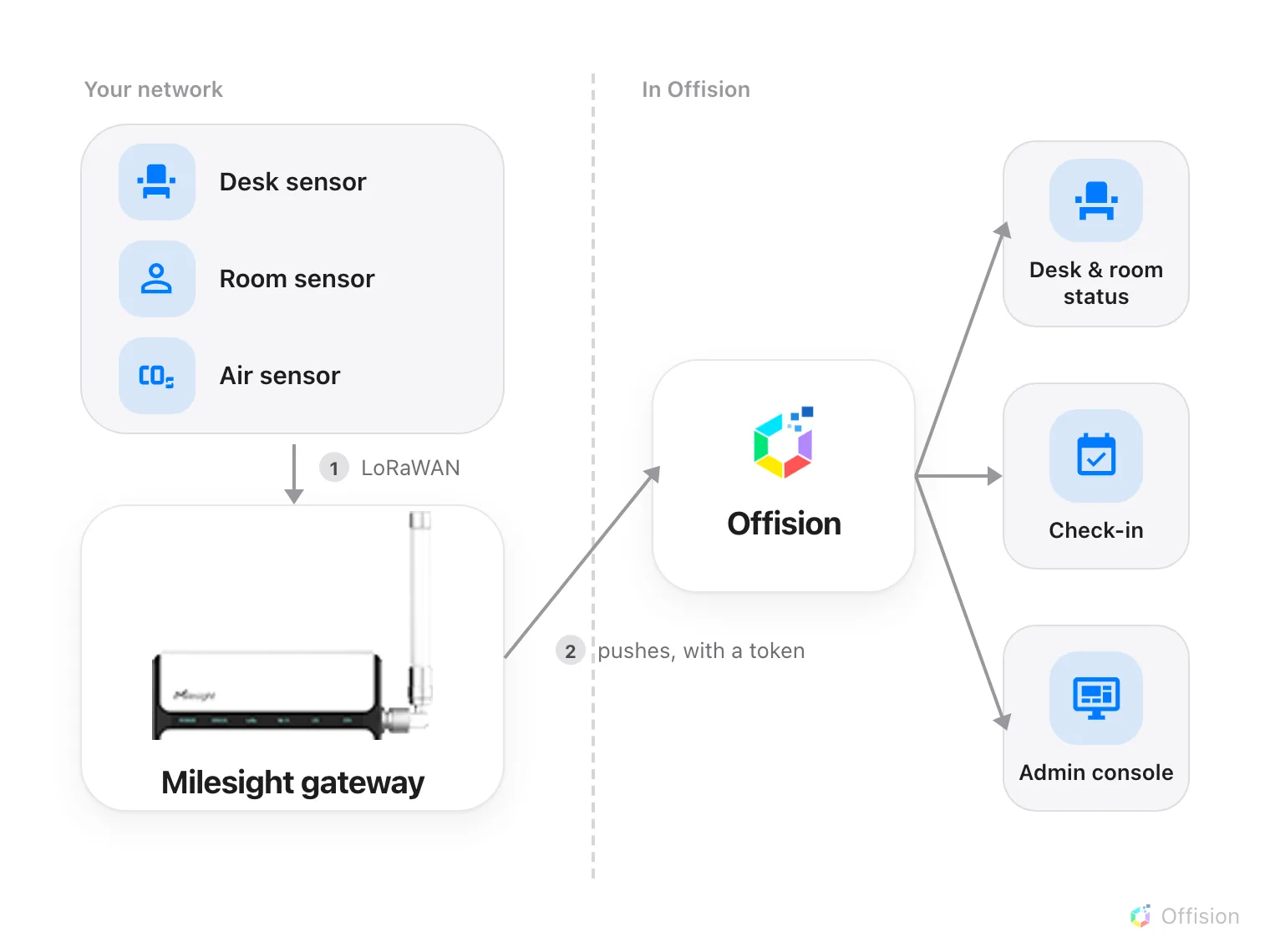
The gateway does the calling. Offision holds no address for it and never asks it for anything.
The gateway calls Offision, not the other way round
Every other sensor connection in this manual works by Offision asking: it holds a key, calls the vendor’s cloud on an interval, and pulls back what it finds. Milesight is the reverse. The gateway sits on your network, and each time a sensor reports, the gateway posts that reading to Offision straight away.
Three things follow from that, and all three surprise people:
- There is no sync button, and no poll interval to set. Nothing is pulled, so there is nothing to schedule.
- Offision never contacts the gateway. It holds no address for it and needs no route to your network. Readings arrive or they do not.
- Sensors appear on their own. You do not pick them from a list. The first time a sensor reports, Offision creates it, named as the gateway names it.
Nothing is installed on the sensors, and nothing Offision does can change one. The connection is read-only in the strictest sense: Offision receives.
Firmware 60.0.0.50 or newer
This is a hard requirement, and the only one in this article that will stop the connection dead.
Before 60.0.0.50, a Milesight gateway sends the reading but not the name of the sensor that took it. Six sensors in a building all post the same shape of message, and nothing in it says which desk moved. There is no setting on the gateway that adds the identity and nothing Offision can do at its end to work it out — the information simply is not in the message.
From 60.0.0.50 the gateway adds Metadata Details, and every reading arrives carrying the sensor’s own permanent id. That is what the whole connection hangs on. Upgrading the gateway is the only fix.
The gateway shows its firmware version on the status page you land on when you
sign in to it. If it starts with a number below 60.0.0.50, upgrade it before
going any further.
Which models report what
Three models have been checked against real hardware, and these are the readings Offision has actually seen from them:
| Model | What it watches | Readings that arrive |
|---|---|---|
| VS341 | One desk or seat | Occupied or not, light level, battery |
| VS370 | A whole room | Occupied or not, light level, battery |
| AM308 | The air in a space | Temperature, humidity, CO₂, PM2.5, PM10, air pressure, TVOC level, motion, light level, battery |
Offision also recognises these model names and labels a sensor with them — AM103, AM104, AM307, AM319, VS121, VS133, VS135, VS330, VS340, VS350, VS360, WS101, WS202, WS203, WS301, WS302, EM300, EM320, EM400, EM500 — but they have not been checked here, so treat the list as should work, not as verified.
A desk sensor, a room sensor, an air sensor
The three verified models answer three different questions, and which one you buy is decided by what you want to see in Offision:
- VS341 — is this seat taken? One per desk. It watches a single workstation and reports occupied or free. This is the model behind desk availability.
- VS370 — is anyone in this room? One per room, mounted to cover the space. It reports the room as occupied whether people are moving or sitting still, which is what makes it usable for meeting rooms.
- AM308 — what is the air like in here? One per space. It measures the room rather than the people in it, and its readings sit beside the occupancy rather than replacing it.
A room can have both a VS370 and an AM308: one says whether the room is in use, the other says whether it is comfortable.
These models do not count people
None of VS341, VS370 or AM308 reports how many people are present — only whether anyone is. Counting is a different Milesight product line altogether (VS121, VS133 and VS135), and those have not been checked against Offision.
If a headcount is what you need, do not buy occupancy sensors expecting to get one out of them later.
How quickly readings arrive
These sensors run for years on a battery, which they manage by staying silent. A sensor’s radio is off except when it has something to say, so:
- A reading appears when the sensor sends one, on its own schedule, and the gaps are wider than people expect. An air sensor reports every few minutes. A desk sensor at an empty desk may say nothing for hours, because nothing about the desk has changed — it speaks up when someone arrives or leaves.
- A report often carries only what changed. A missing reading means unchanged since last time, never zero. Offision keeps the last known value for everything the sensor did not mention.
- Offline means quiet, not unreachable. Nothing can ask a sensor whether it is alive, so Offision judges it by how long ago it last reported. After a gateway restart every sensor reads as quiet until it next speaks. That is normal and it clears itself.
This is why sensors appear in Offision a few at a time rather than all at once when you first connect a gateway. The gateway’s own device list shows how far apart they are:
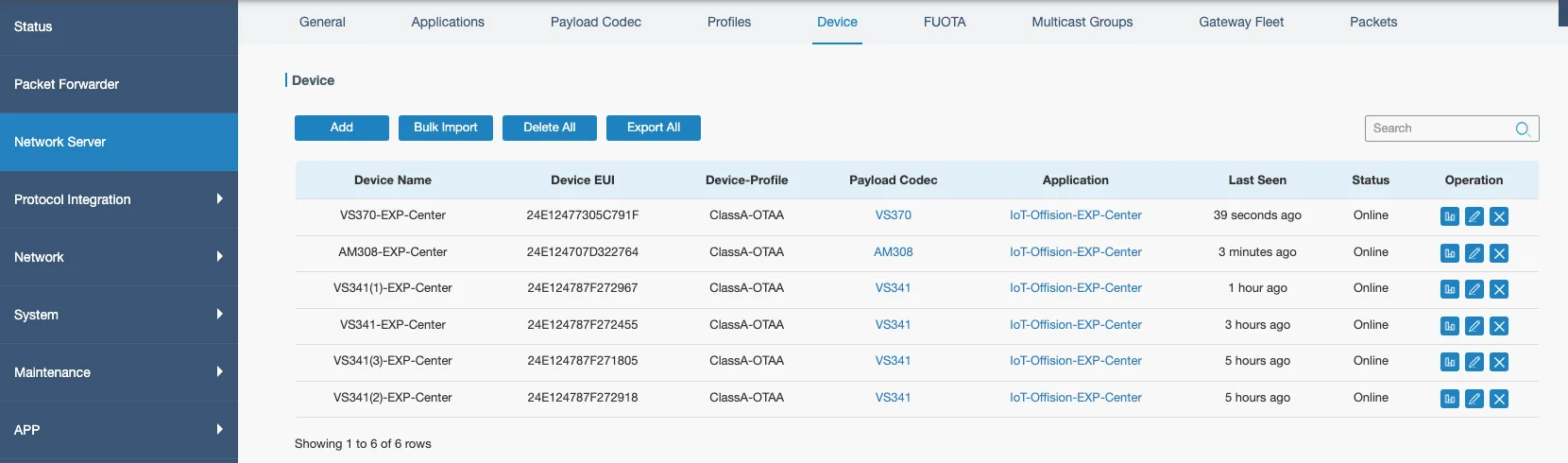
Six sensors on one gateway. Last Seen runs from seconds to hours — all of them healthy.
What this connection does not do
- It does not control anything. No Milesight sensor can be switched, reset or reconfigured from Offision.
- It does not set up the gateway or the sensors. Joining a sensor to the gateway, and telling the gateway how to read that model, are both done in Milesight’s own tools before Offision is involved.
- It does not bring rooms across. Unlike a cloud connection, there is no list of spaces to import. Sensors arrive one at a time as they report, and you decide which desk or room each one belongs to — that step is here.