

Classic map
Connect floors with lifts and stairs
A route leaves one floor only where a lift, stairs or an escalator joins them — and it has to be one facility placed on both floors, not one per floor. The rule most estates get wrong, and how to check it.
Every floor can have a perfect network and the building still refuse to route between floors. Getting the join right is a separate job with its own rules, and it is the part of wayfinding estates most often get wrong.
1. Only five kinds of facility can join floors
A route changes level at a facility, but not at just any facility. Only these count:
Lift · Stairs · Escalator · Escalator (Up) · Escalator (Down)
An Exit, a Toilet, Others or a Custom facility is a marker people look for. It is never a way between floors, however it is named.
2. One facility, placed on every floor it serves
This is the rule to get right, and the one that quietly breaks buildings.
A facility joins two floors when the same facility has a position on both. It is one entry in the Facilities list with several positions — not one facility per floor that happen to share a name.
Two separate facilities both called Stairs, one on each floor, connect nothing. Each is a lone marker on its own floor. Nothing in the console complains, both floors look complete, and no route ever crosses.
So: create one facility, then add a position to it for each floor the shaft actually serves.
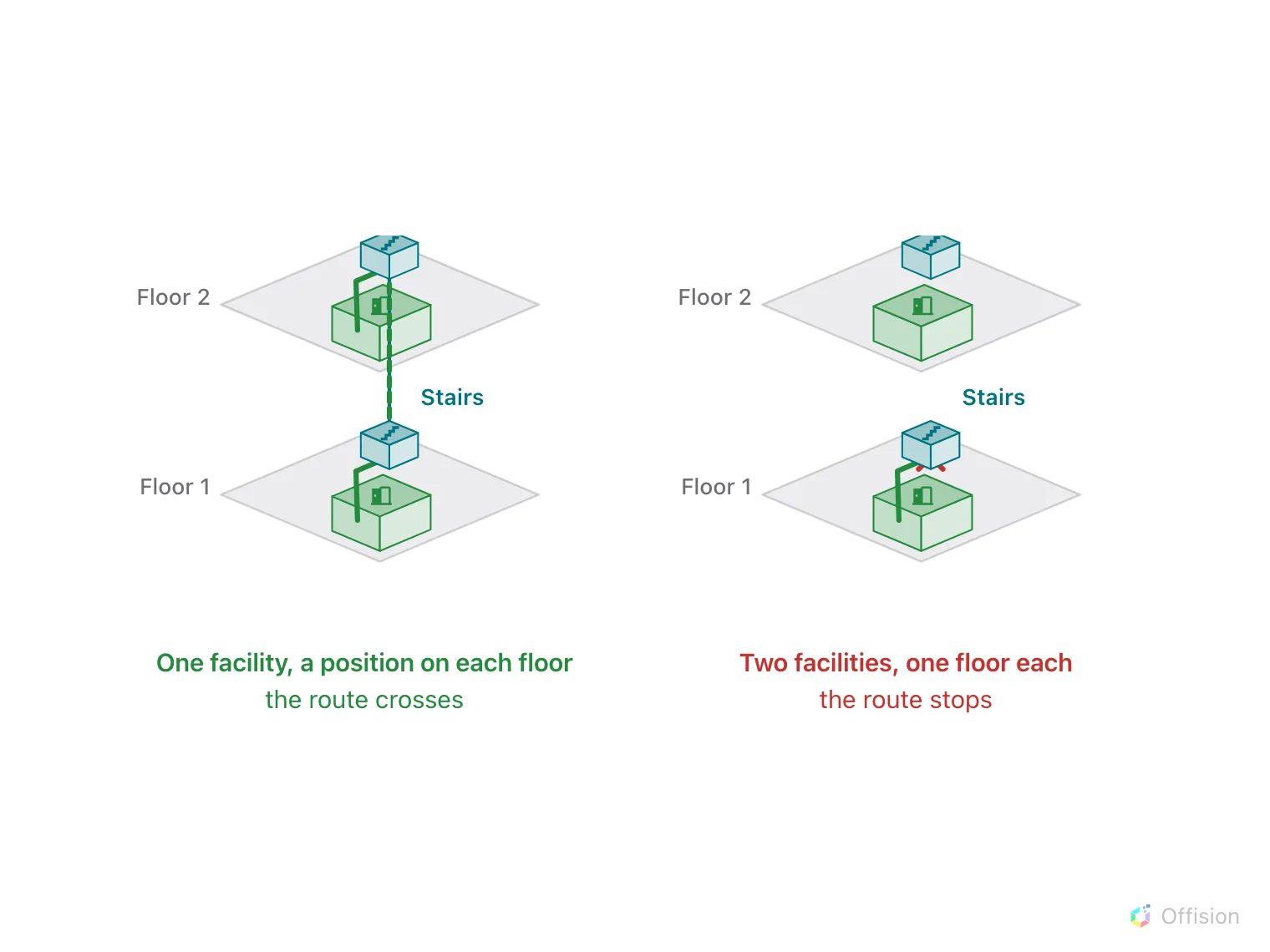
One facility, a position on each floor: the route crosses. Two facilities, one floor each: it stops.
A lift that stops on four floors is one facility with four positions. A stairwell that skips the basement has a position on every floor except that one — and that is how you tell a route not to send somebody down there.
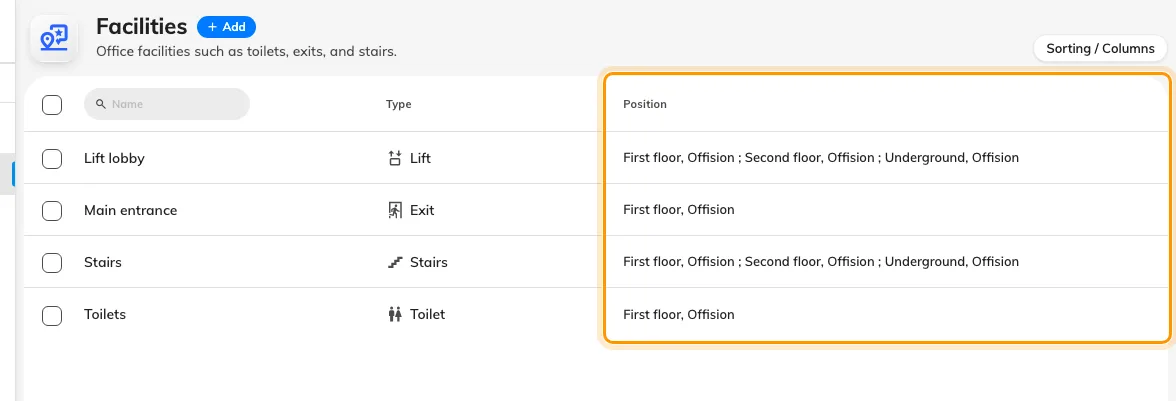
The Position column is the check: a lift or stairwell lists every floor it serves.
3. The route network has to reach each position
Placing the facility is half of it. On each floor, the walking paths must actually reach the spot where you put it, or the route arrives on that floor and cannot get to the lift.
Draw a path to the facility marker on every floor, exactly as you would to a room. Generate paths does this for you and, importantly, keeps the existing start, lift and stairs points when it regenerates — so a floor you have already joined does not come apart the next time you rebuild its corridors.
4. Escalators only go one way
Three of the five travel both ways: Lift, Stairs and plain Escalator.
The other two are directional, and this is what they are for:
- Escalator (Up) carries a route only from a lower floor to a higher one.
- Escalator (Down) only from higher to lower.
A hall with a pair of escalators is therefore two facilities, one of each kind, each placed on the two floors it links. Marking that pair as a single plain Escalator would let routes run the wrong way up an escalator, which reads as a bug in the directions and is a modelling mistake.
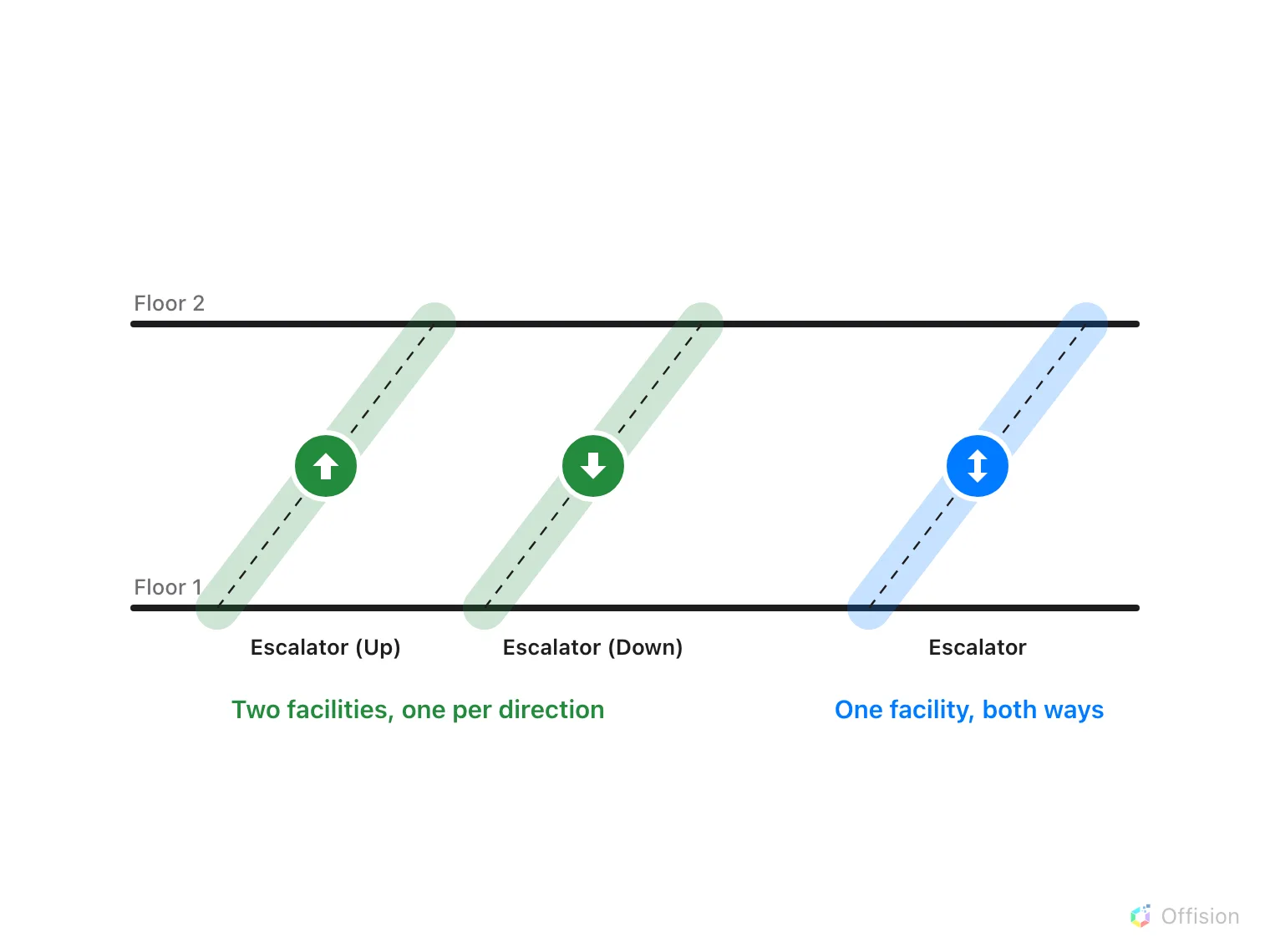
A pair of escalators is two facilities, one per direction. A plain Escalator carries routes both ways.
5. Let the router prefer to stay put
Changing floors is deliberately expensive compared with walking, and crossing several floors costs more than crossing one. You do not set this and cannot tune it — but knowing it explains two behaviours that otherwise look wrong:
- A route walks a long way on one floor rather than nipping up and back down.
- Given a lift and stairs side by side, it will not always pick the one you expected; both are legitimate.
6. Check it worked
Do the two tests that actually distinguish the failures:
- Ask for a room on another floor. The directions should name the lift or stairs by the facility’s own name, and the floor rail should show both levels on the route.
- Ask for the same room from the other direction. A join built with a directional escalator will work one way and refuse the other — which is correct for an escalator and a fault for a lift.
Then repeat for the basement, if you have one. Floors are ordered, and the ground floor is level G with basements below it as B1, B2 — a stairwell that was never given a position in the basement leaves it reachable by nothing.
What this does not control
- Which floors exist, or their order. Both come from the building’s floors in Locations, and the order is what decides which way is up.
- Lifts that are out of service. The network is a drawing. It has no idea a lift is broken today.
- Access rights. A route will happily send somebody to a stairwell they are not allowed to use.
- Whether wayfinding runs at all. That is the per-floor licence — and one unlicensed floor in the middle breaks every route that would have passed through it.