

How events work in Offision
What an event is, how it differs from a booking, the five statuses it moves through, and why publishing is the only one that turns anything on. Also how a one-off event — a conference, a pop-up — is set up and cleaned up afterwards: there is no temporary environment, an event is created, closed or deleted.
A booking reserves a room for people you name. An event publishes something people sign themselves up for — a town hall, a training class, a customer open day — counts how many said yes, and gives each of them a code to show at the door.
The two overlap in practice. An event usually reserves a room as well, and choosing an internal room when you set one up creates that booking for you. But they answer different questions, and the giveaway that you want an event rather than a booking is a registration list: the moment you need to know who is coming before they arrive, a booking has nothing to offer you.
An event happens once, or it has sections
An individual event happens once. A series event is one event with sections under it — the four dates of a training course, the same induction run every Monday. People can be signed up to the whole series or to one section, and each section carries its own date, place and capacity.
Pick this when you create the event. It is the one choice that is awkward to change afterwards, because everything below it hangs off the answer.
Publishing is the switch that turns everything on
An event moves through five statuses, and only one of them does anything. In Draft it exists for the people building it and nobody else. Publish makes it real: staff can find it, the public page opens, invitations can go out, reminders start firing, and attendance can be taken at the door.
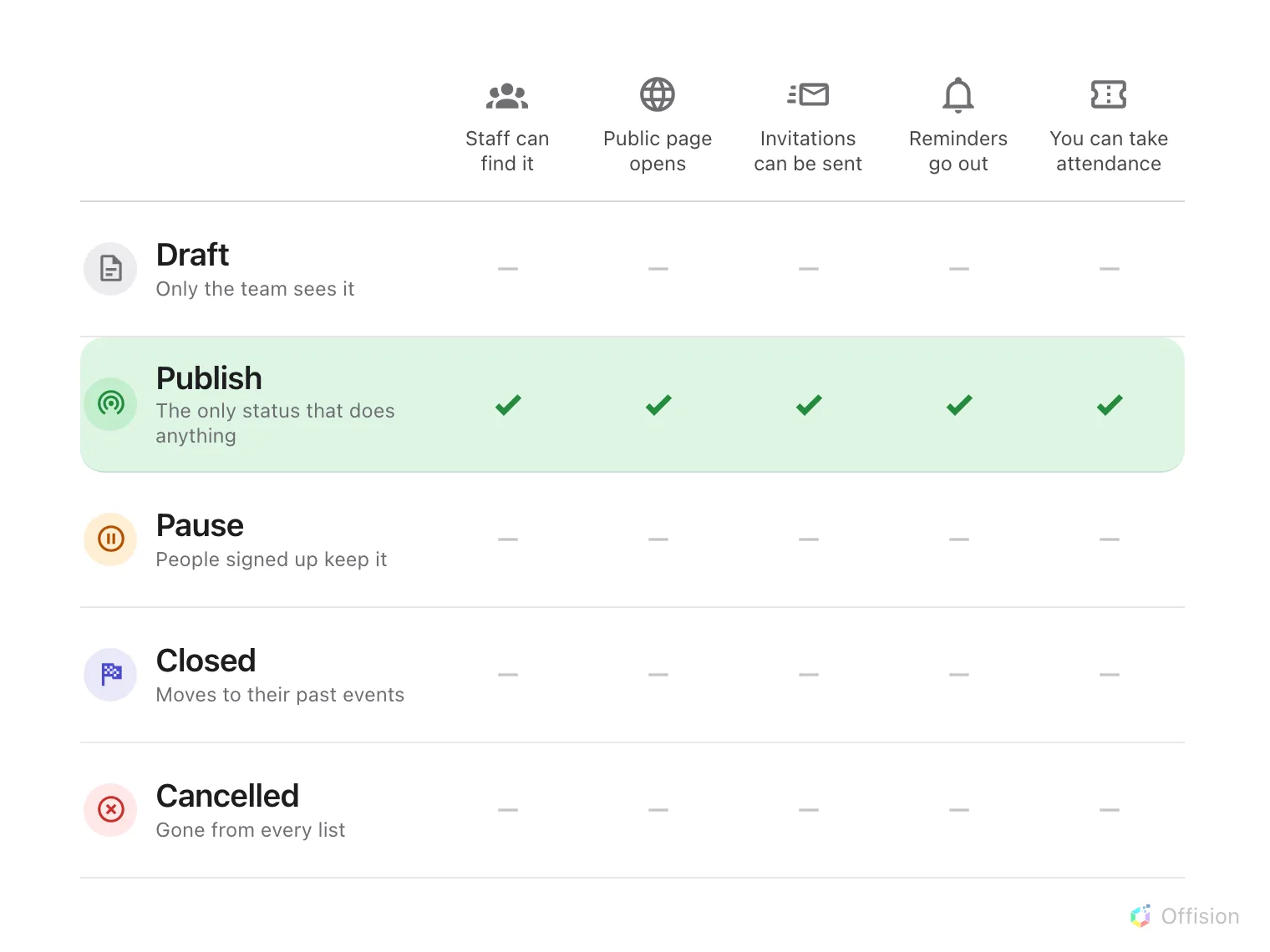
Publish is the only status in which anything happens. The other four differ only in what the people who already signed up still see.
The three ways an event ends differ only in what a registrant is left with. Pause takes it off both lists but leaves it with the people who signed up — use it while you rearrange something. Closed is the ordinary end: it moves into everyone’s past events. Cancelled removes it from every list, including theirs.
Creating an event and editing one are different jobs
Event manager lets you see every event, create one and delete one. It does not by itself let you change one: events are edited by their own team, so opening one for editing adds you to that team as an editor. Publishing, pausing and closing happen there too, in the editor, rather than from the list.
Open Event listA one-off event, and cleaning up afterwards
There is no temporary environment to stand up for a conference or a pop-up and tear down afterwards, and none is needed: an event is its own container. Its registrations, check-ins, sections, reminders and public page all hang off the one event record, so setting up is creating the event, and cleaning up is what you do to that record when it is over.
- Closed is the ordinary end. The event moves into everyone’s past events, its registrations and attendance stay readable, and nothing else in the account is touched.
- Delete removes the event and its registrations permanently — the honest “remove the data” — and is done from the event list by an Event manager. There is no undo.
- Event media is shared. Banners and images are a library used across events, so deleting a file removes it from every event that used it. Delete the event, not its pictures, unless nothing else uses them.
- A room the event held is given back when the event is deleted or its location removed; its booking does not linger.
The rest of the account is not part of the event and is not cleaned up with it: a building, a room, a temporary registration form field, a user group created for the crew all stay until somebody removes them by hand.
What this does not decide
- Who may create events. That is a permission and a licensed seat, and it is set per person — see who can create events.
- Who may sign up. Every event is opened to staff and to the outside world independently, and an event open to neither is invisible to everybody. That is internal and external events.
- What a registrant is asked for. The registration form is built per event by the person running it, in the User guide.