

Owner, editor and assistant
The three roles a person can hold on a single event, what each one can and cannot do, and why an event has exactly one owner.
Event coordinator decides who may create an event. Once one exists, a separate and much smaller set of roles decides who may work on that event. They are held per event, they are given by the people already on it, and they have nothing to do with anybody’s permissions elsewhere in Offision.
An event’s team has three roles.
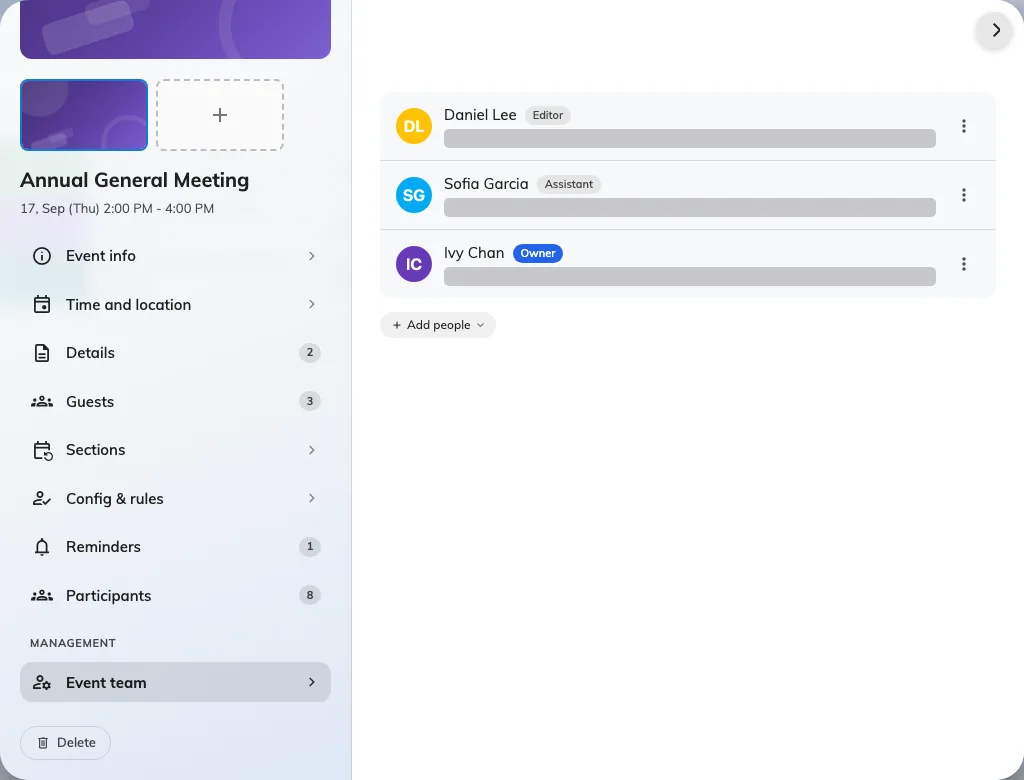
Three roles on one event. There is always exactly one owner.
Owner
The person the event belongs to. Whoever creates an event becomes its owner automatically, and an event has exactly one — promoting somebody else to owner does not add a second, it moves the title across and leaves the previous owner as an editor.
That single-owner rule is worth knowing before you go looking for a way to share ownership: the answer is to make the other person an editor, which is the same thing in practice without the ambiguity of two people believing they are responsible.
Editor
Can edit the event’s details and manage its team. In everyday use an editor and an owner are hard to tell apart — the difference is that the owner is the one name the event is filed under.
This is also the role administrators end up in without asking for it. Opening an event from the console to change something adds you to its team as an editor, because the console has no way to edit an event from outside its team.
Assistant
The person on the door. An assistant helps run the event with deliberately limited access: their job is taking attendance on the day, and the app gives them what that needs and nothing else.
An assistant sees the event and where it is, and how many people are registered. They do not see the breakdown of who those people are, they cannot open the editor, and they cannot publish, pause or cancel anything. What they can do is open Take attendance and check people in.
What each one can do
| Owner | Editor | Assistant | |
|---|---|---|---|
| Edit the event’s details | Yes | Yes | No |
| Publish, pause, close, cancel | Yes | Yes | No |
| Manage the team | Yes | Yes | No |
| Invite participants and see the list | Yes | Yes | No |
| Take attendance on the day | Yes | Yes | Yes |
| Can there be more than one? | No | Yes | Yes |
What this does not decide
- Who may create events at all. That is the Event coordinator permission and its licence — see let somebody create events.
- Who may attend. The team runs the event; the audience is set separately.
- Who sees the event in the console. Anybody with Event manager sees every event whether they are on its team or not.