

What Offision emails a participant
There are only two event emails, the invitation is one of them, and both ride on the wallet pass — which is why some people who registered never hear anything.
An event sends two emails, and no others. There is no separate invitation mail, no acceptance mail and no cancellation mail — knowing that saves a long hunt for a template that does not exist.
- Event registration confirmed — the participant’s ticket. It carries their QR code and the links that add the pass to a phone.
- Event reminder — sent before the event, as many times as the organiser set up, or not at all.
Both arrive with the event’s own name in front of the subject, so a person signed up to several can tell them apart in a full inbox. An event with no name at all sends the plain subject instead, rather than one that opens with a stray divider.
The invitation is the registration email
Send invitation does not send a third kind of mail. It sends the registration email — and if the person already had one, it mints their pass again and sends the same thing afresh. That is also how you resend to somebody who deleted it.
The email hangs off the pass
This is the mechanism worth understanding, because it explains every case of “they registered and heard nothing”. The registration email is not sent by registering. It is sent as part of issuing the wallet pass, so wherever no pass is minted, no email follows.
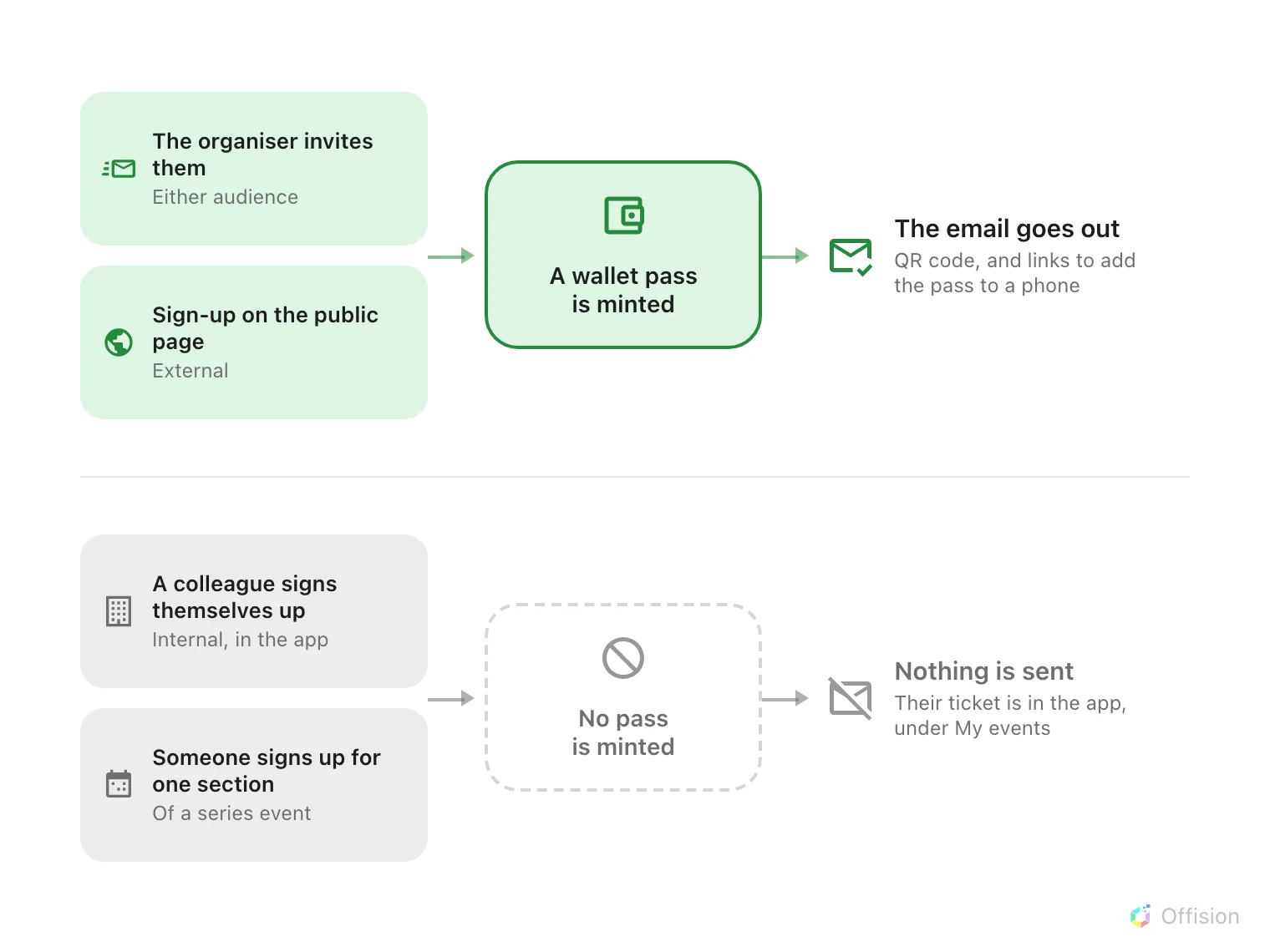
The email is issued with the pass, so the two routes that mint no pass send no mail either.
Two consequences follow, and both are usually reported as faults:
- A colleague who signs themselves up gets nothing. No confirmation, no pass. Their ticket is in the app, under My events. The same colleague invited by the organiser gets both — the difference is the route taken, not the person.
- Signing up for one section of a series event sends nothing, whichever audience the person belongs to.
Who gets a reminder
Reminders go to everybody still expected: people who have been invited, people who have had their invitation sent, and people already marked as attended. Anybody cancelled or marked no show is left out, which is what stops a reminder chasing somebody who told you they were not coming.
Reminders also need the event to be published when the reminder falls due. One paused overnight will not send that morning’s reminder, and will not send it late afterwards either.
Which language they are written in
Neither email is written in the recipient’s language. Both render in the company’s email language, set once in System ▸ Email settings — so a Japanese guest and an English one get the same words.
An event can depart from that. The Email language card on the event’s Public design page takes a Primary language and an optional Secondary one; leave Primary on Same as system and the event simply follows the company setting, which is what every event created before this does.
The choice covers the invitation, the reminders and the wallet pass together, so a ticket can never come out in a different language from the mail that delivered it. The event’s own name and venue follow it too — before, whichever translation happened to be stored first could surface, which is how a confirmation could arrive with an English title over a Chinese address.
What this does not control
- What the pass looks like. The colours and logos are a company-wide design that an event can override.
- Whether the email carries a link to the event page. That link only appears where the public event pages are switched on.