

Open your Events page
Where you build events, how it differs from the page everybody uses to join them, and the two things your account needs before it appears.
Running an event happens in the app, not in the admin console. Under Events you have two pages, and they do different jobs:
- Event list — what everybody has: browsing and joining what is on.
- Event management — yours: building events and running them.
This guide is about the second. If you only ever attend events, the first one is all you need.
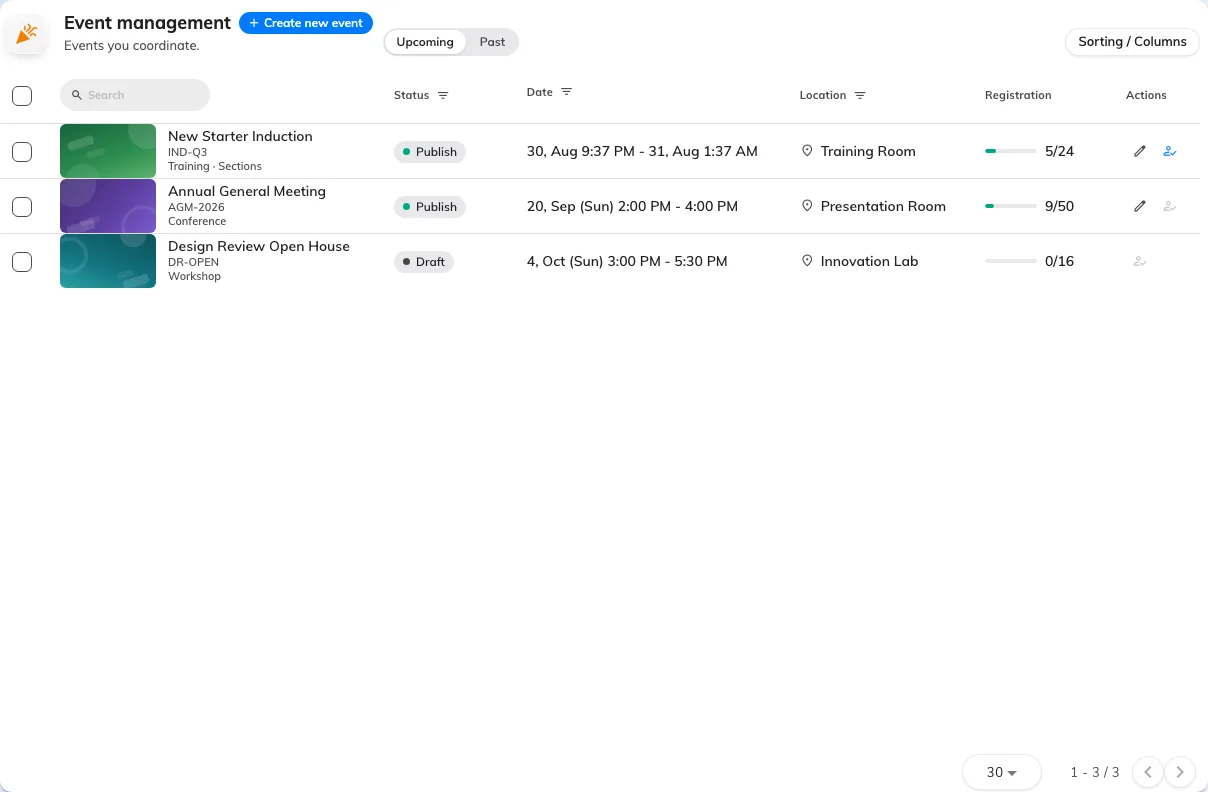
Event management: the events you are on the team of, and nobody else's.
Before it appears
Event management shows up once your account has two things: the Event coordinator permission, and an Event coordinator licence. They are granted in different places by an administrator, and having one without the other is the same as having neither.
What you can see, and what you cannot
Your page shows the events you are on the team of — the ones you created, and any you have been added to as an editor or an assistant. It is not every event in the company; that view belongs to an administrator.
That also means an event disappearing from your list usually means somebody removed you from its team, not that the event was deleted.
The order things happen in
- Create an event — its type, category and name.
- Set when and where, then fill in the details.
- Decide who your event is open to.
- Publish it — nothing is visible to anybody until you do.
- Invite people and, on the day, check them in.