

Invite people and see who's coming
Three ways onto the list, what each one sends, and why inviting is the only way to be sure somebody has a ticket in their inbox.
Participants on your event is who is coming, and where you add people yourself.
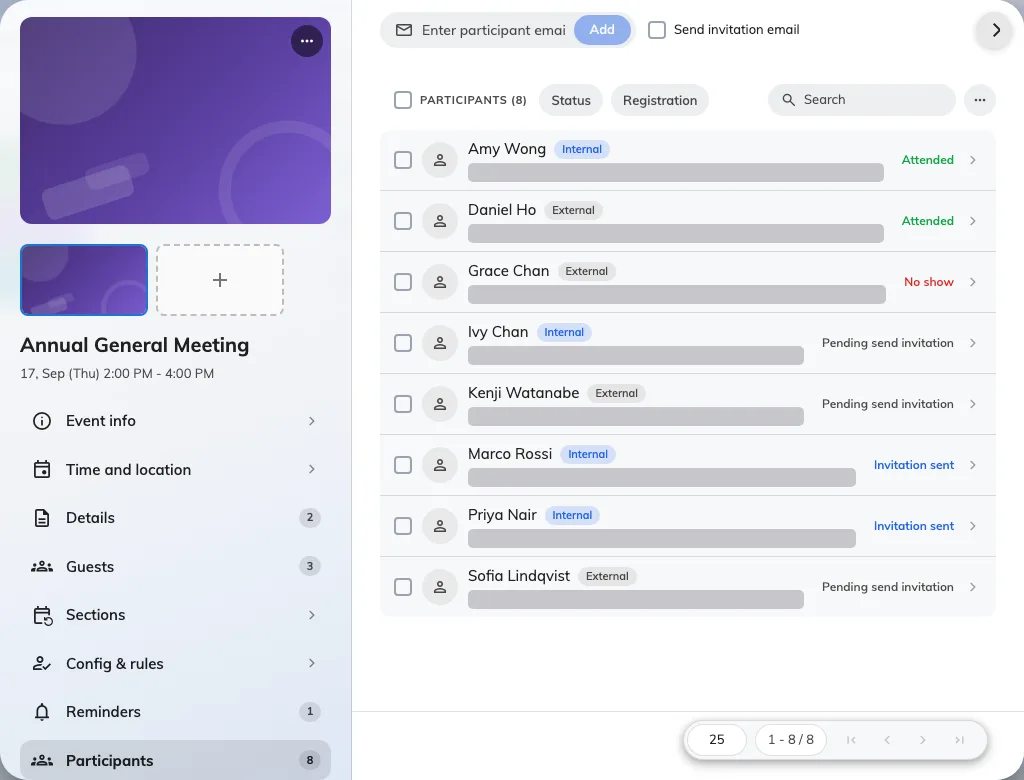
The participant list, with each person marked internal or external and carrying a status.
Three ways onto the list
Add participants picks people one at a time — colleagues from your directory, or guests by email address.
Import participants takes a file, for a list that came from somewhere else. It reads email, name, title, department and phone, and skips rows with a bad address or somebody already on the list — so re-importing a corrected file is safe.
They sign themselves up, if you have opened the event to them.
What adding somebody actually sends
Adding a participant creates their place and their pass, and sends them the registration email. Their status then reads Pending send invitation until you send it — which is the state to expect on an event that is not published yet, not a failure.
Resend invitation sends the same email again and mints the pass afresh. Use it for anybody who deleted theirs.
Reading the list
Each person carries a status: Pending send invitation, Invitation sent, Attended, No show, or Invitation cancelled.
Invitation cancelled is the only one that frees a place. Marking somebody as a no-show afterwards records what happened but does not give the seat back, which matters on a full event with people waiting.
Taking somebody off
Cancel them rather than deleting. Cancelling keeps the record — useful when they ask later whether they were ever registered — and it is what releases the place.