

Ask registrants extra questions
Custom fields are the only way to ask your colleagues anything — and the same field can be required of guests and hidden from staff.
Custom fields are extra questions on the registration form. They are also the only way to ask your colleagues anything, since the seven built-in questions exist on the external side alone.
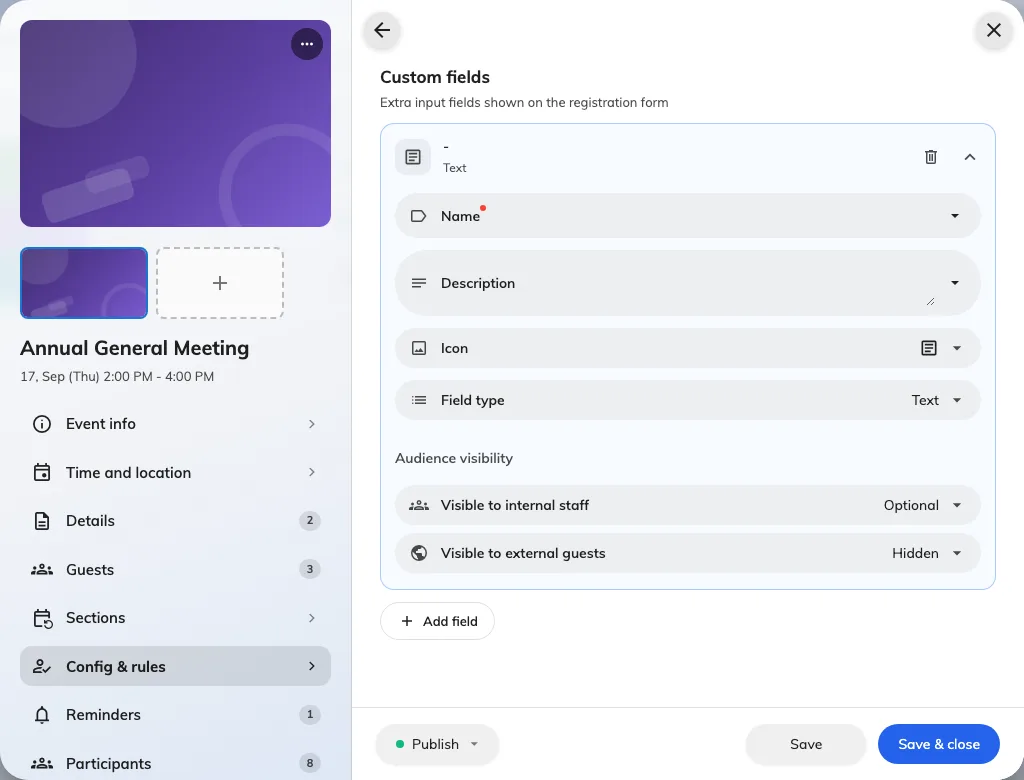
A question being written, with a visibility setting for each audience.
Each field has an audience
Every field carries Audience visibility, set separately for each side: Visible to internal staff and Visible to external guests, each of which can be required, optional, or hidden.
That is more useful than it first looks. One field, asked of guests and hidden from staff — Which product line are you here for? — is a single question that behaves like two.
What a required internal field changes
This is the one consequence worth knowing before you make something required for staff: it turns a one-tap Join into a Register that has to open a form.
That is the right trade when you genuinely need the answer — dietary requirements for a lunch, a shirt size for a team day. It is a poor trade for something optional, because you will lose sign-ups to the extra step.
Writing them
Keep the label short enough to read on a phone, and put anything longer in the hint rather than the label. Where a question has a known set of answers, use a choice field rather than free text — you will be counting these later, and free text does not count.
Order
Fields appear in the order you arrange them. Put the ones everybody must answer first, so somebody abandoning halfway has still given you the important half.