

Create an event
Four things to settle before anything else exists — and one of them is awkward to change later.
Create new event opens a short form. It asks for very little, because everything else is added afterwards in the editor.
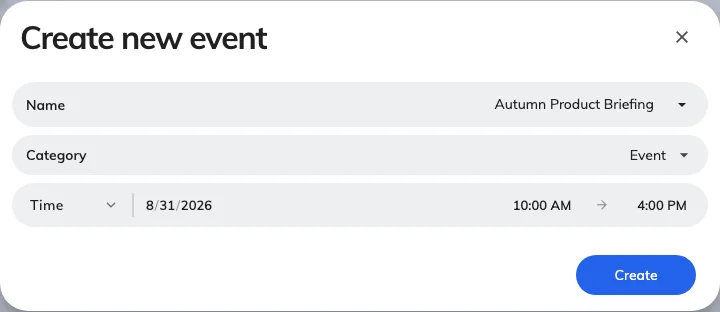
Create new event asks for four things; everything else is added afterwards.
1. Individual or series
Individual event happens once. Series event is one event with sections under it — the four dates of a course, the same induction every Monday.
2. Pick a category
Required, and it is not just filing: the category gives your event its colour everywhere it appears, and it is what people filter by on the public page.
Your company will have a set already — Event, Lecture, Webinar, Seminar and so on. Pick the closest; you cannot leave it blank.
3. Name it
The name is what appears on the list, on the public page, on the screens in the lobby and on everybody’s wallet pass. Write it for somebody who has not heard of it — Q3 all-hands, not AH-Q3.
If your company works in more than one language, give it a name in each. An event named only in English shows in English on an otherwise Japanese screen, and the wallet pass falls back the same way.
4. Set the period
The start and end, or All day. This can be changed freely afterwards — but moving it once reminders are set will drop any reminder that was aiming at the old time, so reschedule early if you can.
What happens when you save
You get an event in Draft, with you as its owner. Nothing is visible to anybody else and nothing has been sent. The editor opens on it, and that is where everything else — details, registration, invitations — is done.