

What your licence covers, and where to see it
How Offision licences are counted, what stops when a count or a month's quota runs out, what the trial banner means, and where the running version and release notes are.
A licence in Offision is a count, not a switch. Modules do not unlock feature by feature; what you buy is a number of seats — users, panels, boards, sensors, locks — or a monthly quota per room, desk or building. That is why a device can exist in the console and still show No license: adding it is free, and the seat is what runs it.
Where to look
The Licenses module opens on Subscriptions, a statement in three parts:
- Licensed to, with the domain, tenant ID and subscription ID, and a License model line saying whether your company is licensed by user seat or by module with monthly quotas.
- One block per subscription: Plan, its status, Billing method, Number of user licenses, Started, and a date labelled Trial ends, Renews or Expired depending on its state.
- The Licenses ledger — one row per item type (User, Room booking panel, Signage, Occupancy sensor, Door lock and so on) with In use, Total and Free. A row reading Fully deployed has no seat left. Open a row to see each seat, who or what holds it, its expiry, and Release license for a seat still held by a deleted user or device.
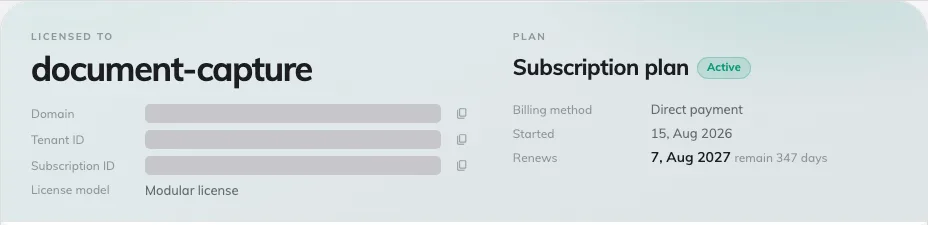
Subscriptions — licensed-to header, plan terms and the licence ledger.
Two further pages sit beside it. Invoices lists each invoice with a download link, and is absent when your company is billed directly rather than online. Usage appears on the modular model and shows, per item and per building or resource, this month’s Used against Quota.
The same quotas are also visible where they apply: a building’s monthly visitor quota on Visiting location, and, for tickets and service requests, the Ticketing license and Service license pages.
What happens at a limit
- A seat pool runs dry. Assigning a licence to a panel, board or kiosk offers No seats left, and the screen keeps showing No license until a seat is freed or bought. Nothing already licensed is affected.
- A monthly quota runs out. The room, desk or building shows Locked — needs license until the quota resets on the first of the next month. The page offers Increase limitation with the note “Assign a booking license to this resource to raise its monthly booking limit.”; a building says the same for its visitor limit.
- A resource count is reached. Where the subscription caps rooms, desks, equipment or buildings, adding one more is refused with a plain message such as “Over Booking Room Limitation”.
Purchases can be made from the page when the subscription is paid online — Add licenses, Remove licenses — and through Contact us for add licenses otherwise. Reload from server fetches a change made on your behalf without waiting.
The trial
A trial is a subscription of type Free trial. While it runs, a banner across the console reads Free trial period remains N days, and Invoices shows “Invoices will not be issued in free trial period”. The statement offers Start billing with the reminder that every module you set up keeps running once billing starts.
When the date passes, the banner changes to Free trial period expired, and once the account is switched off every app shows “Offision account disabled due to free trial period expired”.
An expired paid licence reads differently: “This license has expired. Panels, boards and kiosks have stopped syncing — renew to bring them back online.” with a Renew license button. Renewing restores the same seats.
Version and release notes
The running version is printed at the foot of the console’s quick panel as Offision V…. What changed in each version is under Release notes on the console’s System tile, which any administrator can open.