

4.5.13
New this release: usage by user group, who fills in each visitor detail, a rotating visitor QR, a colleague's booking card, and a design page per event page.
Group usage by user group
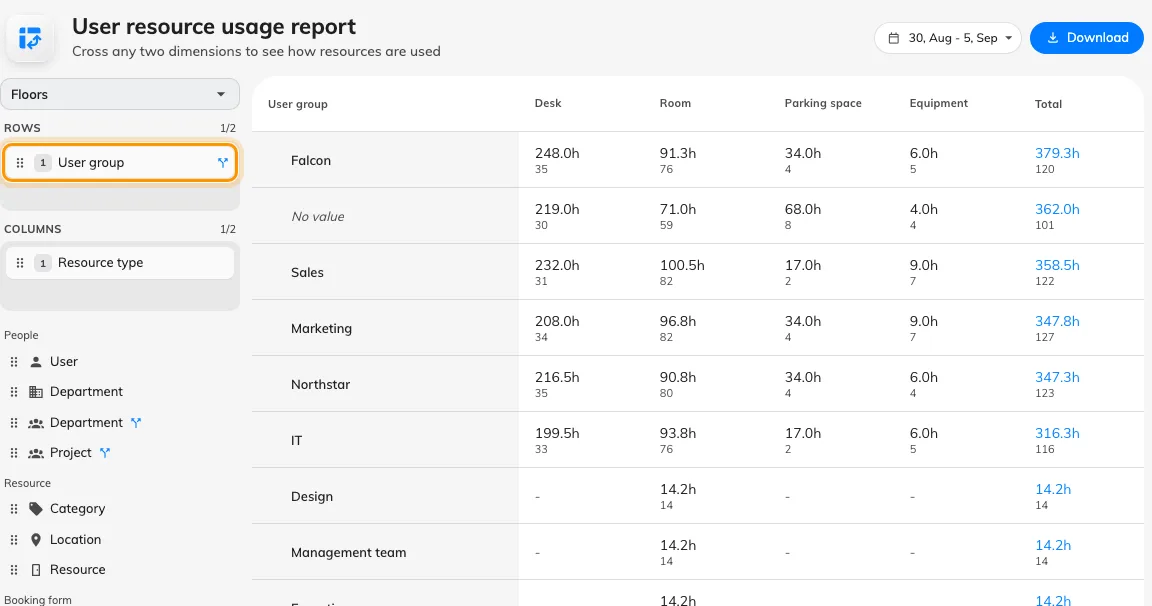
The usage report could tell you who booked what and which department they sat in, but not which user groups — so the Finance-versus-Operations question meant exporting and regrouping by hand. Booking › Analytics › User resource usage now offers User group among its People fields: drag it into Rows or Columns and we rebuild the table, with a booking counted in every group its owner belongs to. Groups outside any category are included, which the per-category fields cannot reach. Needs the Analytics licence.
Decide how many lines a card field gets
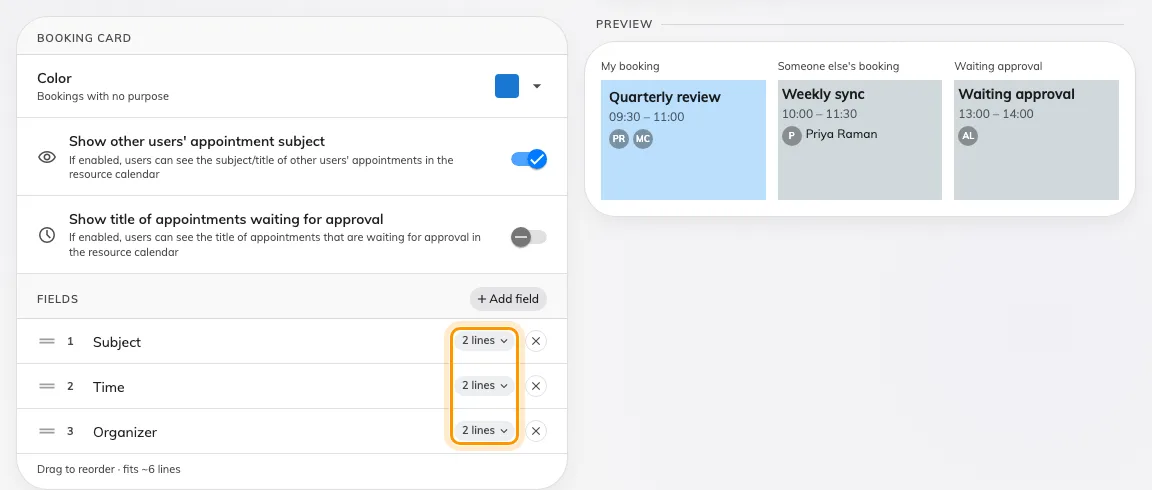
Every field on the booking card took two lines whatever it held, so a long title was clipped while a one-word purpose left a blank line under it. In UI customization › Booking › Resource calendar — and Management calendar — each field on the card now carries a Lines pill: one, two, three or unlimited, and a purpose override can set its own. A long title wraps into the lines its block has room for; horizontal blocks keep one line.
The schedule card follows your design
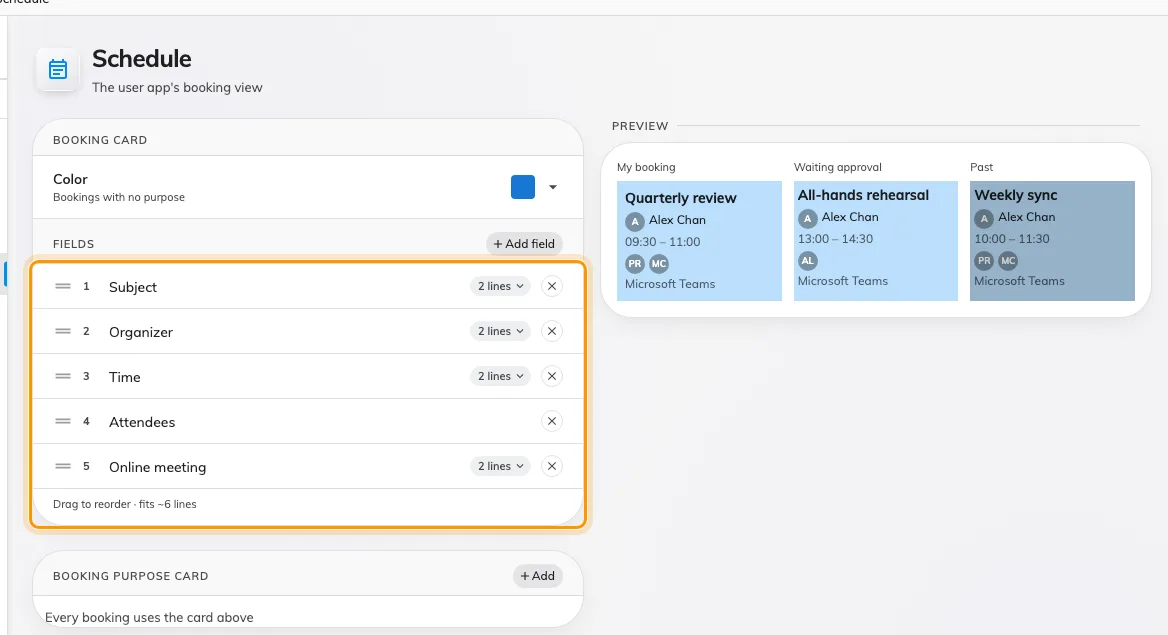
The app's Schedule view drew its own card, so the fields and colours you had set for the Resource calendar never reached it. UI customization now has a Schedule page with the same card editor: pick the fields, their order and their line caps, and the Schedule card in the user app redraws to match.
Show a room's description on the form
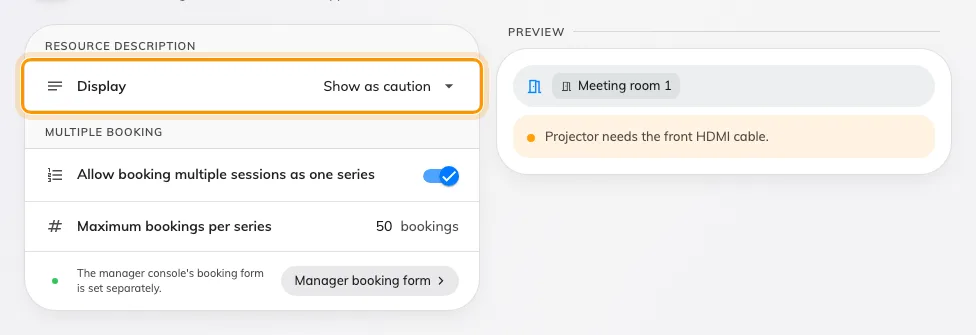
A room's description lived on its admin record and never reached the person booking it. UI customization › Booking › User booking form now has a Display setting for it: Hidden keeps today's form, Show description prints it under the chosen room, and Show as caution prints it as a warning — for a room with rules to follow. The page draws the sample form beside the setting, so you see the wording land before anyone books.
Choose who fills in each visitor detail
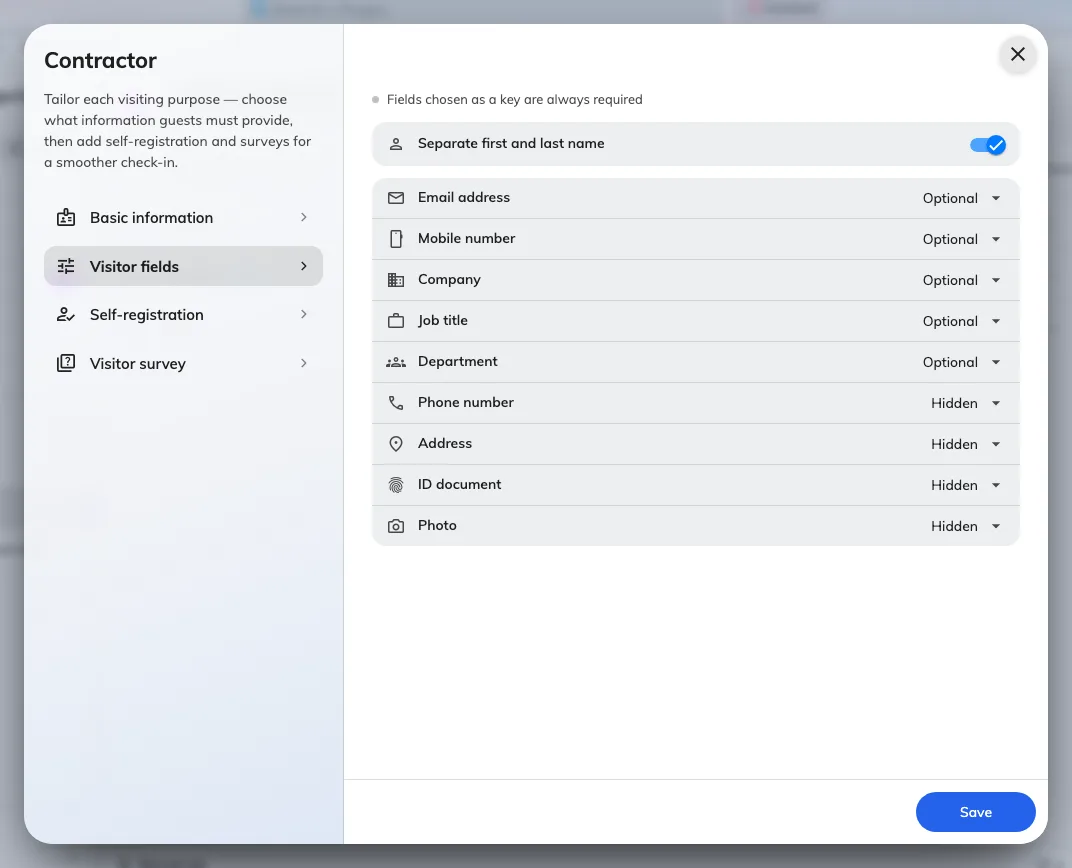
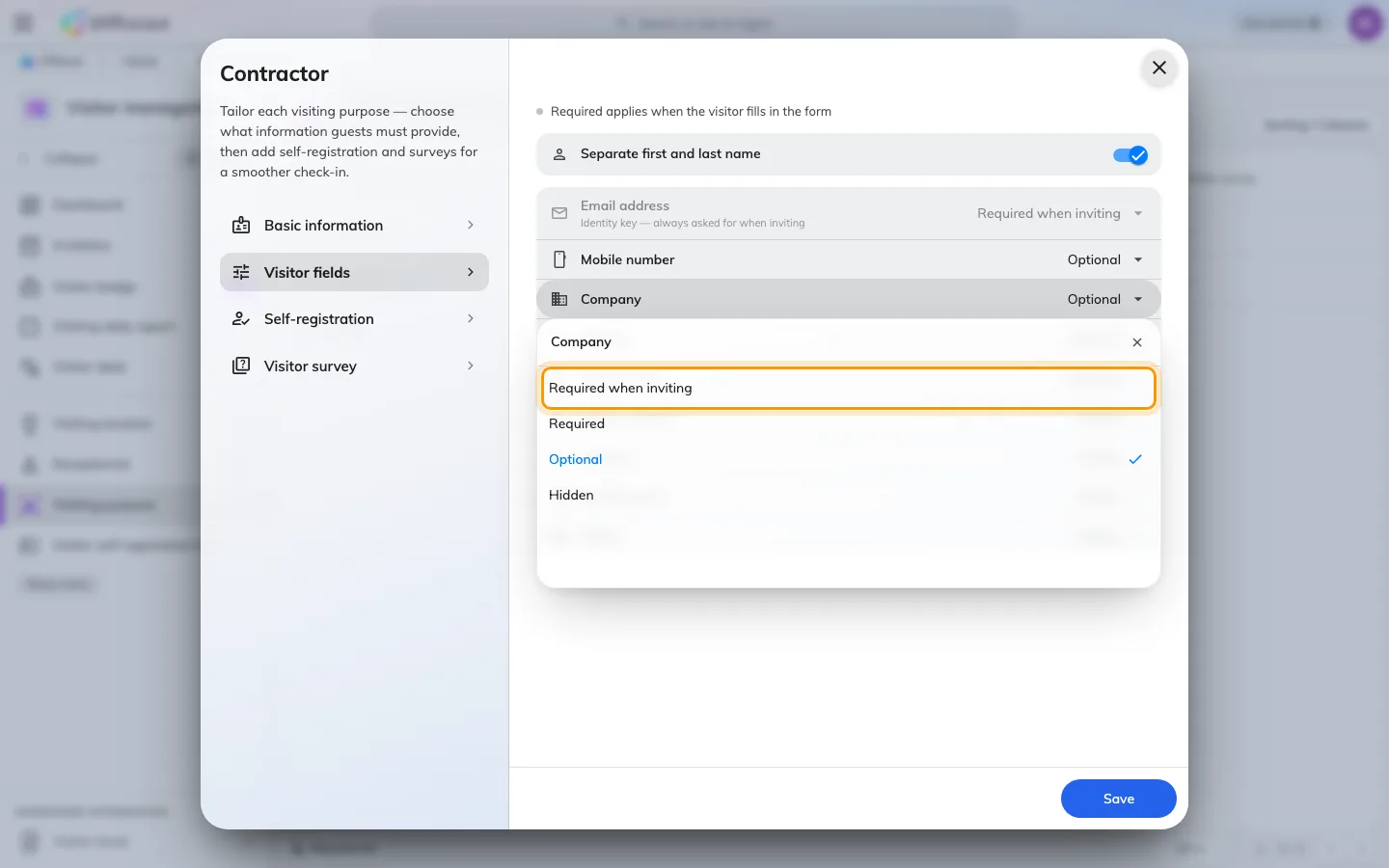
Required on a visiting purpose meant the same thing for the host writing the invitation and the visitor registering at the door, so a host had to know a guest's mobile number before inviting them — or you loosened the field for everyone. In Visitor management › Visiting purpose each field now has four levels: Required when inviting, which the host must supply; Required, which the visitor supplies at registration or check-in; Optional; and Hidden. Email, mobile and company are the three a host can be asked for, and the identity key is pinned at the top.
A visitor QR that rotates
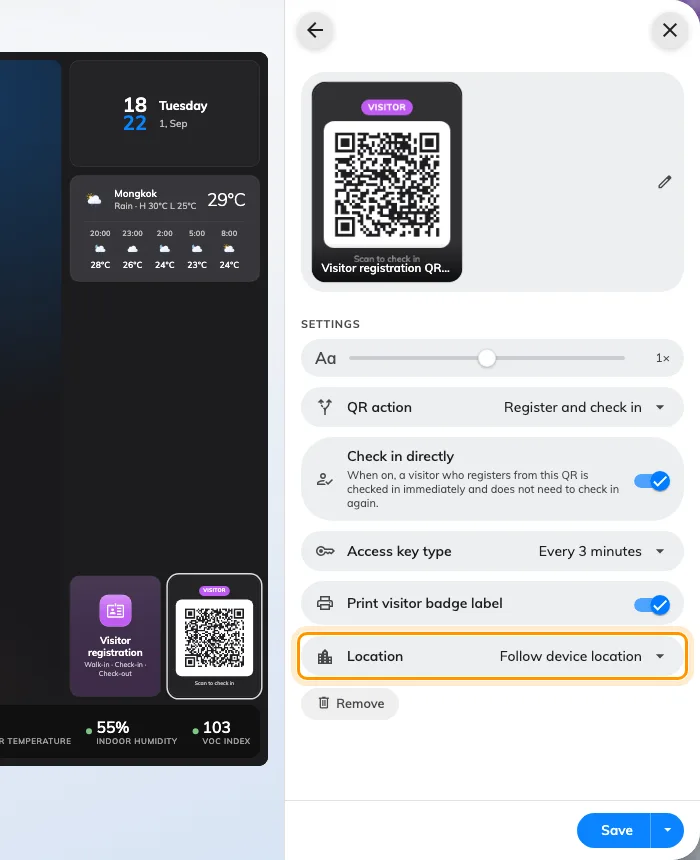
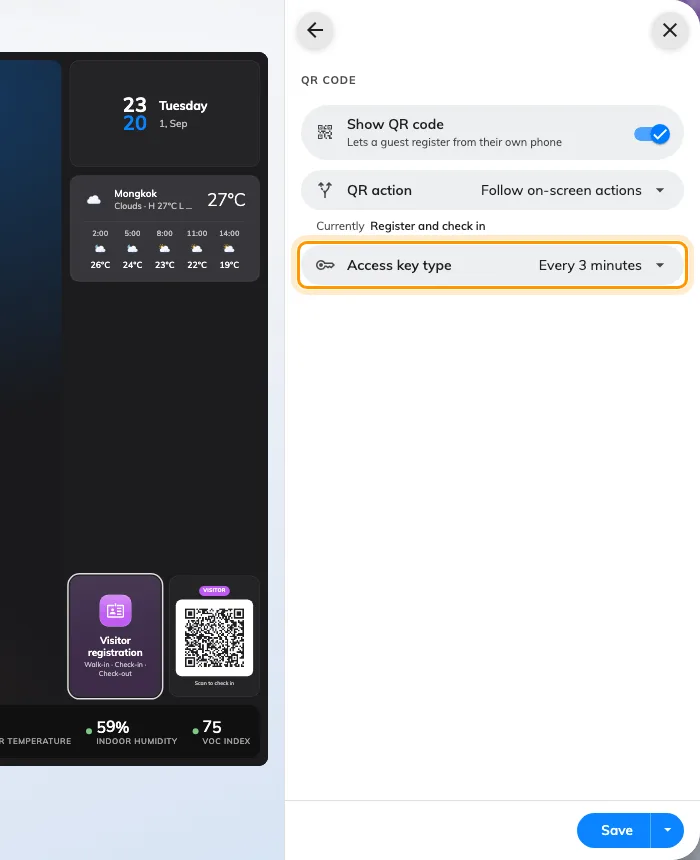
A photograph of the visitor QR on the lobby screen worked for as long as the code behind it lived — a day, by default. Both visitor widgets in Signage Content V2, the registration QR code and the self-service buttons, now rotate their code on the Access key type in the widget's QR code settings: daily, hourly or every 3 minutes, the default for new widgets. A widget already set to Daily keeps it. Needs the Signage licence and visitor walk-in allowed in Visitor management settings.
Open a colleague's booking
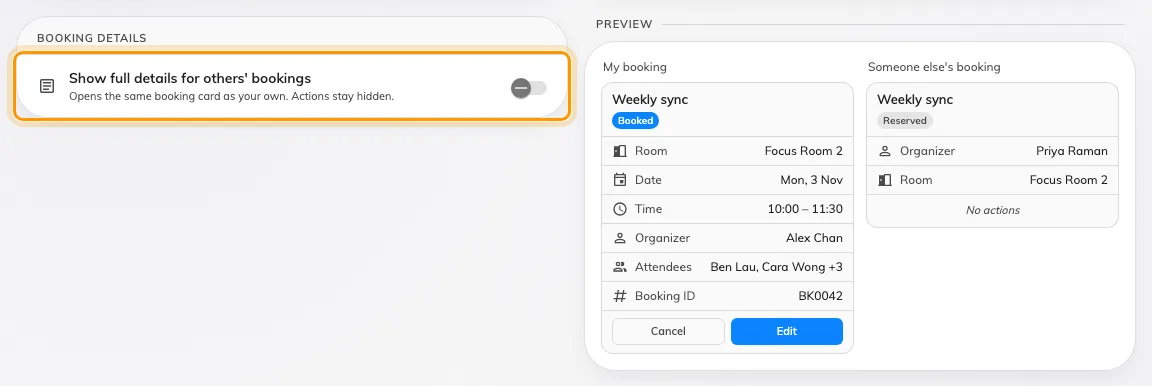
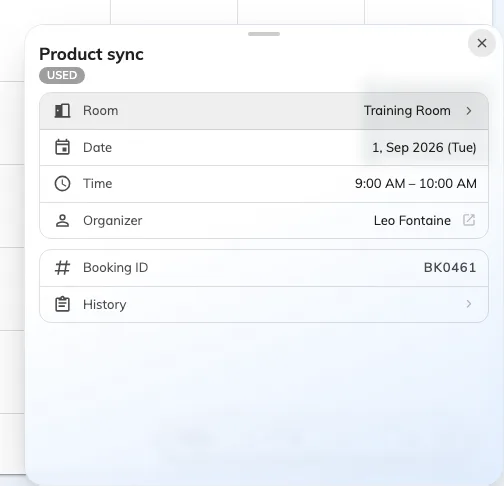
Tapping a colleague's booking on the Resource calendar gave you a title, a time and a Reserved badge — enough to know the room was taken, not enough to know whether to ask for it. UI customization › Booking › Resource calendar › Booking details now has Show full details for others' bookings: turned on, a colleague's booking opens the card you get for your own — status, attendees, notes, reference and history — with every action hidden. Private and confidential bookings stay masked, and the switch is off until you turn it on.
What's new, inside the console
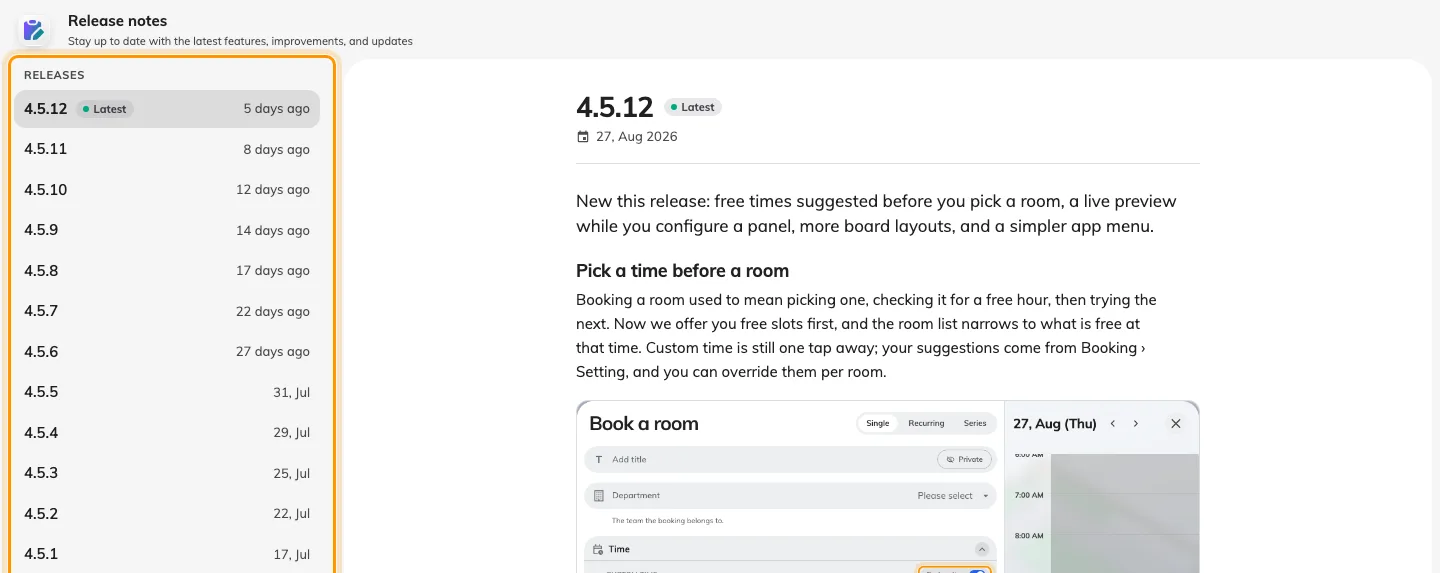
A release used to reach you as an email, if it reached you at all. The console home now carries a New version row for the release your server actually runs, and Release notes opens each release as the same illustrated article you are reading — the rail lists every release, the newest marked Latest. Dismiss the row and it stays dismissed on every browser you sign in from.
Choose who may embed Offision
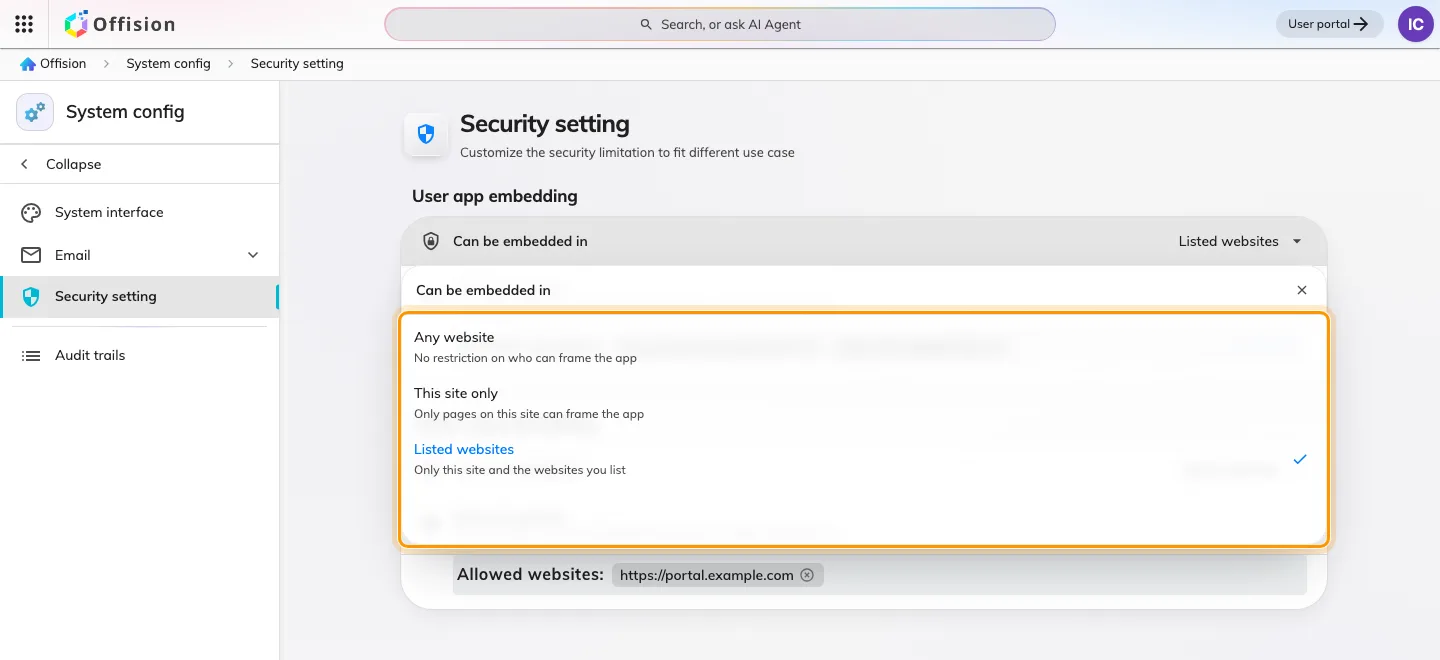
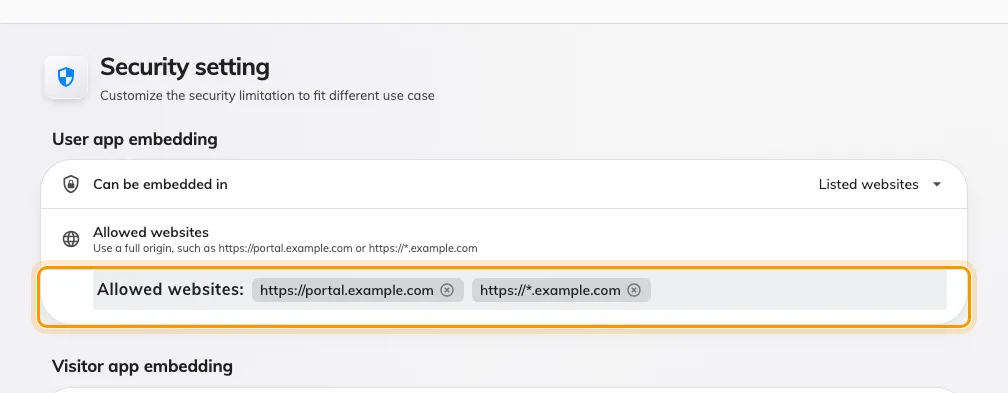
Putting the user app or the visitor app inside your own portal was a single on-off switch, with no say over which sites. System config › Security setting now asks, per app, where it Can be embedded in: Any website, This site only, or a list of websites you write. The user-app switch had never taken effect before this release; it does now.
Design the pages guests see
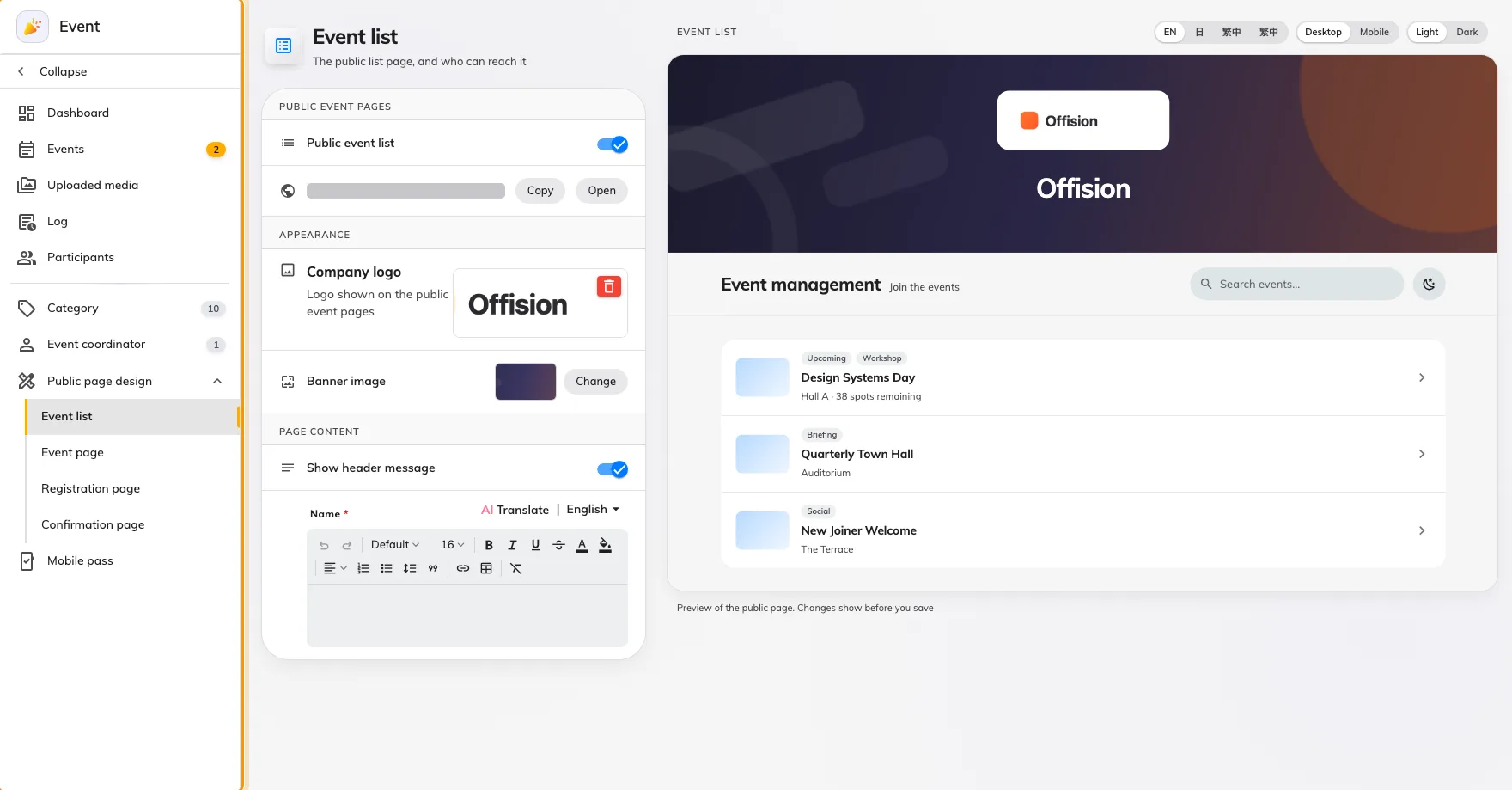
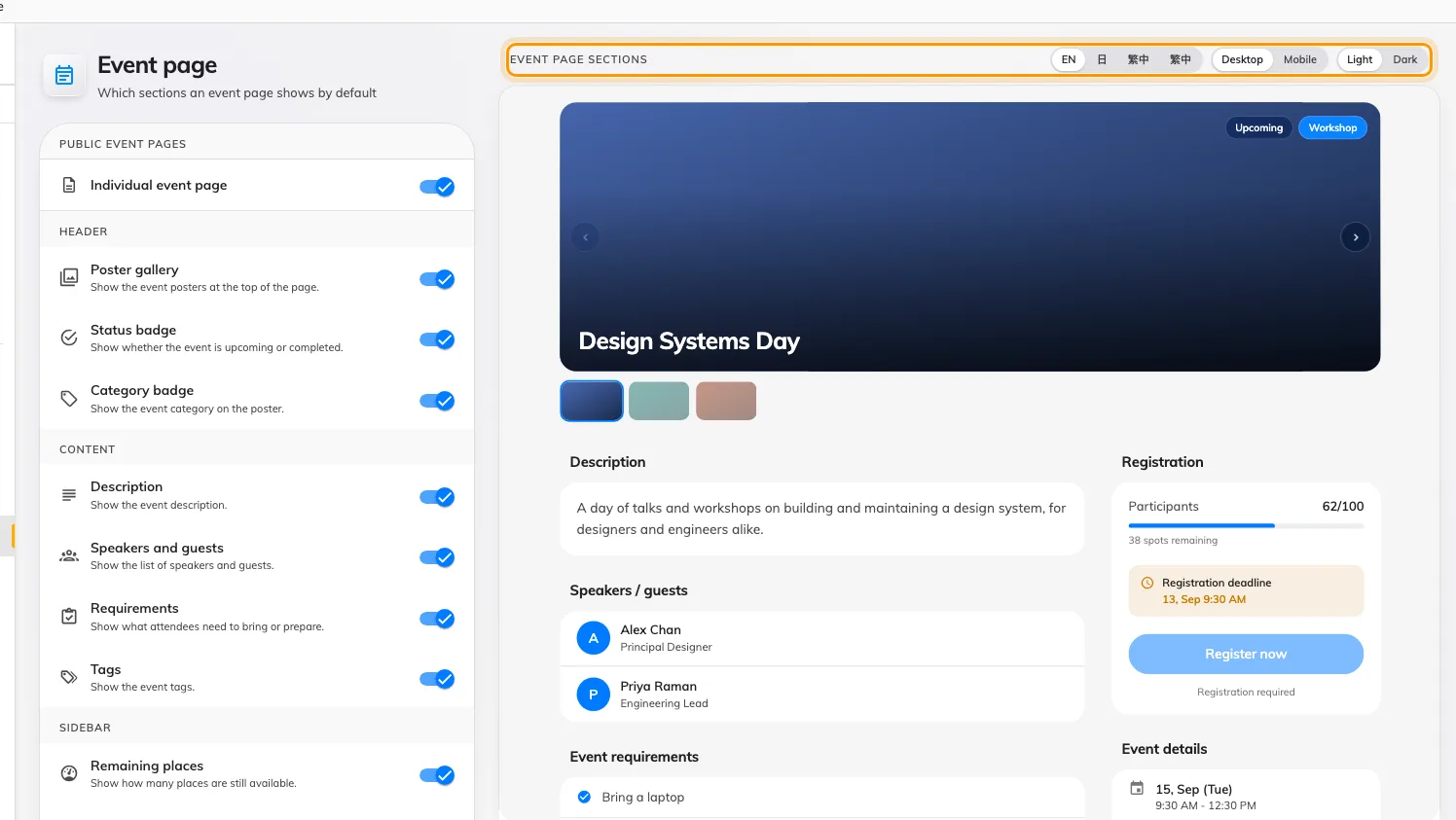
Every setting for the public event pages sat on one page of twenty-eight controls, and you saved to find out what a change looked like. Events › Public page design now gives each page its own — Event list, Event page, Registration page, Confirmation page — with a live preview beside the settings that redraws as you change them. An event that needs its own look opens a three-tab dialog from its editor, where anything left on Global default shows what it resolves to. Needs the Activity licence.
What changed
Booking
- Usage by user group meant exporting the report and regrouping it by hand. Now User group is a field in Booking › Analytics › User resource usage — drag it into Rows or Columns, and a booking counts in every group its owner is in.
- A long booking title was cut off on the calendar block. Now it wraps into the lines the block has room for.
- Every field on the booking card took the same two lines. Now you set how many each may take — 1, 2, 3 or unlimited — per field and per purpose, in UI customization › Resource calendar and Management calendar.
- The app's Schedule card ignored the card design you had set for the calendar. Now it follows the same field customization, from a Schedule page of its own under UI customization.
- People booked a room without knowing what was in it. Now the booking form can show the room's description under the room — Hidden by default; choose Show description or Show as caution in UI customization › User booking form.
Visitor management
- Required meant the host and the visitor both had to fill a field in. Now each field on a visiting purpose says who: Required when inviting for the host, Required for the visitor at registration and check-in, Optional, or Hidden. Email, mobile and company are the fields a host can be asked for.
Signage
- A photo of the visitor QR on a lobby screen let anyone in later. Now the code behind both visitor widgets in Signage Content V2 — the registration QR code and the self-service buttons — rotates on its Access key type: daily, hourly or every 3 minutes, the default for new widgets.
User app
- Tapping a colleague's booking on the Resource calendar showed a stub. Now it can open the same card as your own — status, attendees, notes, history — with the actions hidden, and private or confidential bookings still masked. Off until you turn on Show full details for others' bookings in UI customization › Resource calendar.
Management console
- A Microsoft 365 or Google Workspace delegated account that lost its sign-in stopped rooms syncing without a word. Now an Action required card on the console home names the account, the reason and how many rooms are out of date, with a Sign in step — and shows nothing while every connection is healthy.
- A release reached you by email, if at all. Now the console home shows a New version row for the release your server runs, and Release notes opens each release as an illustrated article.
Security
- Embedding the user app or the visitor app in your own site was a single on-off switch. Now each app chooses Any website, This site only, or a list you write, in System config › Security setting. The user-app switch had never taken effect; it does now.
Events
- Every setting for the public event pages sat on one page of twenty-eight controls. Now each public page — Event list, Event page, Registration page, Confirmation page — has a design page of its own under Events › Public page design, with a live preview beside it; an event's own overrides open in a three-tab dialog that shows what Global default resolves to.
Fixes
- The usage report showed a user's id instead of their name — in the grid, the drill-down and the Excel export.
- The event wallet pass showed the time in the phone's time zone, not the event's own; a visitor badge could carry the wrong date the same way.
- Event emails ignored the language set in Email settings. An event can now also choose its own email language.
- A reminder row said "null" for its hour, and "1 days" for a single day.
- The visitor's photo was missing from the printed badge.
- A combined room overlapped the rooms it is made of.
- An edited appointment appeared twice on the calendar.