

How a reported issue works
What a ticket is attached to, the four states it moves between, and why the person who reported it never hears from Offision by email.
A reported issue is something broken: a screen that will not wake up, a chair with a wheel off, a panel down to its last percent of battery. Reporting it opens a ticket, and the ticket is what gets followed until somebody has fixed it.
The reporter is never emailed
This is the one thing worth knowing before anything else, because it is reported as a fault about once per deployment. Offision emails support staff when a ticket appears, and emails the assignee when one is assigned to them. It sends the person who reported the issue nothing at all.
That is deliberate rather than missing: most reports come from a room panel, which has no idea who tapped it, and a system that emails half its reporters and not the other half is worse than one that emails none. Somebody who reported from the app follows their own tickets there instead, in the Reported issues widget, where the status is live and the comments are readable.
What one ticket is attached to
Every ticket names exactly one resource — a room, a desk, a piece of equipment — and optionally one amenity on it, such as the projector rather than the room around it.
That single attachment is doing real work. It is what lets the queue be filtered by room, what lets the dashboard name the rooms that break most often, and what a ticket policy matches on when it decides who to email. A report that could name three rooms could do none of those things.
Alongside the resource, a ticket carries a title and description, one of five report reasons — Damaged, Malfunction, Out of battery, Abnormal offline and Other — any photographs attached at reporting time, who reported it, who is handling it, and a comment thread.
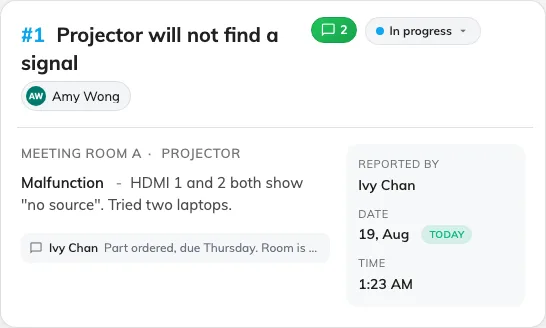
One ticket in the queue: the resource it names, its reason, its status and who has it.
Four states, none of them final
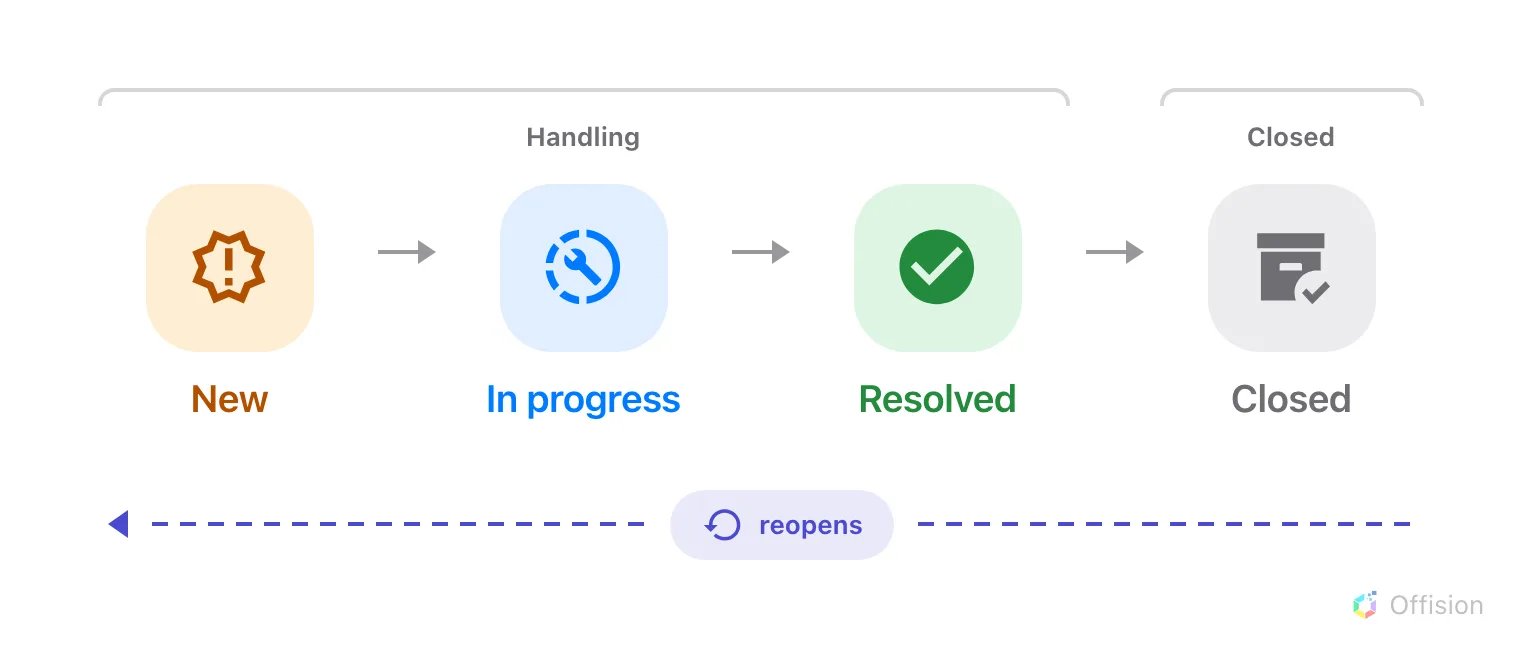
A ticket moves forward through four states — and back out of any of them.
- New — reported, and not yet picked up. Support staff have been told.
- In progress — somebody is working on it.
- Resolved — the fault is fixed.
- Closed — the ticket is finished with and out of the working queue.
The queue itself only offers two views, Handling and Closed, so New, In progress and Resolved are all “handling” as far as the screen is concerned. A ticket is out of sight only once it is closed.
Nothing here is one-way. A resolved or closed ticket can be set back to any earlier state, which is what happens when a fault comes back a week later — the same ticket reopens rather than a second one being filed.
Open Reported issuesAssigned, or assigned to nobody
A new ticket has no assignee unless somebody sets one. That is a supported state, not a broken one — an unassigned ticket sits in the queue as Not yet assigned and waits to be picked up.
It does change who hears about it, though, and that is worth reading once: an unassigned report is announced to every member of support staff, while an assigned one goes to one person. See who gets told.
What a reported issue does not do
- It does not take the room out of use. A room with three open tickets still takes bookings. Stopping that is done on the resource itself, in Booking.
- It is not a service request. Service is a person doing something for a booking — tea, cleaning, help during a meeting — with its own staff, its own hours and its own queue. Ticketing is something being broken. The two never feed each other: resolving a ticket finishes no service, and a service request cannot open one.
- It does not reach the device. Reporting a panel as offline tells the people who look after it. It does not restart anything.