We have already sent a verification email to your mailbox. Please check your mailbox or junk mail folder. You can also click the resend button to send the verification email again.
Reminder
We have already sent a verification email to your mailbox. Please check your mailbox or junk mail folder. You can also contact us via hello@offision.com for further support.
Booking hosts can manage their reservations, named polls show who answered, and visiting purposes can be tailored to each building.
Let hosts manage their bookings
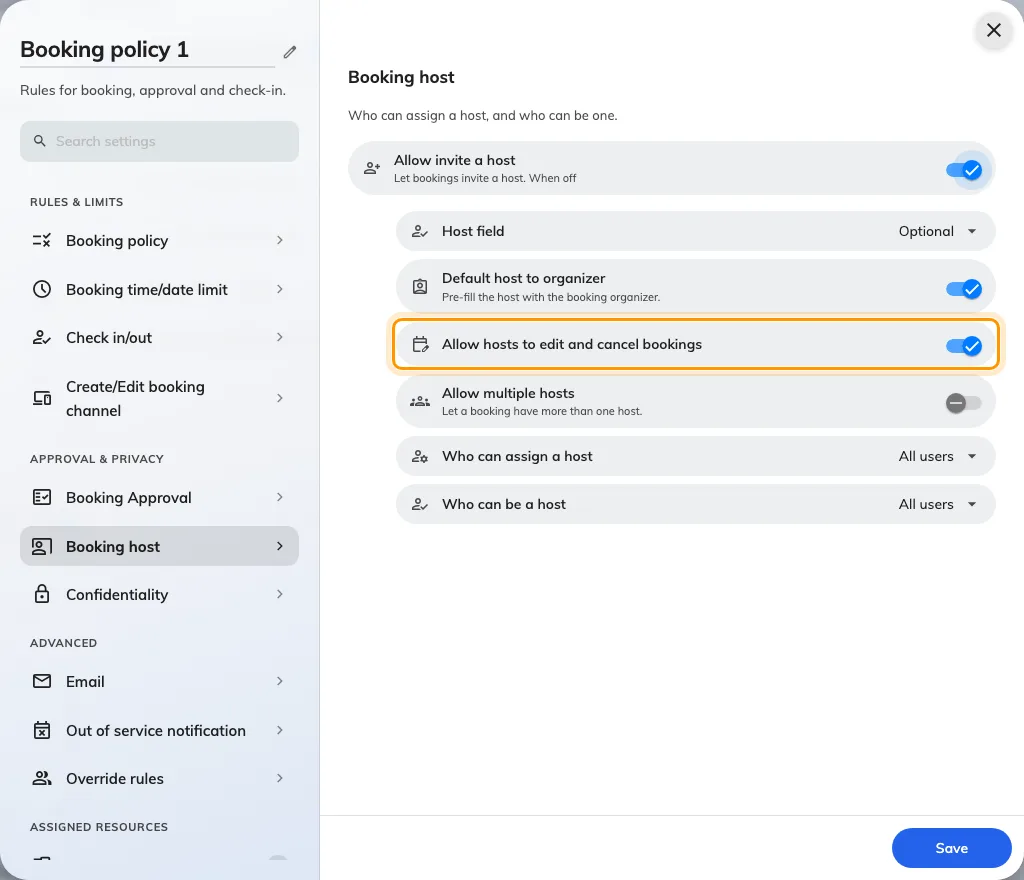
Hosts previously had to ask the organizer to change or cancel a reservation. In Booking › Booking policy › Booking host, Allow hosts to edit and cancel bookings now lets saved hosts manage it when every applicable policy permits; this setting is on for existing and new policies.
Read who gave each poll answer
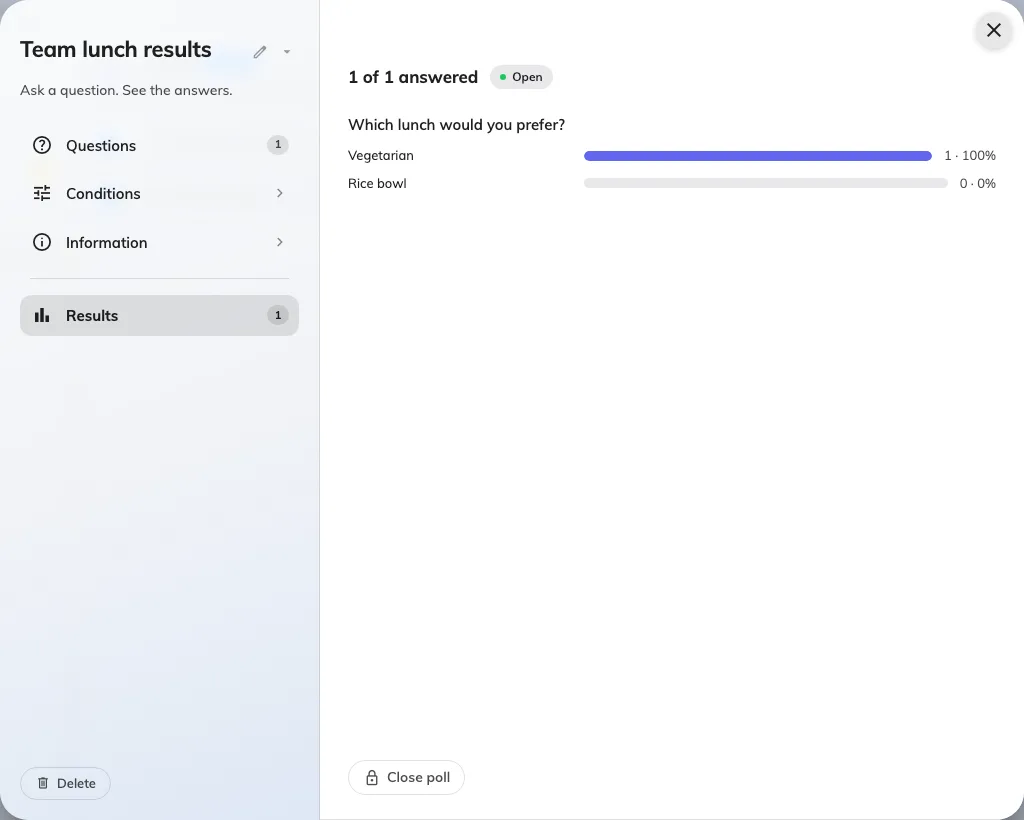
Named polls did not show respondents for every question type. With Announcement licensed and enabled, open Broadcast › Poll, select a poll and open Results to see respondents under each question.
Choose visiting purposes for each building
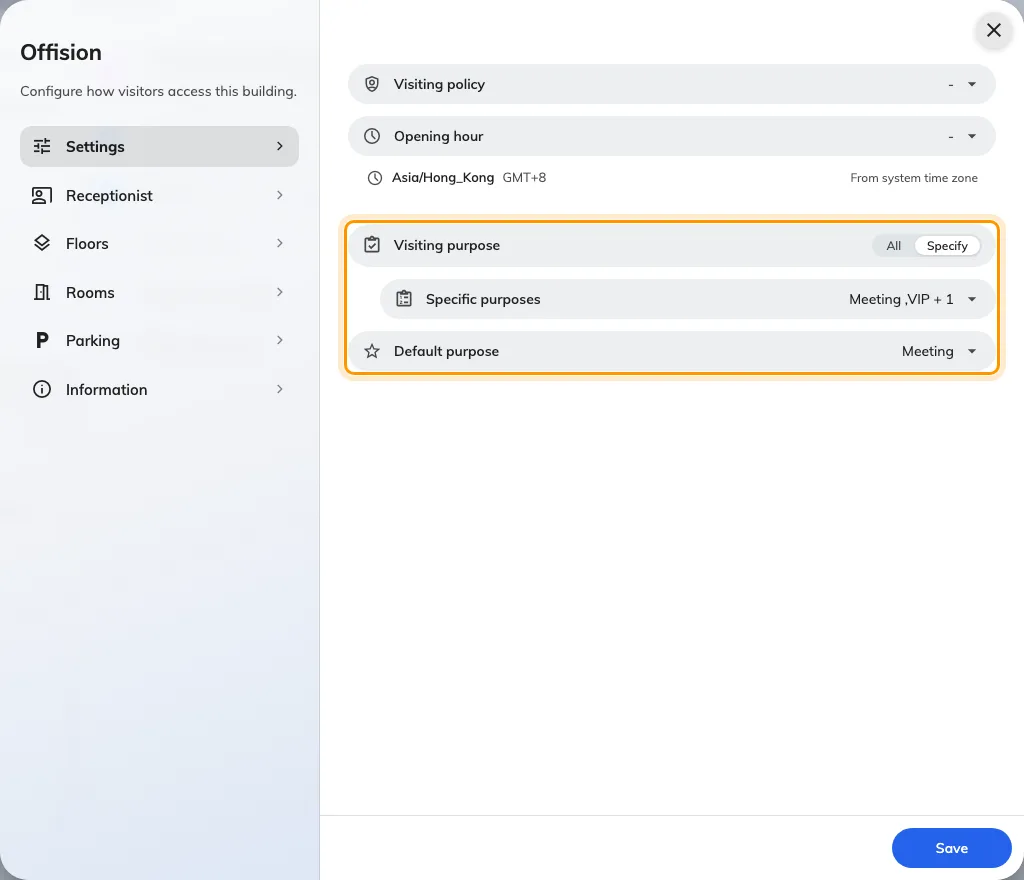
A shared visiting-purpose default could offer the wrong starting choice for a building. For buildings enabled for visitor invitations, open Visiting location, edit the building and use Settings to choose All or Specify, then choose an offered default or No default.
A visitor who scans your lobby code is now walked to the room one step at a time, and an export is bounded by the rows it holds rather than by two months.
Signage now asks which device you are hanging and sizes itself to it. Logos take a white or black ground, and the calendar header stands aside for the grid.
New this release: the in-room panel says when a meeting is nearly over, a Host column in the import sheet, pasted attendee lists, and an audit-trail export.
New this release: a flat 2D map for signage, a weekly look back at your bookings, the day your week starts on, and cancelling a meeting you checked into.
New this release: usage by user group, who fills in each visitor detail, a rotating visitor QR, a colleague's booking card, and a design page per event page.
Signage V2 layout editor and schedule (Beta), booking control buttons in the user app, new booking history page, and Apple Wallet and visitor badge fixes.
Automatic licence assignment for new resources, new resource and user import dialogs, better visitor self check-in, and a default service panel layout.
Attendance for bookings, GPS check-in within building range, Player Remote Control (Beta), redesigned booking approval and event lists, and a new License page.
Signage V2 (Beta), rotating visitor QR codes on signage, visitor import from the visiting calendar, booking IDs on stickers and reports, and a new console home.
Per-member limits on user group quotas, better booking reminder emails, pinnable items in the management console menu, and fixes for import booking times.
Conditional approval above a booking count limit, better camera scanning on devices, and fixes for booking history export and Outlook recurring series.
Combined-room labels and merged blocks on the calendar, automatic data-centre switching for devices, event registration QR code, and floor plan search.
Booking import, cancel a whole series at once, conditional approval outside business hours, easier room and attendee selection, and manual 2FA disable.
Editable long-term visitor badge email, redesigned quota history and policy pages, new API authentication page, and hover submenus in the management console.
Redesigned management calendar, support ticket chat, attendance records in the user app, new booking cards, and Deleted Items on booking and visiting pages.
Booking manager notifications, rejection suggestions, report export column picker, user self-registration, digital name card, and a Deleted Items recycle bin.
Conditional approval time units in hours, three re-approval conditions for edited bookings, and fixes for QR check-in and Outlook edits skipping re-approval.
Import and export of event participants, improved attendance report, badge printing toggle on the signage Visitor widget, and hidden QR code on Qbic E-Paper.
Refreshed user app booking dialog and in-calendar editing, floor plan widget auto-flipping with building order and preset labels, and visitor form fixes.
Improved booking form timeline, QR code manager per resource type, redesigned Reception page with an On-Site People list, and location-based invite policy.
2FA via email, configurable booking PIN length, sensor auto check-in limited to business hours, booking panel skin previews, and integration mode conversion.
Clearer recurring bookings in the form, optional room-user count field, auto-selected building on the visitor form, Client Wi-Fi dialog, and card import fixes.
New floor plan label display modes, refreshed My Calendar booking menu and filters, a unified company-account switcher, and drag-and-drop navigation menu.
Resource usage and monthly user usage reports, hourly walk-in QR codes with direct visitor check-in, visitor and service daily reports, and API rate limiting.
Font size preference in the user app, customizable email templates, user licence API endpoints, and a new date-range picker for management console reports.
Faster floor plan saving, and fixes for disappearing floor plan objects, the Fixed Seat module, the visitor walk-in form, and approval-booking slot colours.
Filters on My Calendar, non-overlapping floor plan labels, a new daily service report layout, and fixes for time fields and announcement text wrapping.
Light bar support on IAdea devices, fixes for management calendar booking buttons, Enter to submit the password and private M365 meetings shown as Reserved.
Refreshed login and reset password pages, faster initial loading with floor plan caching, local storage cleared on logout, iPad visitor label printing fix.
Non-square logo cropping and rounded logos in emails, clearer booking PIN, smaller YouTube notices on signage, fixes for floor plan and walk-in-only rooms.
Mobile Pass for Long-Term Badges, walk-in and check-in with Mobile Pass or HID cards on panels, HSTS and XSS hardening, automatic No Show and Check-in sync.
Invite visitors from the booking form, QR code after walk-in to view the badge on a phone, redesigned badge emails, Teams contacts in M365 manual setup.
Redesigned booking and visitor forms with file uploads, room layout and attendee availability, Outlook contacts, sub-service items, user security profiles.
Export users button and redesigned user import dialog, fixes for Device Monitoring charts, Qbic controller data, floor plan saving and Google Workspace extends.
Quota in Resource Finder, licence warnings in the management console, default resource calendar sorting, hide other users' subjects, System URLs, M365 fixes.
Resource Finder with favourites, new user app menu, organizer and attendee icons on calendars, all-day bookings as full slots, announcement module toggle.
Column sorting, inline editing and keyboard shortcuts in the management console, resource suggestion priority, shorten-recurring option, room pin on signage.
In-Room Panel theme for quick booking without sign-in, service preparation period, batch actions for service requests, visitor badges and reported issues.
Fixed Seat screen with Busy status, refreshed resource and panel selection, new lists for categories, amenities and team spaces, PDF fixes for signage.
Required photo capture and better location selection in visitor self-registration on signage, fixes for approval requests, issue filters and floor ordering.
Service, ticket and visitor badge logs for managers, updated pop-up dialogs, fixes for location assignment with many floors and unknown-user approvals.
Redesigned AI Assistant with Booking AI and Occupancy AI, refreshed service, password and visitor settings, activity panel preview, licence detection fix.
Booking list widget text fit on small screens, PDF widget display size, desk details in booking info, suspended resource and unapproved visitor badge fixes.
Improved Traditional Chinese translation, Microsoft Teams meeting links for room bookings from the Offision calendar, PDF files and language widget on signage.
Resource search and filter on the management calendar, editable special rule names, larger organizer icon on desk devices, resource location on signage.
Management console lists for small screens, optional invite email for new users, walk-in-only resource policy, SME Starter Pack calendar, device batch settings.
Reset Start Tour, resource position editing in the list, a User Title field, Qbic TDD-1000 support, organizer title on devices, a booking kiosk template.
Kiosk menu styling on signage, "Anonymous" label for organizer-less bookings on the panel, daylight saving time calculations, multi-resource deletion fix.
Group and per-user notification widgets and a map time slider on signage, online/offline device colour, Microsoft 365 sync, holiday and email time zone fixes.
Visitor record export, user location filter by group, new floor editor tools, walk-in toggle on the signage floor plan, booking sync and ICS download fixes.
Release notes and updated FAQ in the management console, user search and online meeting info in the user app, meeting logo on the panel, floor-plan zoom.
Quota history in the user app, walk-in time limit, panel brightness and auto-reset, signage default templates, user and visitor locations on floor plans.
Branch management (beta), booking panel and signage UI customization with new widgets, LG signage support, AI features (beta) for announcements and analytics.
Visitor badges via WhatsApp/SMS, holidays and daily quota on the calendar, Crestron Desk Q/Touch, panel screen saver, Teams intercom (beta), world clock.

 Neat
Neat
 Crestron