

See what was reported before you walk anywhere
What a ticket tells you without being opened — the room and the thing on it, the report reason, the photographs the reporter attached — and how to file one for a fault somebody told you about in the corridor.
Everything needed to decide what to carry is printed on the ticket itself. Nothing has to be opened first.
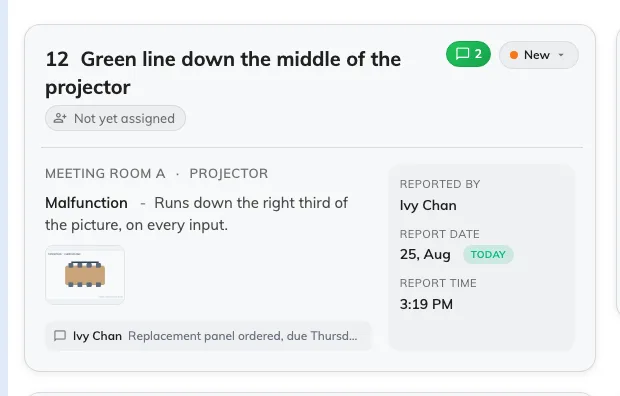
One ticket: the room, what is wrong, the photographs, and who reported it.
On the card
Along the top, the ticket’s number and title, the person handling it, the comment mark and the status. Down the right, Reported by and the date and time it came in. The middle is what you actually carry:
- The room, and after it the thing on it where the reporter named one — Cedar Room · Projector means the projector, not the room around it. A ticket names exactly one resource, and at most one amenity on it.
- The report reason — one of Damaged, Malfunction, Out of battery, Abnormal offline and Other — followed by whatever was typed with it.
- The photographs, as thumbnails. Tap one and it opens full size. This is the difference between walking up with the right part and walking up twice.
- The latest comment, if the ticket has one. Tapping it opens the whole thread.
In list view
The same things become columns — ID, title, room, report reason, attachments, status, reported by, handling by, date and time — so a morning can be read down one edge of the screen. Attachments is worth a glance before you set off.
Filing one yourself
New record, the + beside the page title, opens the same form an employee reports a fault with: the resource, optionally the thing on it, the reason, a description and any photographs. Use it for a fault somebody told you about in the corridor or over the phone, so it is in the queue like every other.
The form itself is described in Report a problem with a room.