

Give supervisors a team view
Naming supervisors on a working schedule gives them a Team attendance view in their own app — summaries, daily details and an Excel export for just that schedule — without console access, and without the selfies, IPs and coordinates behind the punches.
A team lead needs to know who was in this month — but the console’s report lives behind Attendance write access, which is far more than a team lead should hold. The Supervisors field on a working schedule is the answer: a per-schedule role, not a permission. Requires 4.5.10.
1. Name them on the schedule
Open the schedule’s Basic Info page and add the person — or a group of team leads — to Supervisors. The field’s own hint states the deal: Can view and export this schedule’s attendance results in the user app. Cannot edit records.
Open Working scheduleBeing a supervisor of one schedule grants nothing on any other. Someone supervising two teams sees both, each through its own schedule.
2. What they get
From then on their app carries Team attendance — in the footer actions, alongside their own Sign in and records. It is the report scoped to their schedules: a schedule picker where they supervise more than one, the summary per person, the daily details, a per-person drill-down, and an Excel export.
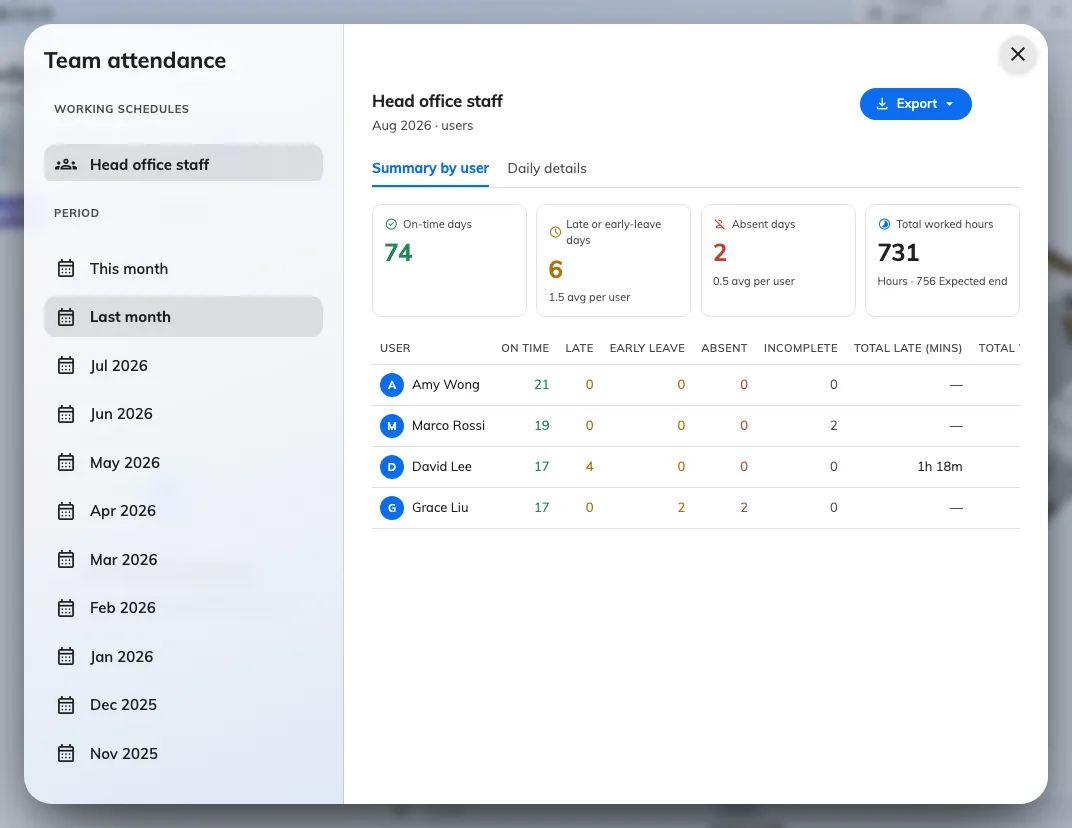
Team attendance in the supervisor's own app: their schedule's people, this month's verdicts, and an export — no console involved.
What a supervisor never sees
The view is deliberately thinner than the console’s. A supervisor gets each punch’s time, type and the worker’s own remarks — and not the selfie, the IP address, the coordinate, or an administrator’s manager remarks. Those stay in the console’s Attendance Records. A supervisor also cannot add, edit or delete anything: when a record needs fixing, that is an administrator’s job.
If someone opens Team attendance and sees You do not supervise any working schedule, they were removed from the field — or were added as a worker instead. The two lists sit side by side in the editor and it is an easy swap to make.